1. Inngangur
This manual provides essential information for the proper setup, operation, maintenance, and troubleshooting of your Meizu mblu 21 4G LTE smartphone. Please read this manual thoroughly before using your device to ensure optimal performance and longevity.
The Meizu mblu 21 features a 6.79-inch HD display, a 13MP dual camera system, and runs on Android 14. It is designed for efficient performance and reliable connectivity.
2. Uppsetning
2.1 Innihald pakka
Staðfestu að pakkinn þinn inniheldur eftirfarandi hluti:
- Meizu mblu 21 Smartphone
- Rafmagns millistykki
- Leiðbeiningar um hraða notkun (ef fylgja með)
2.2 Uppsetning SIM-korts og microSD-korts
The Meizu mblu 21 supports Dual Nano SIM cards and a MicroSD card for expandable storage.
- Finndu SIM-kortsskúffuna á hlið tækisins.
- Insert the SIM ejector tool (not included, use a thin pin if necessary) into the small hole on the SIM tray to eject it.
- Place your Nano SIM card(s) and/or MicroSD card into the designated slots on the tray, ensuring proper orientation.
- Settu SIM-kortsskúffuna varlega aftur í símann þar til hún smellpassar.
2.3 Upphafleg ræsing og netstilling
- Press and hold the power button until the Meizu logo appears.
- Fylgdu leiðbeiningunum á skjánum til að ljúka upphafsuppsetningunni, þar á meðal vali á tungumáli, Wi-Fi tengingu og uppsetningu Google reiknings.
- For cellular connectivity, ensure your SIM card is active. This device is an international version and in the USA market, it operates exclusively on T-Mobile's 4G LTE network. Outside the USA, it is compatible with various carriers worldwide.
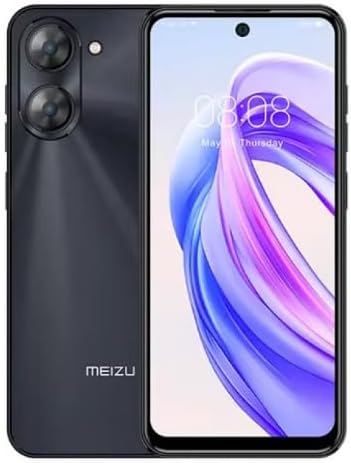
Mynd 2.3.1: Framan og aftan view of the Meizu mblu 21 smartphone. The front displays the screen with a punch-hole camera, while the rear shows the dual camera module and the Meizu branding.
3. Notkunarleiðbeiningar
3.1 Grunnleiðsögn (Android 14)
Your Meizu mblu 21 runs on Android 14, offering an intuitive user experience. Use gestures or on-screen navigation buttons to move between apps, access settings, and manage notifications.
3.2 Notkun myndavélar
The device features a 13MP Smart Camera on the rear and an 8MP front camera. Open the Camera app to capture photos and videos. Utilize various modes and settings for optimal results.
3.3 Öryggisaðgerðir
Unlock your device using the side-mounted fingerprint sensor for instant access or the 8MP front camera for Smart Face Unlock.
3.4 Tengingar
- Wi-Fi: Supports Dual-Band Wi-Fi (2.4GHz and 5GHz) for stable internet access.
- Bluetooth: Bluetooth 5.0 fyrir tengingu við þráðlausa fylgihluti.
- VoLTE: Enjoy clearer voice calls with VoLTE HD Calls.

Mynd 3.4.1: Visual representation of key connectivity and operating system features, including Android 14, Dual-Band Wi-Fi, Bluetooth 5.0, and VoLTE HD Calls.
4. Viðhald
4.1 Almenn umönnun
- Haltu tækinu þurru og fjarri miklum hita.
- Þrífið skjáinn og húsið með mjúkum, lólausum klút. Forðist sterk efni.
- Verndaðu skjáinn með skjávörn og hlífðarhulstrið til að koma í veg fyrir rispur og skemmdir.
4.2 Rafhlöðustjórnun
The 4900mAh battery is designed for all-day performance. To prolong battery life:
- Forðastu að tæma rafhlöðuna alveg oft.
- Notið meðfylgjandi straumbreyti til hleðslu.
- Optimize background app usage and screen brightness in settings.

Mynd 4.2.1: Innri view of the Meizu mblu 21 smartphone highlighting the 4900mAh battery, emphasizing its capacity for extended use.
5. Bilanagreining
5.1 Algeng vandamál og lausnir
- Kveikir ekki á tækinu: Gakktu úr skugga um að rafhlaðan sé hlaðin. Tengdu við straumbreytinn og reyndu aftur.
- Vandamál með nettengingu: Check if your SIM card is properly inserted and active. Verify network settings and ensure you are within T-Mobile's coverage area in the USA.
- Hæg frammistaða: Close unnecessary background applications. Clear cache and temporary files. Restart the device.
- Rafhlaðan tæmist fljótt: Reduce screen brightness, disable unused features like Bluetooth or GPS, and check for power-intensive apps.
Ef vandamálin halda áfram skaltu íhuga að endurstilla tækið frá verksmiðju (taka fyrst öryggisafrit af gögnunum þínum) eða hafa samband við þjónustuver.
6. Tæknilýsing
| Gerðarnúmer | M416L |
| Stýrikerfi | Android 14 |
| Skjár | 6.79 Inches HD, 2340 x 1080 Resolution, 90Hz Adaptive Refresh Rate |
| Örgjörvi | Octa Core 1.6GHz ARM Mali-G57 |
| Minni | 64 GB Internal Storage, 4 GB RAM |
| Rafhlaða | 4900mAh (4.9E+3 Milliamp Hours) Lithium Polymer |
| Myndavél að aftan | 13MP Smart Camera, 5P Precision Lens |
| Myndavél að framan | 8MP |
| Farsímatækni | 4G LTE FDD: 2,3,4,5,7,8,12,17,26,28,66; 3G WCDMA: 2/4/5/8; 2G Quad Band |
| SIM tegund | Dual Nano SIM + MicroSD |
| Wi-Fi | Tvöfalt band (2.4 GHz og 5 GHz) |
| Bluetooth | 5.0 |
| Hljóð Jack | USB gerð C |
| Þyngd hlutar | 14 aura |
| FCC auðkenni | 2ANQ6-M416L |

Mynd 6.1: The Meizu mblu 21 smartphone presented in its Titan Black color variant, showcasinhönnun þess.
7. Ábyrgð og stuðningur
For warranty information, please refer to the warranty card included with your product or consult the retailer where the device was purchased. Meizu provides support for its products. For further assistance, please visit the official Meizu websíðuna eða hafðu samband við þjónustuver þeirra.


