
1. Inngangur
Welcome to the OnePlus 13R user manual. This guide provides comprehensive instructions for setting up, operating, maintaining, and troubleshooting your new smartphone. The OnePlus 13R is designed to deliver a powerful and seamless user experience, featuring the Snapdragon 8 Gen 3 Mobile Platform, a vibrant 120Hz ProXDR display, and a long-lasting 6000mAh battery.
For optimal performance and longevity, please read this manual thoroughly and retain it for future reference.
2. Hvað er í kassanum
Upon unboxing your OnePlus 13R, verify that all the following items are included:
- OnePlus 13R Handset
- 55W SUPERVOOC Charger (Power Adapter)
- USB gagnasnúra (tegund-C)
- SIM -útkastartæki
- Flýtileiðbeiningar
- Öryggisleiðbeiningar
- Meðlimakort
- Vörumerkislímmiði
- Velkominn bréf

All standard accessories included with the OnePlus 13R for immediate use.
3. Upphafsuppsetning
3.1. Að setja SIM-kort í
- Finndu SIM-kortaskúffuna á hlið tækisins.
- Settu SIM-kortsútkastarann í litla gatið við hliðina á bakkanum og þrýstu fast þar til bakkinn smellir út.
- Place your Nano-SIM cards into the designated slots on the tray. Ensure the gold contacts are facing downwards. The OnePlus 13R supports Dual-SIM functionality.
- Settu SIM-kortsskúffuna varlega aftur í símann.
3.2. Kveikt á og upphafsstilling
- Ýttu á og haltu inni aflrofann (sem er staðsettur hægra megin) þar til OnePlus merkið birtist.
- Fylgdu leiðbeiningunum á skjánum til að velja tungumál, tengjast Wi-Fi neti og samþykkja skilmálana.
- Skráðu þig inn með Google reikningnum þínum eða stofnaðu nýjan.
- Set up your preferred security methods, including fingerprint unlock and face unlock.
- Complete the setup wizard to begin using your device.
4. Notkun tækisins
4.1. Skjáeiginleikar
The OnePlus 13R features a 6.78-inch 120Hz ProXDR Display with a resolution of 1264x2780 pixels, offering vivid colors and smooth scrolling. The display supports Aqua Touch 2.0, enhancing touch responsiveness even when the screen is wet. A dedicated Glove Mode is also available for improved usability with gloves.

The 120Hz ProXDR display provides a smooth and immersive viewupplifun.
4.2. Frammistaða
Powered by the Snapdragon 8 Gen 3 Mobile Platform and equipped with 12GB of RAM, the OnePlus 13R delivers exceptional speed and efficiency for demanding applications, gaming, and multitasking. The device comes with 256GB of internal storage.

The Snapdragon 8 Gen 3 Mobile Platform ensures powerful and efficient performance.
4.3. Tengingar
The OnePlus 13R supports ultra-fast 5G connectivity and Wi-Fi 7, ensuring reliable and high-speed internet access. It also includes Bluetooth for wireless peripheral connections and dual-band GPS for accurate navigation.

Enjoy seamless connectivity with 5G and advanced Wi-Fi capabilities.
4.4. Rafhlaða og hleðsla
Equipped with a large 6000mAh battery, the OnePlus 13R provides extended usage times. The device supports 80W SUPERVOOC fast charging, allowing for rapid power replenishment. The included charger is a 55W SUPERVOOC adapter, which still provides very fast charging speeds.

The 6000mAh battery ensures long-lasting power for your daily activities.
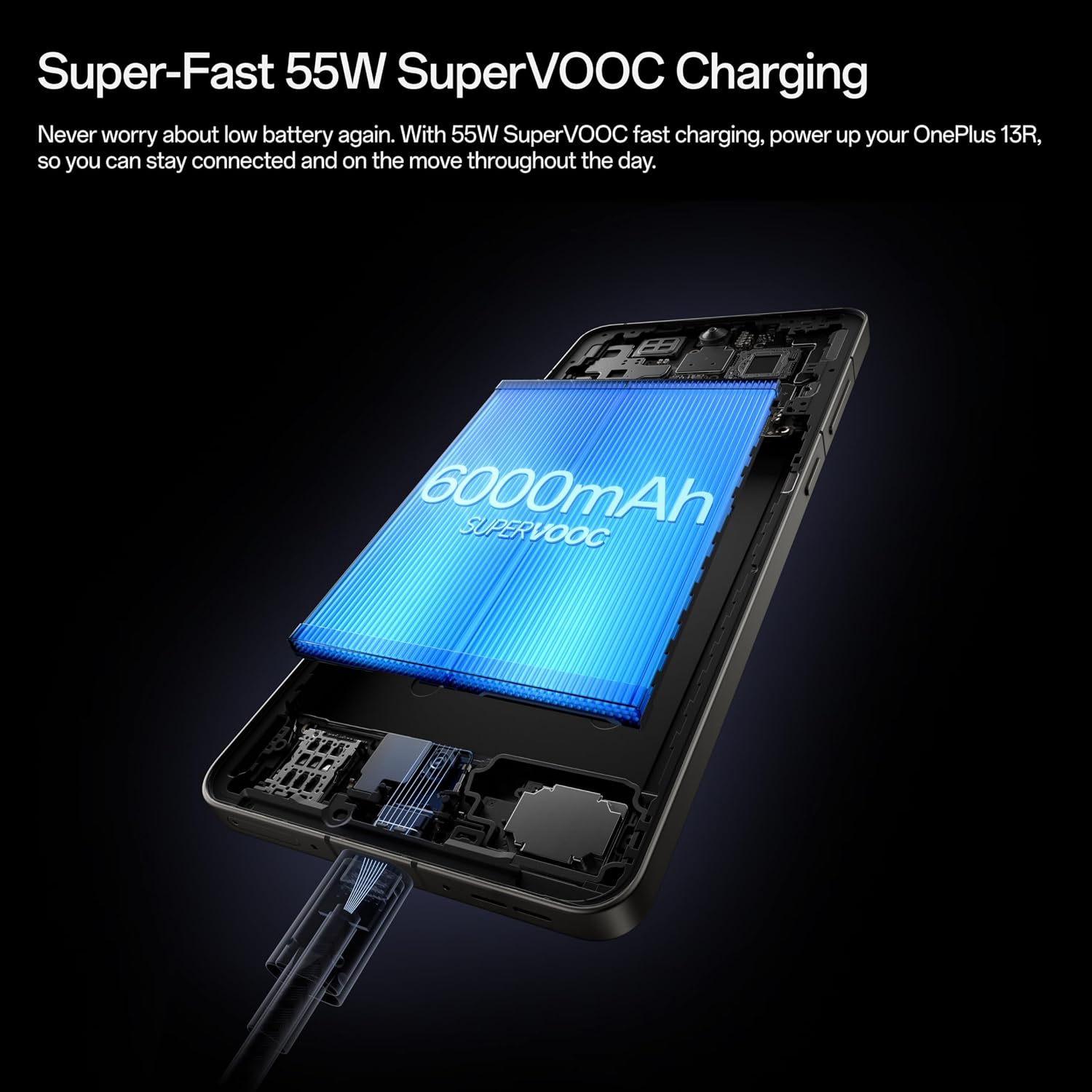
Experience rapid charging with SUPERVOOC technology.
4.5. Myndavélakerfi
The OnePlus 13R features a powerful camera system with a 50MP Sony LYT-700 main sensor with Optical Image Stabilization. It is capable of capturing impressive photos with great color and detail, including 2x optical zoom for distant subjects without losing quality. The front camera is a 16MP sensor, suitable for high-quality selfies and video calls.

Capture high-quality images with the advanced camera system.
4.6. Eiginleikar gervigreindar
The OnePlus 13R integrates various AI-powered features to enhance usability and productivity:
- Hringdu í leitarreitinn: Quickly search for information on anything on your screen by simply circling it.
- AI Writing Tools: Utilize AI to reformat, reword, or generate text for notes, emails, and messages.
- AI Summary: Summarize long documents or articles for quick comprehension.
- AI Photo Editor: Features like Reflection Eraser help remove unwanted reflections from photos taken through glass.
Official video demonstrating the AI features of the OnePlus 13R, including AI Notes and Intelligent Search.
4.7. Öryggi
For robust security, the OnePlus 13R offers multiple biometric authentication options:
- Fingrafaraskynjari í skjánum: A fast and accurate sensor for quick unlocking. Note: The sensor is placed lower on the screen compared to some previous models, which may require a slight adjustment in thumb angle for some users.
- Andlitsopnun: Opnaðu tækið þitt á þægilegan hátt með andlitsgreiningu.
4.8. IR fjarstýring
The OnePlus 13R includes an IR (Infrared) remote feature, allowing you to control compatible household appliances such as TVs and air conditioners directly from your phone. This is particularly useful if you misplace your traditional remote controls.
5. Viðhald
5.1. Þrif á tækinu
To keep your OnePlus 13R in optimal condition, regularly clean its surfaces. Use a soft, lint-free cloth. For stubborn smudges, slightly dampÞurrkið klútinn með vatni eða skjáþolnu hreinsiefni. Forðist sterk efni eða slípiefni.
5.2. Vatns- og rykþol
The OnePlus 13R is rated IP65 for dust and water resistance. This means it is protected against dust ingress and low-pressure water jets from any direction. While it can withstand splashes, it is not designed for submersion in water. Avoid exposing the device to high-pressure water, saltwater, or other liquids.

The IP65 rating provides protection against dust and water splashes.
5.3. Hugbúnaðaruppfærslur
Regularly check for and install software updates to ensure your device has the latest features, security patches, and performance improvements. Navigate to Settings > About device > OxygenOS version to check for updates.
6. Bilanagreining
6.1. Algeng vandamál og lausnir
| Útgáfa | Möguleg lausn |
|---|---|
| Ekki er kveikt á tækinu | Gakktu úr skugga um að rafhlaðan sé hlaðin. Tengdu við hleðslutækið í að minnsta kosti 15 mínútur áður en þú reynir að kveikja á því. |
| Skjár svarar ekki | Perform a forced restart by holding the Power button and Volume Up button simultaneously for about 10 seconds. |
| Lélegt netmerki | Check SIM card insertion. Try restarting the device. Ensure you are in an area with network coverage. |
| Rafhlaða tæmist fljótt | Close background apps. Reduce screen brightness. Disable unnecessary features like GPS or Bluetooth when not in use. |
| Forrit hrynja/frjósa | Clear app cache (Settings > Apps > [App Name] > Storage > Clear cache). Update the app or reinstall it. |
6.2. Factory Reset
If persistent issues occur, a factory reset may be necessary. This will erase all data on your device, so ensure you back up important information before proceeding.
- Navigate to Settings > System settings > Backup & reset > Reset phone.
- Select 'Erase all data' and confirm your decision.
7. Tæknilýsing
| Eiginleiki | Smáatriði |
|---|---|
| Nafn líkans | OnePlus 13R |
| Tegundarnúmer vöru | CPH2647 |
| Mál | 6.37 x 2.98 x 0.32 tommur |
| Þyngd hlutar | 7.3 únsur (206 grömm) |
| Stýrikerfi | Android 15 (OxygenOS 15) |
| CPU líkan | Snapdragon 8 Gen 3 |
| CPU hraði | 3.3 GHz |
| Stærð uppsetts vinnsluminni | 12 GB |
| Geymslugeta minni | 256 GB |
| Skjástærð | 6.78 tommur |
| Upplausn | 1264x2780 |
| Endurnýjunartíðni | 120 Hz |
| Rafhlöðugeta | 6000 mAh (1 Lithium Ion battery included) |
| Hleðsla | 55W SUPERVOOC (80W capable) |
| Myndavél að aftan | 50MP Sony LYT-700 sensor with OIS |
| Myndavél að framan | 16MP |
| Vatns-/rykþol | IP65 vottuð |
| Tengitækni | 5G, Wi-Fi 7, Bluetooth |
| USB tengi | USB 2.0 Type-C |
| Sérstakir eiginleikar | Dual SIM, IR Remote |
8. Ábyrgð og stuðningur
OnePlus products are covered by a limited warranty from the date of purchase. The specific terms and conditions of the warranty may vary by region. Please refer to the warranty card included in your product packaging or visit the official OnePlus webvefsíðu fyrir nákvæmar upplýsingar um ábyrgð.
For technical support, troubleshooting assistance, or service inquiries, please contact OnePlus customer support through their official website or designated service channels. Have your device's serial number and proof of purchase ready when contacting support.


