1. Inngangur
Thank you for choosing the MESWAO 15.6 inch Android 14 Tablet Pro. This tablet is designed to provide a superior visual and performance experience with its large Full HD display, powerful octa-core processor, and extended battery life. This manual will guide you through the setup, operation, maintenance, and troubleshooting of your new device, ensuring you get the most out of its advanced features.
2. Hvað er í kassanum
Vinsamlegast athugið innihald pakkans. Ef einhverjar vörur vantar eða eru skemmdar, hafið samband við þjónustuver.
- 1 x MESWAO 15.6 inch Android Tablet
- 1 x straumbreytir
- 1 x Type-C kapall
- 1 x Notendahandbók
- 1 x Type-C til USB millistykki
- 1 x Stuck pin (SIM ejector tool)

Image: Visual representation of the MESWAO tablet and its included accessories.
3. Vöru lokiðview
3.1 Helstu eiginleikar
- 15.6-inch 1080P FHD IPS Display: Large screen with 1920x1080p resolution, 16:9 aspect ratio, 85% screen-to-body ratio, and 350 nits adjustable brightness for clear visuals.
- Android 14 stýrikerfi: Latest Android version for faster app launches, intuitive user interface, split-screen multitasking, and GMS certification for Google Play access.
- MediaTek Helio G99 CPU: Octa-core processor (6nm, up to 2.2GHz) and ARM Mali-G57 GPU for smooth performance in multitasking, streaming, and gaming.
- 12,000mAh Mega Battery & 30W Fast Charging: Provides up to 15 hours of video playback and 12+ hours of daily use, with 90% charge in 3 hours.
- 6GB vinnsluminni + 128GB ROM (hægt að stækka í 1TB): Ample storage for apps, photos, and videos, with expandable memory via microSD card (FAT32 format).
- Dual-band Wi-Fi & Bluetooth 5.0: High-speed 2.4G/5G Wi-Fi and efficient Bluetooth connectivity for peripherals.
- 5MP Front + 32MP Rear Cameras: Capture moments and conduct clear video calls.
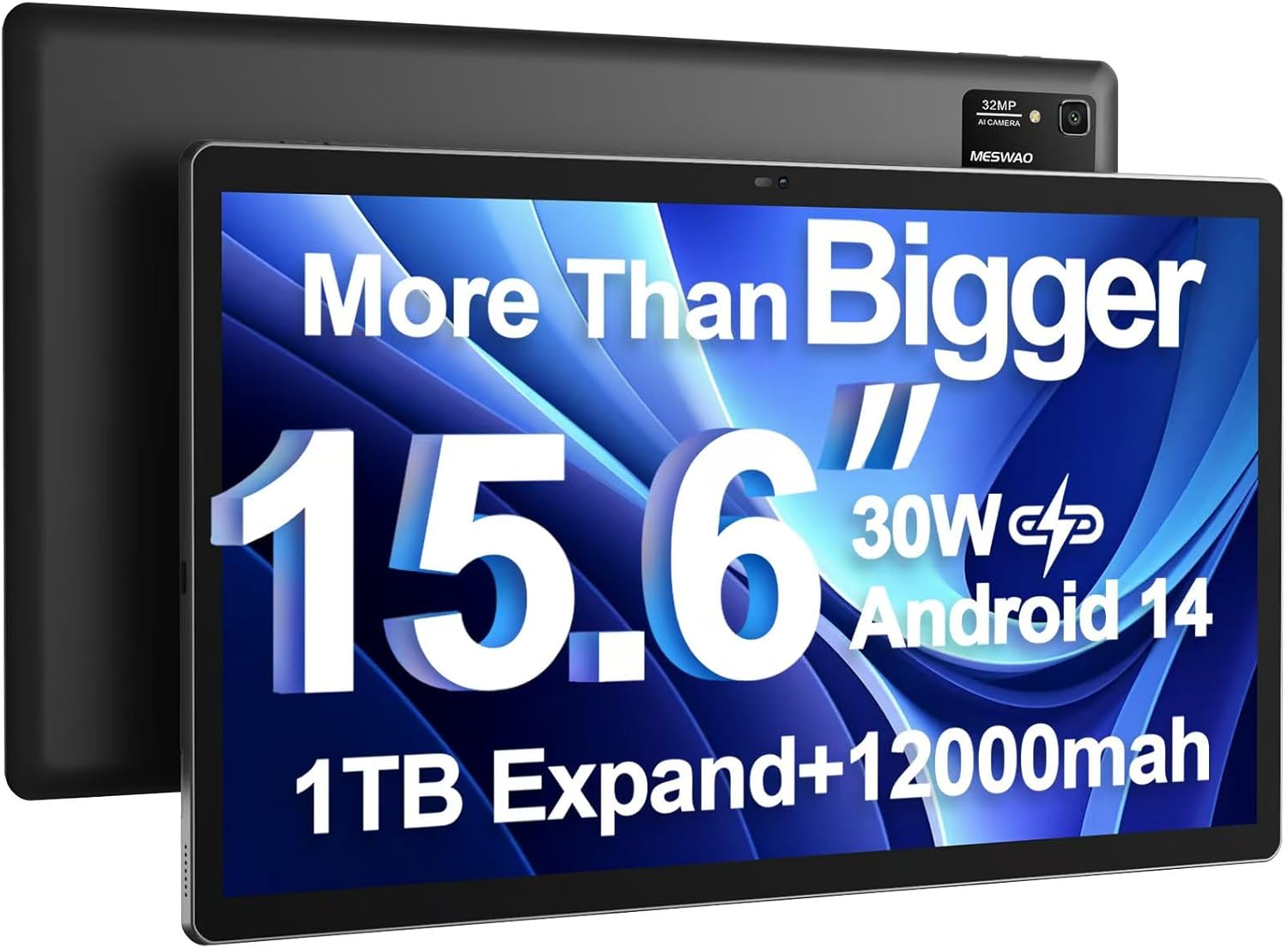
Image: The MESWAO 15.6 inch Android 14 Tablet Pro, showcasinstóri skjárinn og aftari myndavélareiningin.

Image: Visual comparison highlighting the significantly larger screen area of the 15.6-inch tablet compared to a standard 10-inch tablet.

Image: Illustration of the tablet's 12,000mAh ultra-large capacity battery and 30W fast charging, indicating quick charge times and extended usage.
3.2 Íhlutir spjaldtölvunnar
Familiarize yourself with the physical components of your MESWAO tablet:
- Aflhnappur: Staðsett á hliðinni, notað til að kveikja/slökkva á spjaldtölvunni eða vekja/svæfa skjáinn.
- Hljóðstyrkshnappar: Adjust audio output levels.
- Myndavél að framan: 5MP myndavél fyrir myndsímtöl og sjálfsmyndir.
- Myndavél að aftan: 32MP camera with flash for high-resolution photos and videos.
- Type-C höfn: Fyrir hleðslu og gagnaflutning.
- TF kortarauf: For expanding storage with a microSD card.
- Stereo hátalarar: Fjórir hátalarar fyrir betri hljóðupplifun.
- 3.5 mm höfuðtólstengi: For wired audio connection (requires included Type-C to 3.5mm adapter).
4. Uppsetning
4.1 Byrjunarkveikt
- Ýttu á og haltu inni Aflhnappur until the MESWAO logo appears on the screen.
- Fylgdu leiðbeiningunum á skjánum til að velja tungumál, svæði og tengjast Wi-Fi neti.
- Sign in with your Google account or create a new one to access Google Play Store and other services.
4.2 Hleðsla spjaldtölvunnar
Before first use, fully charge the tablet. Use the provided power adapter and Type-C cable.
- Connect the Type-C cable to the tablet's Type-C port.
- Stingdu straumbreytinum í innstungu.
- The charging indicator will appear on the screen. A full charge takes approximately 3 hours with the 30W fast charger.
4.3 Að setja inn microSD-kort
To expand storage, insert a microSD card (FAT32 format, up to 1TB, sold separately).
- Finndu TF-kortaraufina á hlið spjaldtölvunnar.
- Use the provided stuck pin to gently press into the small hole next to the slot to eject the tray.
- Settu microSD-kortið í skúffuna með gullnu snertingin niður.
- Settu bakkann varlega aftur í raufina þar til hann smellpassar.
5. Notkunarleiðbeiningar
5.1 Grunnleiðsögn
- Heimaskjár: Strjúktu til vinstri eða hægri til að fletta á milli heimaskjáa.
- App skúffa: Access all installed applications (if using a launcher with an app drawer, otherwise apps are on home screens).
- Tilkynningar og flýtistillingar: Swipe down from the top of the screen to access notifications and quick settings toggles (Wi-Fi, Bluetooth, Brightness, etc.).
- Nýleg forrit: Ýttu á ferkantaða táknið (eða strjúktu upp og haltu inni frá botni ef þú notar bendingaleiðsögn) til að view og skipta á milli nýlega notaðra forrita.
5.2 Multitasking with Split Screen
The Android 14 OS supports split-screen functionality for enhanced productivity.
- Open the first app you want to use.
- Go to the Recent Apps view.
- Ýttu á forritatáknið efst á spjaldi fyrsta forritsins og veldu „Skjáskipting“.
- Choose the second app from your recent apps or app drawer to open it in the other half of the screen.
- Stilltu stærð hvers forrits með því að draga skiptinguna í miðjuna.

Mynd: Yfirview of key features of the Android 14 operating system on the tablet, including multitasking capabilities.
5.3 Tengingar
- Wi-Fi: Farðu til Stillingar > Net og internet > Wi-Fi to connect to available networks. Supports 2.4Ghz and 5Ghz bands.
- Bluetooth: Farðu til Stillingar> Tengd tæki> Tengistillingar> Bluetooth to pair with Bluetooth headphones, keyboards, or other devices.
- Skjávarp: The tablet supports wireless screen casting to compatible displays. Access this feature from Quick Settings or Stillingar > Tengd tæki > Tengistillingar > Útsending.

Image: Depiction of the tablet's stable dual-band Wi-Fi and Bluetooth 5.0 capabilities, enabling seamless wireless connections.
6. Viðhald
6.1 Umhirða rafhlöðu
- Forðist mikinn hita (heitan eða kuldann) þar sem hann getur dregið úr endingu rafhlöðunnar.
- Do not let the battery completely drain frequently. Charge it before it reaches 0%.
- Use only the provided charger or a certified 30W PD fast charger.
6.2 Þrif
- Notið mjúkan, lólausan klút til að þrífa skjáinn og hlífina.
- Fyrir þrjósk óhreinindi, örlítið dýftampÞurrkið klútinn með vatni eða skjáhreinsiefni. Forðist sterk efni.
- Ekki úða vökva beint á töfluna.
6.3 Hugbúnaðaruppfærslur
Athugaðu reglulega hvort kerfisuppfærslur séu tiltækar og settu upp þær til að tryggja bestu mögulegu afköst og öryggi.
- Connect your tablet to a stable Wi-Fi network.
- Farðu til Stillingar > Kerfi > Kerfisuppfærsla.
- Fylgdu leiðbeiningunum á skjánum til að hlaða niður og setja upp allar tiltækar uppfærslur.
7. Bilanagreining
Ef þú lendir í vandræðum með spjaldtölvuna þína skaltu skoða eftirfarandi algengar lausnir:
| Vandamál | Möguleg orsök | Lausn |
|---|---|---|
| Spjaldtölvan kveikir ekki á sér | Lítil rafhlaða; Kerfisbilun | Hladdu spjaldtölvuna í að minnsta kosti 30 mínútur. Ýttu á aflrofann og haltu honum inni í 10-15 sekúndur til að þvinga fram endurræsingu. |
| Hæg afköst/töf | Of mörg forrit í gangi; Lítið geymslurými; Úreltur hugbúnaður | Close background apps. Clear cache. Free up storage. Check for system updates. |
| Vandamál með Wi-Fi tengingu | Incorrect password; Router issue; Tablet Wi-Fi off | Ensure Wi-Fi is on. Re-enter password. Restart router. Forget and reconnect to network. |
| Rafhlaða tæmist fljótt | High screen brightness; Background apps; Heavy usage | Reduce screen brightness. Close unused apps. Limit background data. Check battery usage in settings. |
| Touchscreen unresponsive/Phantom touches | Temporary software glitch; Defective unit | Restart the tablet. If the issue persists, contact MESWAO customer support for assistance. |
If the problem persists after trying these solutions, please contact MESWAO customer support for further assistance.
8. Tæknilýsing
| Eiginleiki | Smáatriði |
|---|---|
| Nafn líkans | MES-B3 Pro |
| Stýrikerfi | Android 14 |
| Skjástærð | 15.6 tommur |
| Skjáupplausn | 1920 x 1080 pixlar (Full HD IPS) |
| Örgjörvi | MediaTek Helio G99 átta kjarna örgjörvi (allt að 2.2 GHz) |
| Grafískur hjálpargjörvi | ARM Mali-G57 |
| vinnsluminni | 6 GB |
| Innri geymsla (ROM) | 128 GB |
| Stækkanlegt geymsla | Up to 1TB via MicroSD card (FAT32 format) |
| Rafhlöðugeta | 12,000mAh |
| Rafhlöðulíftími (meðaltal) | 13 Hours (up to 15 hours video playback) |
| Hleðsla | 30W PD hraðhleðsla |
| Þráðlaus tenging | 802.11a/b/ac/ax (2.4G/5G Dual-band Wi-Fi), Bluetooth 5.0 |
| Myndavél að framan | 5MP |
| Myndavél að aftan | 32MP |
| Þyngd hlutar | 4.42 pund (u.þ.b. 2 kg) |
| Vörumál | 14.49 x 8.66 x 0.39 tommur (36.8 x 22 x 1 cm) |
9. Ábyrgð og stuðningur
MESWAO products come with a standard manufacturer's warranty. Please refer to the warranty card included in your package for specific terms and conditions. For technical support, troubleshooting assistance, or warranty claims, please contact MESWAO customer service through the contact information provided on the official MESWAO websíðuna eða kaupvettvanginn þinn.
Samskiptaupplýsingar: Please visit the official MESWAO website or refer to the support card included in your product packaging for the most up-to-date contact details.