1. Mikilvægar öryggisleiðbeiningar
Please read and follow all safety instructions before using your Maypug P7 Projector to prevent injury or damage to the device.
- Ekki loka loftræstiopum. Tryggið nægilegt loftflæði í kringum skjávarpann.
- Ekki láta skjávarpann verða fyrir rigningu eða raka til að draga úr hættu á eldsvoða eða raflosti.
- Forðastu að horfa beint inn í linsu skjávarpa þegar lamp is on, as this may cause eye damage.
- Notaðu aðeins viðhengi/aukahluti sem framleiðandi tilgreinir.
- Taktu skjávarpann úr sambandi í þrumuveðri eða þegar hann er ekki í notkun í langan tíma.
- Látið alla þjónustu til hæfs þjónustufólks.
2. Innihald pakka
Gakktu úr skugga um að allir hlutir séu til staðar í pakkanum þínum:
- Maypug P7 Projector
- Fjarstýring
- Rafmagnssnúra
- Notendahandbók
3. Vöru lokiðview
Familiarize yourself with the components and ports of your Maypug P7 Projector.

Mynd 3.1: Framan view of the Maypug P7 Projector with remote control and projected interface.
3.1. Tengingar og tengi
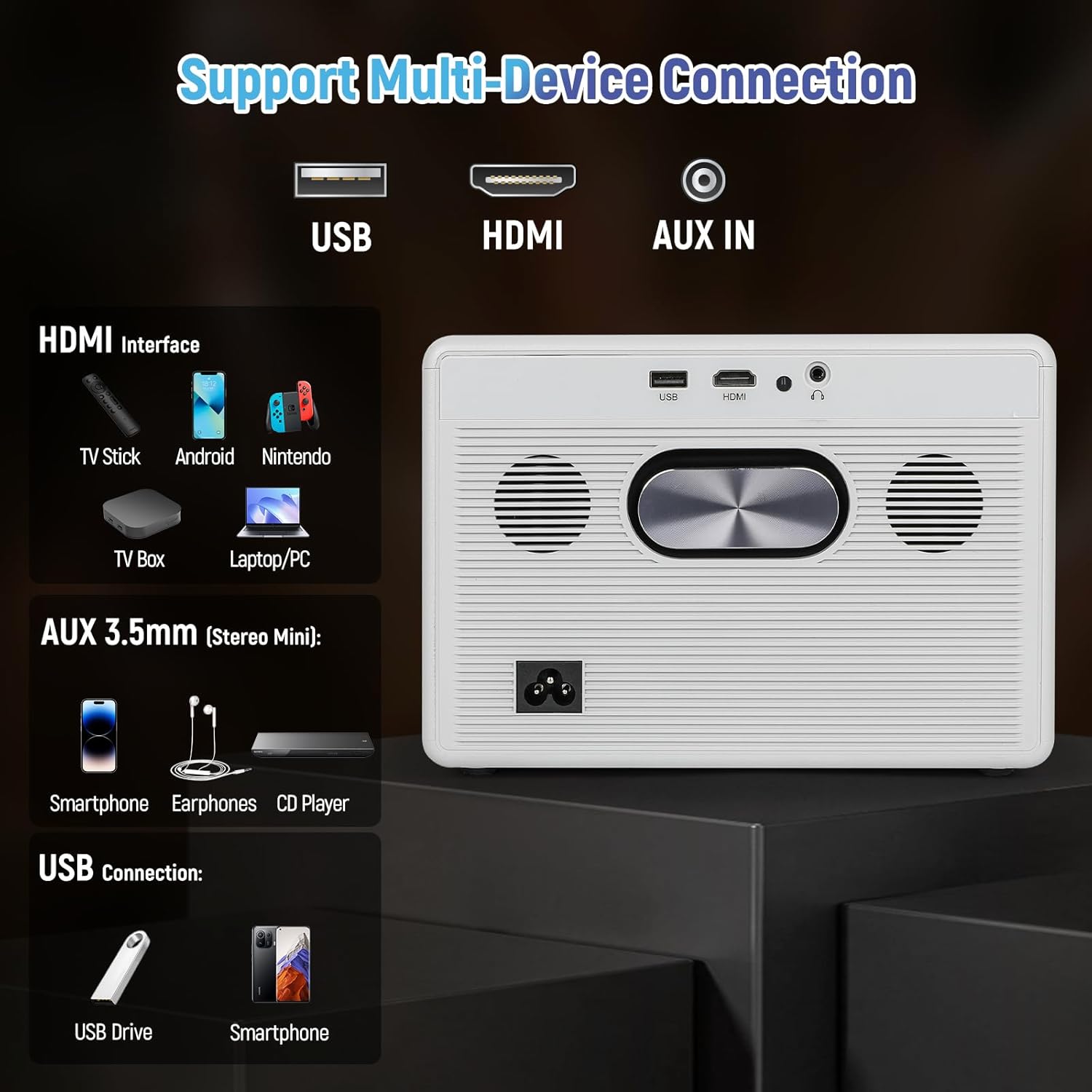
Figure 3.2: Rear panel connections including USB, HDMI, and AUX IN.
- USB tengi: Til að tengja USB geymslutæki.
- HDMI tengi: For connecting external video sources like TV sticks, gaming consoles, or laptops.
- AUX IN (3.5mm Audio Jack): Til að tengja utanaðkomandi hljóðtæki eða heyrnartól.
- Rafmagnsinntak: Til að tengja rafmagnssnúruna.
4. Uppsetning
4.1. Rafmagnstenging
- Tengdu rafmagnssnúruna við aflgjafainntak skjávarpans.
- Stingdu hinum enda rafmagnssnúrunnar í vegginnstungu.
- Ýttu á rofann á skjávarpanum eða fjarstýringunni til að kveikja á honum.
4.2. Fókus og lykilstilling
The Maypug P7 features automatic vertical keystone correction and electric focus for a clear image from various angles.

Figure 4.1: Illustration of automatic keystone correction and electric focus features.
- Automatic Keystone: The projector will automatically adjust vertical distortion (±30°).
- Handvirkur Keystone: For further adjustments, navigate to the settings menu to manually correct keystone up to ±50°.
- Rafmagns fókus: Use the remote control to fine-tune the image sharpness.
4.3. Nettenging (WiFi og Bluetooth)
Connect your projector to a wireless network and Bluetooth devices.
- WiFi tenging:
- Go to the "Settings" menu on the Lilac OS interface.
- Select "WiFi" and choose your desired network.
- Enter the password if prompted. The projector supports dual-band WiFi 6.
- Bluetooth-tenging:
- Go to the "Settings" menu.
- Veldu „Bluetooth“ og kveiktu á því.
- Select your Bluetooth device (e.g., external speakers, headphones) from the list to pair. The projector supports Bluetooth 5.4.
5. Notkunarleiðbeiningar
5.1. Navigating Lilac OS and Built-in Apps
The Maypug P7 runs on Lilac OS, providing a user-friendly interface with pre-installed streaming applications.

Figure 5.1: Lilac OS interface displaying pre-installed and downloadable applications.
- Use the Bluetooth remote control to navigate the interface.
- Access pre-installed apps like Netflix, Prime Video, and YouTube directly.
- Download additional applications from Google Play and the TV Store.
5.2. Þráðlaus vörpun
Mirror content from your mobile devices wirelessly.
- Miracast (Android): For Android devices, select Miracast from the apps menu and follow the on-screen instructions to connect.
- AumiCast (Android/iOS): For both Android and iOS devices, select AumiCast and follow the pairing instructions.
5.3. Að tengja ytri tæki
Connect devices via HDMI or USB for expanded content options.
- HDMI: Connect TV sticks, gaming consoles, Blu-ray players, or laptops to the HDMI port. The projector supports 4K inputs and 120Hz refresh rates for gaming.
- USB: Settu USB-lykil í USB-tengið til að spila margmiðlunarefni files beint.
5.4. Hljóðstillingar
The projector includes built-in 5W stereo speakers. For external audio, use Bluetooth or the AUX IN port.

Figure 5.2: The projector's integrated 5W stereo speakers provide clear audio.
- Stilltu hljóðstyrk með fjarstýringunni.
- Connect Bluetooth speakers/headphones as described in Section 4.3.
- Connect wired headphones or external speakers via the 3.5mm AUX IN port.
5.5. Aðdráttaraðgerð
Adjust the projected image size without moving the projector.
- Use the remote control to access the zoom function.
- The projector supports 50-100% digital zoom.
6. Viðhald
6.1. Þrif
- Þurrkið ytra byrði skjávarpans með mjúkum, þurrum klút.
- Notið linsuhreinsiklút og sérstakt linsuhreinsiefni fyrir linsuna. Notið ekki slípiefni.
6.2. Rykþétt innsigluð ljósleiðari
The Maypug P7 features a fully sealed optical engine designed to prevent dust ingress, ensuring consistent performance and extending the lifespan of internal components. This reduces the need for frequent internal cleaning.
6.3. Geymsla
- Geymið skjávarpann á köldum, þurrum stað fjarri beinu sólarljósi og miklum hita.
- If storing for an extended period, cover the projector to protect it from dust.
7. Bilanagreining
| Vandamál | Möguleg orsök | Lausn |
|---|---|---|
| Engin mynd sýnd | Rafmagnssnúra laus; Inntaksgjafinn er rangur; Linsulokið á. | Check power connection; Select correct input source (HDMI/USB); Remove lens cap. |
| Myndin er óskýr | Fókus ekki stilltur; Skjávarpinn of langt/nálægt skjánum. | Use electric focus via remote; Adjust projector distance. |
| Myndin er brengluð (trapisulaga) | Keystone ekki stilltur. | Allow auto keystone to correct; Adjust manual keystone in settings. |
| Ekkert hljóð | Volume too low; External audio device not connected/paired; Mute enabled. | Increase volume; Check Bluetooth/AUX connection; Disable mute. |
| Vandamál með WiFi/Bluetooth tengingu | Out of range; Incorrect password; Interference. | Move closer to router/device; Re-enter password; Reduce interference. |
8. Tæknilýsing
| Eiginleiki | Smáatriði |
|---|---|
| Vörumerki | Maypug |
| Gerðarnúmer | M-P7 |
| Skjáupplausn | Upprunaleg 1920 x 1080 (1080P), 4K stutt |
| Birtustig | 2000 ANSI lumen |
| Andstæðuhlutfall | 20,000:1 |
| Endurnýjunartíðni | 60Hz (up to 120Hz for HDMI input) |
| Stýrikerfi | Lilac OS with built-in apps (Netflix, Prime Video, YouTube) |
| Þráðlaus tenging | Dual-Band WiFi 6, Bluetooth 5.4, Miracast, AumiCast |
| Leiðrétting á hljómsteini | Automatic Vertical (±30°), Manual (±50°) |
| Einbeittu þér | Rafmagns fókus |
| Aðdráttaraðgerð | 50-100% stafræn aðdráttur |
| Hljóð | Built-in 5W Stereo Speakers with Hi-Fi audio |
| Sjónræn vél | Fully Sealed, Dust-Proof |
| LED líftími | 50,000 klst |
| Þyngd hlutar | 6.73 pund |
| Mál | 10.5 x 9.15 x 9.15 tommur (stærðir pakka) |
Note: Item weight and dimensions are approximate.
9. Ábyrgð og stuðningur
Your Maypug P7 Projector is backed by a 3 árs ábyrgð. For technical assistance or warranty claims, please contact our 24/7 US-based support lið.
Contact information can typically be found on the official Maypug websíðunni eða kaupskjölunum þínum.


