1. Inngangur
This manual provides essential instructions for the installation, operation, and maintenance of your Rimoody Android 2 DIN Car Radio. Please read this manual thoroughly before using the product to ensure proper function and safety. Keep this manual for future reference.
2. Öryggisupplýsingar
- Mælt er með faglegri uppsetningu: Vegna flækjustigs rafkerfa bíla er mjög mælt með faglegri uppsetningu til að koma í veg fyrir skemmdir á einingunni eða ökutækinu þínu.
- Aflgjafi: Gakktu úr skugga um að tækið sé tengt við 12V DC aflgjafa með neikvæðri jarðtengingu.
- Öryggi í akstri: Notið ekki tækið á þann hátt að það trufli aksturinn. Setjið alltaf öryggi á veginn í forgang.
- Hitastig: Forðist að láta tækið verða fyrir miklum hita eða beinu sólarljósi í langan tíma.
- Raki: Haldið tækinu frá vatni og miklum raka.
3. Innihald pakka
Gakktu úr skugga um að allir hlutir séu til staðar í pakkanum:
- Rimoody Android Car Radio (9-inch IPS Display)
- Rafmagnssnúra
- RCA Cable
- Inntakskaðall að aftan
- GPS loftnet
- Festingar Bracket
- Notendahandbók (þetta skjal)
- Hljóðnemi (MIC)
- USB snúru
- Myndavél að aftan

Image 3.1: Included accessories and unit dimensions.
4. Uppsetning og uppsetning
4.1. Uppsetningu lokiðview
The Rimoody Android Car Radio is designed for a 2 DIN slot. Ensure your vehicle has a compatible dashboard opening. Professional installation is strongly recommended.

Image 4.1: Before and after installation comparison.
4.2. Raflagnatengingar
Connect the provided power cable, RCA cables, and other input/output cables according to your vehicle's wiring diagram and the radio's port labels. Pay close attention to the following:
- Kraftur: Connect the yellow wire to constant 12V (+), the red wire to accessory 12V (+), and the black wire to ground (-).
- Hátalarar: Tengdu hátalaravírana við samsvarandi hátalaravíra í ökutækinu og gætið þess að pólunin sé rétt.
- Myndavél að aftan: Connect the rear camera input cable to the camera and the reverse trigger wire to the vehicle's reverse light circuit.
- GPS loftnet: Setjið GPS-loftnetið á stað þar sem er gott útsýni view himinsins, oftast á mælaborðinu.
- USB: Connect the USB cable for external devices or data transfer.
4.3. Fyrsta ræsing
After all connections are secure, turn on your vehicle's ignition. The car radio should power on and display the initial setup screen. Follow the on-screen prompts to configure basic settings such as language and time.
5. Notkunarleiðbeiningar
5.1. Basic Navigation and Touchscreen
The unit features a 9-inch IPS touchscreen. Navigate through menus and applications by tapping, swiping, and pinching. The main screen displays various app icons for quick access to functions like Phone, Music, Maps, and Settings.
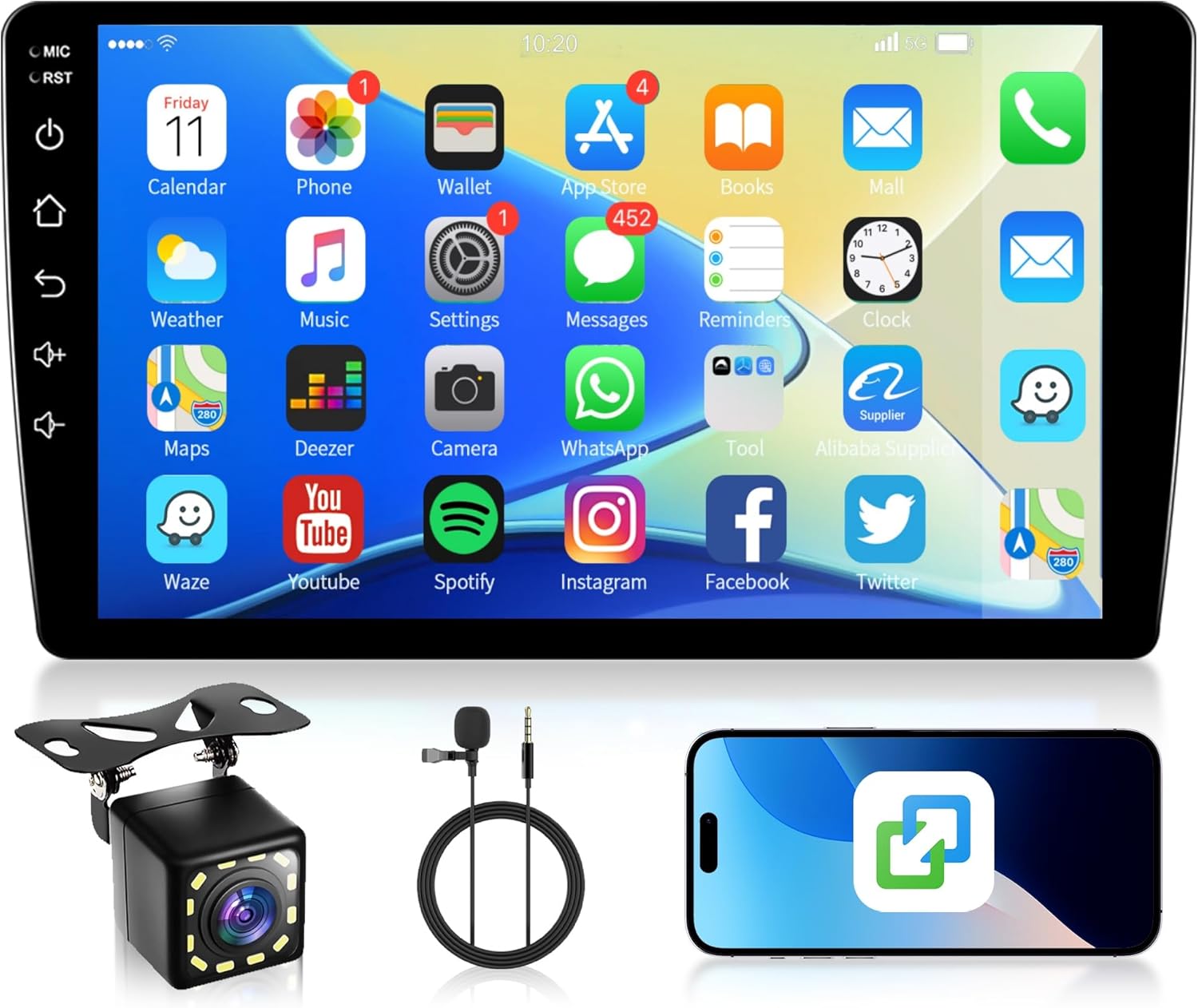
Image 5.1: Main interface with app icons.
5.2. iOS/Android Mirror Link
The Mirror Link function allows you to project your smartphone's screen onto the car radio display. This feature supports both iOS and Android devices.
- Ensure your phone's Wi-Fi or USB debugging is enabled (for Android).
- Select the 'Mirror Link' application on the car radio.
- Follow the on-screen instructions to connect your phone via USB or Wi-Fi.
- Once connected, your phone's display will be mirrored on the car radio screen.

Image 5.2: Wireless Mirror Link in action.
5.3. Bluetooth-tenging
Tengdu snjallsímann þinn með Bluetooth fyrir handfrjáls símtöl og hljóðstreymi.
- Go to the 'Bluetooth' application on the car radio.
- Virkjaðu Bluetooth á snjallsímanum þínum og leitaðu að tiltækum tækjum.
- Select the car radio (device name typically 'Topway' or similar) from your phone's Bluetooth list.
- Staðfestu pörunarkóðann á báðum tækjunum.
- Þegar þú hefur parað tækið geturðu hringt/svarað símtölum og spilað tónlist þráðlaust.

Mynd 5.3: Bluetooth-viðmót fyrir símtöl og tónlist.
5.4. GPS leiðsögn og WiFi
The unit has integrated GPS and WiFi for navigation and online services.
- GPS: Use pre-installed navigation apps or download others from the App Store. The unit supports both online and offline maps.
- WiFi: Connect to a Wi-Fi hotspot (e.g., from your phone) to access online maps, stream media, or download apps. Go to 'Settings' > 'Network & Internet' > 'Wi-Fi' to connect.

Image 5.4: GPS navigation and WiFi connection.
5.5. FM/RDS útvarp
Access the 'Radio' application to tune into FM stations. The RDS (Radio Data System) feature displays station information where available.
- Sjálfvirk skönnun: Press the 'Scan' button to automatically search and save available stations.
- Handvirk stilling: Use the arrow buttons to manually adjust the frequency.
- Forstillingar: Vistaðu uppáhaldsstöðvarnar þínar með forstilltum hnöppum til að fá fljótlegan aðgang.
5.6. Stýrisstýring
If your vehicle supports it, you can connect the car radio to your steering wheel controls for convenient operation.
- Opnaðu stillingarnar „Stýrisstýring“ í valmynd tækisins.
- Follow the on-screen instructions to map your vehicle's steering wheel buttons to the desired functions (e.g., volume up/down, track skip, mode).

Image 5.5: Reverse camera view and steering wheel control setup.
5.7. Aðgerð bakmyndavélar
When the vehicle is shifted into reverse gear, the car radio will automatically display the rear camera feed, providing parking assistance with guidelines.
- Ensure the rear camera is correctly installed and connected to the 'REVERSE IN' port and the reverse trigger wire.
- Skjárinn skiptir sjálfkrafa yfir í myndavélina view þegar bakkað er.
5.8. Skipt skjávirkni
The split screen feature allows you to run two applications simultaneously on the 9-inch display.
- Opnaðu fyrsta forritið sem þú vilt nota.
- Haltu inni hnappinum „Nýleg forrit“ eða strjúktu upp frá botni (fer eftir notendaviðmóti) til að fara í skipt skjástillingu.
- Select the second application from the list to display it alongside the first.
Image 5.6: Split screen mode.
6. Viðhald
6.1. Þrif
Use a soft, dry cloth to clean the screen and exterior of the unit. Avoid using abrasive cleaners or solvents, as they may damage the surface.
6.2. Hugbúnaðaruppfærslur
Athugaðu reglulega hvort hugbúnaðaruppfærslur séu til staðar til að tryggja bestu mögulegu virkni og aðgang að nýjum eiginleikum. Uppfærslur er venjulega að finna á vefsíðu framleiðandans. websíðuna eða í gegnum kerfisstillingar tækisins ef það er tengt við Wi-Fi.
7. Bilanagreining
- Enginn kraftur: Athugið allar rafmagnstengingar (stöðug 12V, aukabúnaður 12V, jarðtenging). Athugið öryggi ökutækisins.
- Ekkert hljóð: Check speaker wiring. Ensure volume is not muted or set to zero. Verify audio output settings.
- Bluetooth tengist ekki: Ensure Bluetooth is enabled on both devices. Delete previous pairings and try again.
- GPS merki tapað: Gakktu úr skugga um að GPS-loftnetið sé rétt tengt og að það sé skýrt view himinsins.
- Afturmyndavélin birtist ekki: Athugaðu tengingar myndavélarinnar og vertu viss um að vírinn fyrir bakkgírsstöðuna sé rétt tengdur við rafrás bakkljósa ökutækisins.
- Snertiskjár svarar ekki: Reyndu að endurræsa tækið. Ef vandamálið heldur áfram gæti verið nauðsynlegt að endurstilla tækið á verksmiðjustillingar (athugið: þetta mun eyða öllum notandagögnum).
8. Tæknilýsing
| Eiginleiki | Forskrift |
|---|---|
| Vörumerki | Rimoody |
| Fyrirmynd | 33a6281d-7b69-4291-900d-983b137239ff |
| Skjárstærð | 9 tommur |
| Skjár Tegund | IPS snertiskjár |
| Upplausn | 1024*600 |
| vinnsluminni | 1 GB |
| ROM | 32 GB |
| Stýrikerfi | Android |
| Tengingar | USB, FM/RDS, Bluetooth, WiFi |
| Sérstakir eiginleikar | iOS/Android Mirror Link, GPS Navigation, Bluetooth, FM/RDS, Rear Camera Support, Steering Wheel Control, Split Screen, OBD2/DAB+/DVR (optional support) |
| Hljóðútgangsstilling | Steríó, umgerð |
| Stillingar fyrir rás umgerð hljóðs fyrir hátalara | 4.1 |
| Output Power | 180 Watt |
| Samhæf tæki | Snjallsími |
| Vöruþyngd | 1.23 kg |
| Stærðir pakka | 32.5 x 26.4 x 8.6 cm |
9. Ábyrgð og stuðningur
Rimoody offers comprehensive support for your product:
- 24 Months Free Replacement: In case of product defects within 24 months of purchase.
- 30 Day No Reason Refund: Return the product within 30 days for a full refund.
- Ævi tækniaðstoð: Aðgangur að tæknilegri aðstoð allan líftíma vörunnar.
- 24 klukkustunda skjót svörun: Expect a prompt response to your inquiries within 24 hours.
For technical support or warranty claims, please contact Rimoody customer service through the platform where you purchased the product.


