1. Inngangur
This manual provides detailed instructions for the setup, operation, and maintenance of your SHARP 43FH2EA Full HD Android TV. Please read this manual thoroughly before using the television to ensure proper and safe operation.

Mynd 1: Framan view of the SHARP 43FH2EA Full HD Android TV.
2. Hvað er í kassanum
Upon unboxing, please verify that all components listed below are present and undamaged:
- SHARP 43FH2EA Television Unit
- Fjarstýring
- 2x AAA rafhlöður (fyrir fjarstýringu)
- TV Stand Installation Set
- Flýtileiðarvísir

Figure 2: Included remote control for the SHARP 43FH2EA TV.
3. Uppsetning
3.1 Festing sjónvarpsstandsins
Carefully place the TV screen-down on a soft, clean surface to prevent scratches. Attach the stand components to the designated slots on the bottom of the TV using the provided screws. Ensure the stand is securely fastened before placing the TV upright.

Figure 3: Detail of the TV stand attachment point.
3.2 Fyrsta ræsing og uppsetning Android TV
Connect the power cord to the TV and a wall outlet. Press the power button on the remote control or the TV. Follow the on-screen instructions to complete the initial setup, including language selection, network connection (Wi-Fi or Ethernet), and Google account sign-in for Android TV features.

Figure 4: Android TV user interface displaying various applications.
4. Að stjórna sjónvarpinu
4.1 Android TV eiginleikar
Your SHARP 43FH2EA is equipped with Android TV, providing access to a wide range of entertainment options. The intuitive interface allows you to easily navigate through apps, movies, TV shows, and more. You can customize your home screen with your favorite applications.
- Foruppsett forrit: Netflix, YouTube, Google Play Movies & TV, Google Play Store, Prime Video.
- Google Play Store: Sæktu fleiri forrit, leiki og efni.

Mynd 5: Dæmiample of the Android TV app selection screen.
4.2 Google aðstoðarmaður
Use the built-in Google Assistant for voice control. Press the Google Assistant button on your remote to search for content, control smart home devices, manage tasks, and get information using voice commands.

Figure 6: Google Assistant in action on the TV screen.
4.3 Chromecast Innbyggt
With Chromecast built-in, you can cast movies, videos, apps, games, and photos directly from your smartphone, tablet, or laptop to the TV screen. Enjoy high-resolution content and vibrant colors.

Mynd 7: Dæmiample of content casting using Chromecast built-in.
4.4 Spilastilling
When connecting a game console, the TV's Game Mode minimizes input lag and provides sharp 4K resolution (upscaled if source is lower resolution) for an enhanced gaming experience. This mode ensures quick response times and natural colors.

Figure 8: Gaming experience on the SHARP TV.
5. Tengingar
The SHARP 43FH2EA offers a variety of connection options for your external devices:
- HDMI: 3x HDMI ports for connecting Blu-ray players, game consoles, set-top boxes, and other HDMI-enabled devices.
- USB: 2x USB ports for media playback from USB drives.
- Loftnetsinntak: For DVB-T/T2 terrestrial signals.
- Gervihnattainntak: For DVB-S/S2 satellite signals.
- Stafrænt sjónrænt hljóðúttak: Til að tengjast við ytri hljóðkerfi.
- Hljóðinntak: Fyrir hliðræna hljóðgjafa.
- Bluetooth: For wireless connection to compatible audio devices like headphones or soundbars.
- Þráðlaust net (WLAN): Fyrir þráðlausa nettengingu.
- LAN (RJ45): Fyrir snúrubundið internettengingu.
- UHD Triple Tuner: Integrated DVB-T/T2/C/S/S2 (MPEG4 + 10-bit HEVC/H.265) tuner for receiving various broadcast signals.

Figure 9: Rear panel with connectivity ports.
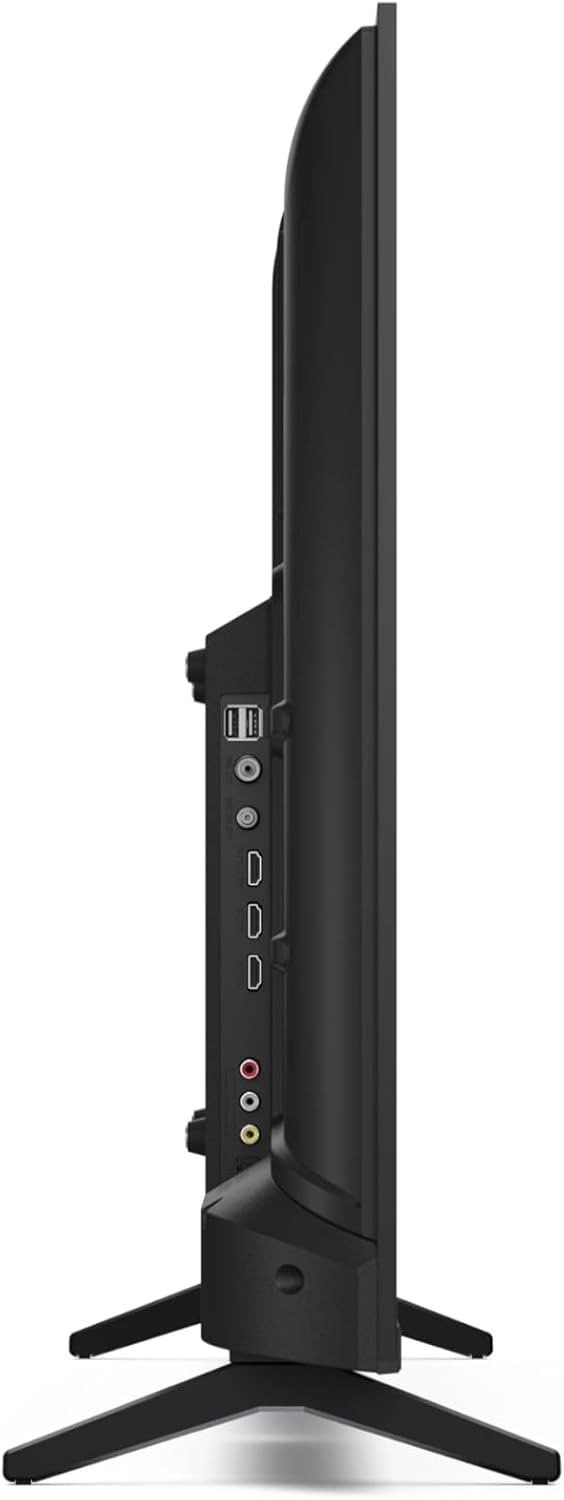
Mynd 10: Hlið view of the TV highlighting accessible ports.
6. Picture and Audio Quality
6.1 Full HD and Active Motion 400
The Full HD resolution (1920 x 1080 pixels) ensures sharp and detailed images. Active Motion 400 technology significantly enhances motion clarity by calculating and inserting intermediate frames, reducing blur and improving the viewing experience for fast-paced content like sports and action movies.

Figure 11: Active Motion 400 for enhanced picture clarity.
6.2 Hljóðkerfi
The TV features a speaker system with a front-facing silk tweeter (8 W) and a downward-firing woofer (8 W). It supports Dolby Digital, Dolby Digital Plus, and Dolby AC-4 for rich and immersive sound. Dolby Digital Plus further enhances sound by supporting up to 5.1 channels and a subwoofer, creating an impressive surround sound experience.
7. Viðhald
Til að tryggja endingu og bestu mögulegu virkni sjónvarpsins skaltu fylgja þessum viðhaldsleiðbeiningum:
- Að þrífa skjáinn: Notið mjúkan, lólausan klút sem er sérstaklega hannaður fyrir raftæki. Notið ekki slípiefni eða leysiefni. Þurrkið létt.ampÞurrkið klútinn með vatni ef þörf krefur og þurrkið skjáinn varlega.
- Þrif á skápnum: Þurrkið sjónvarpsskápinn með mjúkum, þurrum klút.
- Loftræsting: Tryggið góða loftræstingu í kringum sjónvarpið. Ekki loka fyrir loftræstiop.
- Rafmagnssnúra: Athugið reglulega hvort rafmagnssnúran sé skemmd.
8. Bilanagreining
Ef þú lendir í vandræðum með sjónvarpið þitt skaltu skoða eftirfarandi algengar úrræðaleitarskref:
| Vandamál | Möguleg orsök/lausn |
|---|---|
| Engin rafmagn / sjónvarpið kveiknar ekki á sér. |
|
| Engin mynd, en hljóð er til staðar. |
|
| Ekkert hljóð, en mynd er til staðar. |
|
| Fjarstýring virkar ekki. |
|
| Vandamál með Wi-Fi tengingu. |
|
If the problem persists after trying these steps, please contact SHARP customer support.
9. Tæknilýsing
| Eiginleiki | Smáatriði |
|---|---|
| Gerðarnúmer | 43FH2EA |
| Skjástærð | 43 tommur (108 cm) |
| Upplausn | Full HD (1920 x 1080 pixlar) |
| Skjátækni | LED |
| Endurnýjunartíðni | 50 Hz |
| Stýrikerfi | Android sjónvarp |
| Sérstakir eiginleikar | Chromecast built-in, Google Assistant, Active Motion 400 |
| Tengingar | 3x HDMI, 2x USB, Antenna In, Satellite In, Digital Optical Audio Out, Audio In, Bluetooth, WLAN, LAN (RJ45) |
| Útvarpstæki | UHD Triple Tuner DVB-T/T2/C/S/S2 (MPEG4 + 10-bit HEVC/H.265) |
| Hljóðúttak | 2x 8W (Woofer + Tweeter) |
| Hljóðtækni | Dolby Digital, Dolby Digital Plus, Dolby AC-4 |
| Stærðir (með standi) | 95.5 x 60.3 x 21.4 cm (B x H x D) |
| Þyngd | 8 kg |
| VESA staðall | 200 x 200 mm |
| Orkunýtniflokkur | E |

Mynd 12: Stærð vörunnar.

Figure 13: Energy Efficiency Label. For more details, visit EPREL gagnagrunnur.
10. Ábyrgð og stuðningur
For warranty information and customer support, please refer to the documentation included with your product or visit the official SHARP website. You can also contact SHARP customer service directly for assistance with product inquiries or technical support.
- Framleiðandi: Skarp
- Websíða: www.sharpconsumer.com
- Netfang: kamil.gorczyca@sharpconsumer.eu
- Sími: +48603907251


