Lockly Vision and Model 6S Smart Lock User Manual
Model: Vision and Model 6S
1. Inngangur
This manual provides detailed instructions for the installation, operation, and maintenance of your Lockly Vision and Model 6S Smart Lock. This smart lock system offers advanced security features including a built-in camera, fingerprint sensor, and a unique PIN Genie Keypad. Please read this manual thoroughly before installation and use to ensure proper functionality and safety.

Figure 1.1: Lockly Vision and Model 6S Smart Lock System Overview. This image displays the main components of the Lockly smart lock system, including the exterior camera and keypad unit, the interior handle and battery unit, and the separate Wi-Fi bridge for remote connectivity.
2. Öryggisupplýsingar
- Do not expose the lock to direct water spray or submersion.
- Notið aðeins tilgreinda rafhlöðutegund og gætið þess að pólunin sé rétt við uppsetningu.
- Forðist að nota slípiefni eða leysiefni á yfirborð lásins.
- Keep fingers clear of moving parts during operation.
- Gangið úr skugga um að allir íhlutir séu vel festir við uppsetningu til að koma í veg fyrir að þeir færist úr stað fyrir slysni.
3. Innihald pakka
Gakktu úr skugga um að allir hlutir sem taldir eru upp hér að neðan séu til staðar í pakkanum þínum:
- Lockly Vision Elite Smart Lock (Exterior Assembly with Camera and Keypad)
- Lockly 6S Smart Lock (Interior Assembly with Handle)
- Wi-Fi brú
- Mounting Hardware (Screws, Bolts, Strike Plate)
- Uppsetningarsniðmát
- Notendahandbók (þetta skjal)
- Rechargeable Lithium Batteries (2x)
4. Uppsetning og uppsetning
The Lockly Vision and Model 6S Smart Lock is designed for easy DIY installation without the need for drilling or complex wiring. Follow the step-by-step guidance provided in the included installation template and the Lockly Home app.
4.1 Gátlisti fyrir uppsetningu
- Ensure your door meets the specified thickness requirements.
- Confirm the backset measurement of your door.
- Download the Lockly Home app from your device's app store.
4.2 Uppsetningarskref
Refer to the detailed instructions within the Lockly Home app for visual and audio guidance. General steps include:
- Remove your existing deadbolt and handle.
- Install the new latch and strike plate.
- Mount the exterior keypad assembly.
- Connect the interior handle assembly.
- Insert the rechargeable batteries.
- Perform the door handing process via the app.
5. Notkunarleiðbeiningar
5.1 PIN Genie Keypad Operation
The patented PIN Genie keypad features a unique number-shuffling design to prevent PIN theft. The numbers on the keypad dynamically rearrange after each use.

Figure 5.1: PIN Genie Keypad in operation. This image illustrates how the numbers on the keypad shuffle dynamically, making it difficult for onlookers to guess your PIN based on finger placement.
- To unlock: Touch the screen to activate the keypad. Enter your 6-8 digit access code. The numbers will shuffle after each digit entry. Press the Lockly button to confirm.
- To lock: Press the Lockly button on the keypad.
5.2 3D Biometric Fingerprint Access
The integrated biometric fingerprint sensor allows for quick and secure unlocking in approximately 0.3 seconds. The lock can store up to 99 unique fingerprints.

Figure 5.2: Using the 3D Biometric Fingerprint Sensor. A hand is shown placing a finger on the side-mounted fingerprint sensor of the Lockly smart lock for quick and secure access.
- To unlock: Place your registered finger on the sensor. The lock will unlock upon successful recognition.
- To register fingerprints: Use the Lockly Home app to add and manage fingerprints.
5.3 Lockly Home App Control
The Lockly Home app provides comprehensive control and monitoring features for your smart lock.
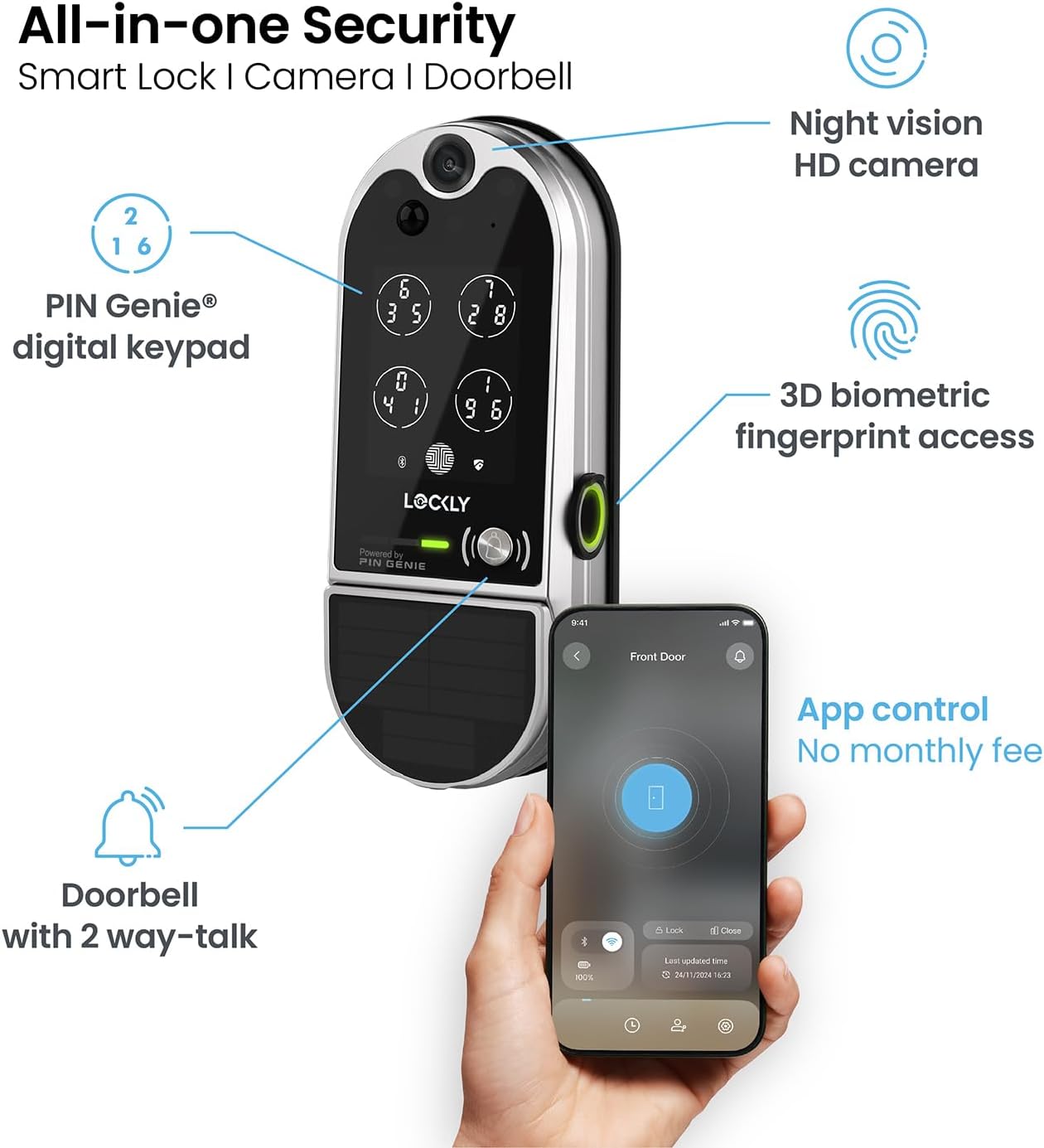
Figure 5.3: All-in-one Security Features. This image highlights the integrated features of the Lockly Vision smart lock, including its night vision HD camera, 3D biometric fingerprint access, app control, and doorbell with two-way talk functionality.
- Fjarstýring: Lock or unlock your door from anywhere using the app.
- Aðgangsstjórnun: Create, modify, or delete access codes and fingerprints.
- Rauntíma viðvaranir: Receive notifications for motion detection, door activity, and low battery.
- Tvíhliða hljóð: Communicate with visitors at your door via the built-in doorbell and speaker.
5.4 Video Doorbell and Motion Detection
The Lockly Vision Elite features an HD camera with night vision and motion detection capabilities.
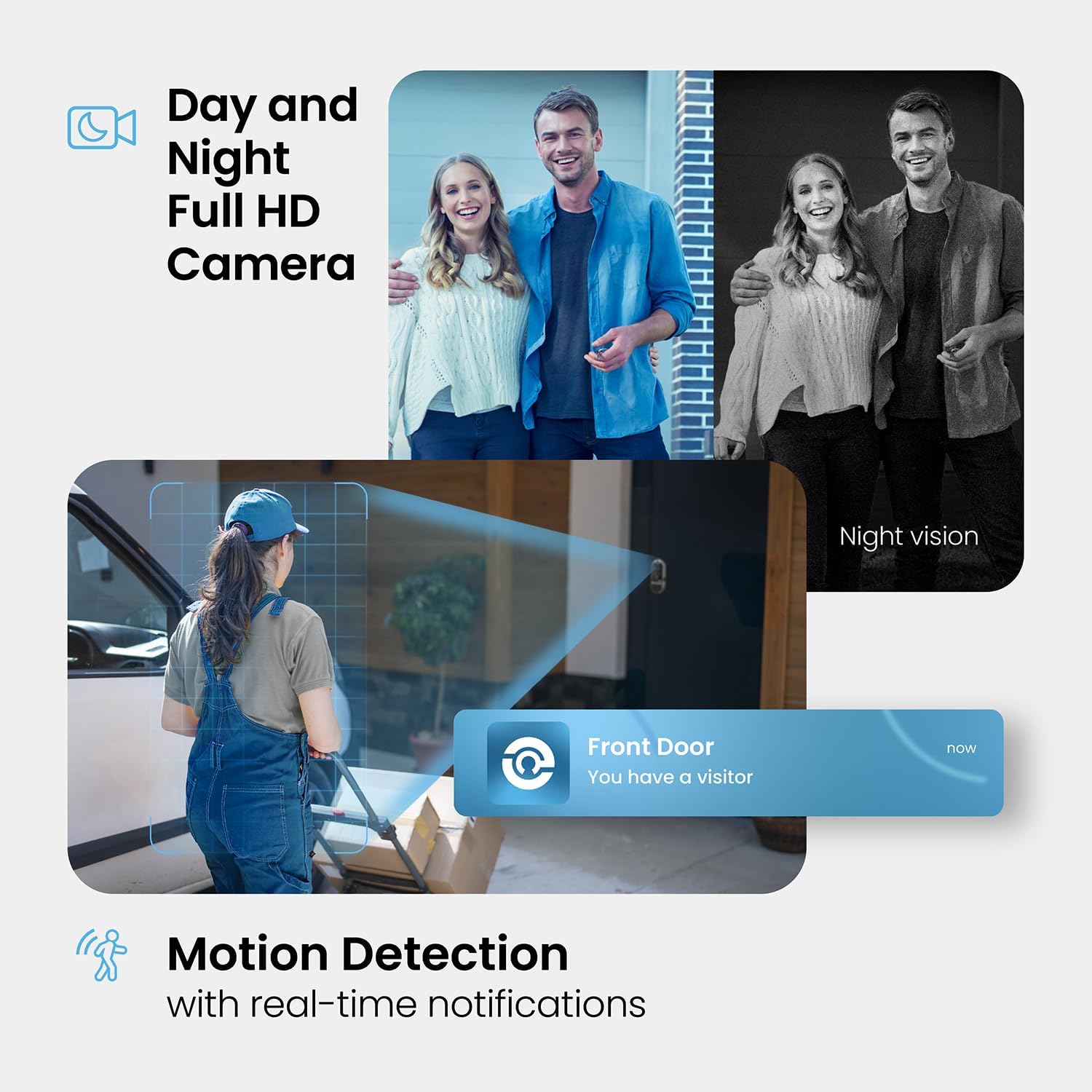
Figure 5.4: Day and Night Full HD Camera with Motion Detection. This image shows the camera's ability to capture clear footage both day and night, along with a notification indicating a visitor at the front door.
- Lifandi View: Access a live video feed of your doorstep through the app.
- Hreyfiskynjun: The camera detects motion and sends real-time alerts to your phone.
- Upptökur af Footage: Footage is stored for review (check app for storage options).
5.5 Share Access
Easily share temporary or permanent access with trusted individuals using eKeys, eBadges, or Offline Access Codes™.

Figure 5.5: Sharing Access. This image depicts a user receiving an access code via text message, demonstrating the ease of sharing temporary or permanent access to the Lockly smart lock.
- raflyklar: Grant app-based access to other Lockly users.
- Aðgangskóðar án nettengingar™: Generate codes that work without internet connectivity.
5.6 Access Log History
The Lockly Home app maintains a detailed log of all access events, allowing you to review who entered and exited your property.

Figure 5.6: Access Log History. This image shows a family entering their home, with an inset displaying the Lockly app's access log, which records all entry and exit events for review.
- View tíminnamps and entry methods (e.g., fingerprint, code, mobile).
- Filter logs by date or user.
6. Viðhald
6.1 Rafhlöðustjórnun
The Lockly Vision and Model 6S Smart Lock is powered by rechargeable lithium batteries, offering up to 6 months of battery life. The Vision Elite model includes a solar panel for extended battery life.
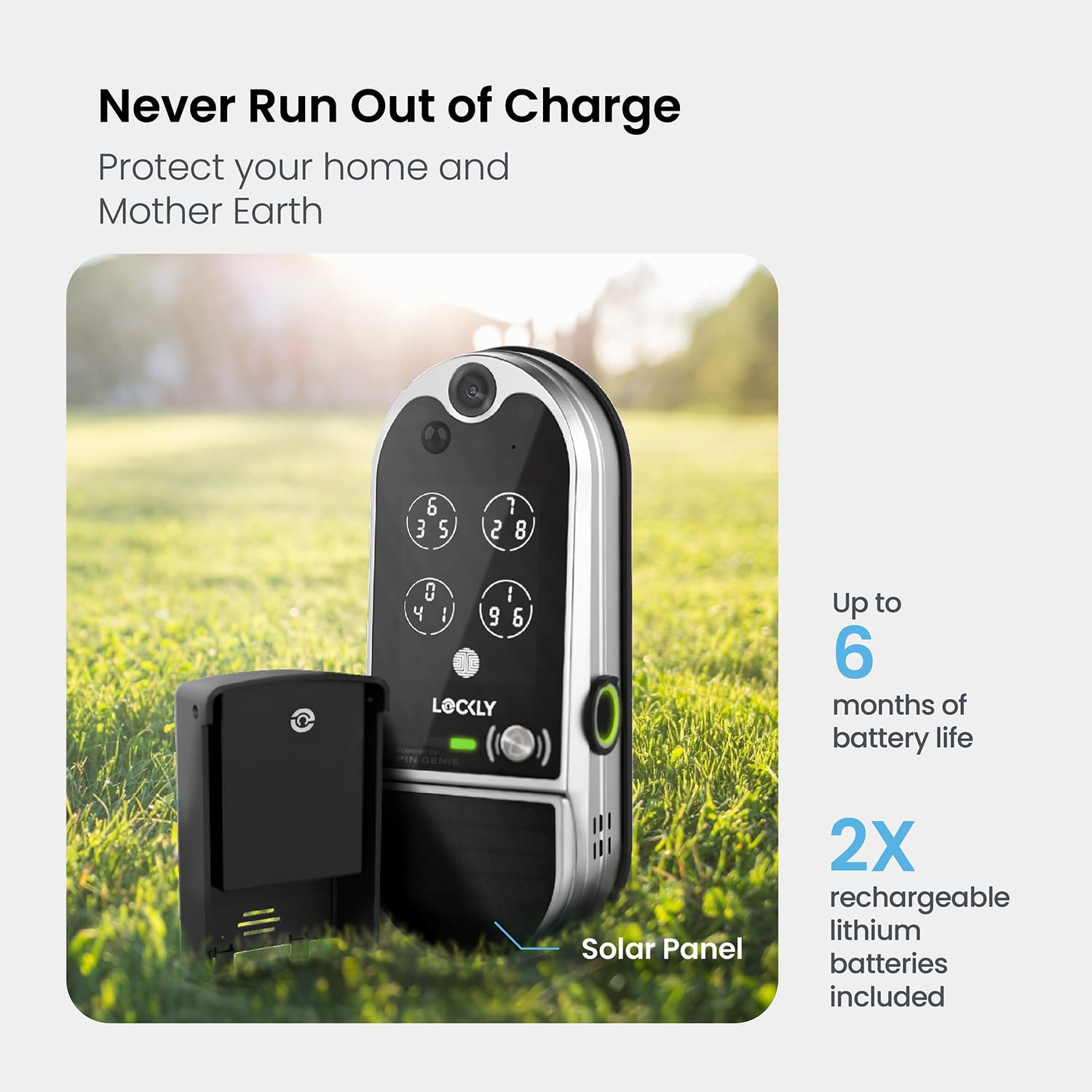
Figure 6.1: Battery Life and Solar Panel. This image highlights the long battery life of up to 6 months and the inclusion of a solar panel for continuous charging, ensuring the lock remains powered.
- Monitor battery levels via the Lockly Home app.
- Recharge batteries when prompted by the app or low battery indicator.
- The solar panel on the Vision Elite model helps maintain battery charge with adequate sunlight exposure.
6.2 Þrif
Þurrkið yfirborð lásins með mjúkum klút.amp klút. Ekki nota sterk efni eða slípiefni.
7. Bilanagreining
- Lás svarar ekki: Check battery levels. Ensure batteries are correctly inserted. Try restarting the lock by removing and reinserting batteries.
- Fingrafar ekki greint: Gakktu úr skugga um að fingurinn sé hreinn og þurr. Skráðu fingrafarið aftur ef vandamálin halda áfram.
- Lyklaborðið lýsir ekki upp: Touch the screen firmly. Check battery levels.
- Vandamál með tengingu við forrit: Ensure your Wi-Fi bridge is powered on and within range of both the lock and your Wi-Fi router. Check your home internet connection.
- Hurðin læsist/opnast ekki vel: Check for any obstructions around the deadbolt. Ensure the lock is properly aligned with the strike plate.
8. Tæknilýsing
| Eiginleiki | Forskrift |
|---|---|
| Fyrirmynd | Lockly Vision Elite & Model 6S Smart Lock |
| ASIN | B0DZXCG42K |
| Aflgjafi | Rechargeable Lithium Batteries (2x) |
| Rafhlöðuending | Up to 6 months (with solar panel on Vision Elite) |
| Fingrafarageta | Allt að 99 fingraför |
| Upplausn myndavélar | HD with Night Vision |
| Tengingar | Bluetooth, Wi-Fi (via included bridge) |
9. Ábyrgð og stuðningur
Lockly products typically come with a limited manufacturer's warranty. Please refer to the warranty card included in your product packaging or visit the official Lockly webvefsíðu fyrir ítarlegar ábyrgðarskilmála.
For technical support, troubleshooting assistance, or to inquire about replacement parts, please contact Lockly Customer Service:
- Websíða: www.lockly.com/support
- Netfang: Vísa til websíða fyrir tengiliðseyðublað eða netfang.
- Sími: Vísa til websíða fyrir símanúmer.
When contacting support, please have your product model and ASIN (B0DZXCG42K) readily available.


