1. Inngangur
Welcome to the user manual for your ASUS NUC 15 Pro Tall Barebones Mini PC. This guide provides essential information for setting up, operating, maintaining, and troubleshooting your new mini PC. This barebones kit features an Intel Series 2 Core 7 240H processor, supports dual-channel DDR5 RAM, offers a dual storage design, Thunderbolt™ 4, Wi-Fi 7, Bluetooth 5.4, and toolless chassis access for easy upgrades. A VESA mount is included for flexible placement.
2. Hvað er í kassanum
- ASUS NUC 15 Pro Tall Mini PC Unit (Model: RNUC15CRHC70000U)
- VESA Mount
- Rafmagns millistykki
- Rafmagnssnúra
3. Vöru lokiðview
Familiarize yourself with the physical layout and connectivity options of your ASUS NUC 15 Pro Tall Mini PC.
3.1 Framhlið

Image: Front panel of the ASUS NUC 15 Pro Tall Mini PC, highlighting the USB ports, audio jack, and power button.
- Aflhnappur: To power the unit on or off.
- USB 3.2 Gen 2x2 Type-C Port: For high-speed data transfer and connecting compatible Type-C devices.
- 2x USB 3.2 Gen2 Type-A Ports: Til að tengja USB jaðartæki.
- Hljómtæki: Til að tengja heyrnartól eða hátalara.
3.2 Bakhlið

Image: Rear panel of the ASUS NUC 15 Pro Tall Mini PC, detailing the power input, display outputs, network, and additional USB/Thunderbolt ports.
- DC-In: Tengi fyrir aflgjafainntak.
- 2x HDMI 2.1 (TMDS) Ports: For connecting displays.
- 2.5Gb Ethernet Port: Fyrir tengingu við snúrubundið net.
- USB 3.2 Gen2 Type-A Port: Til að tengja USB jaðartæki.
- USB 2.0 Type-A tengi: Til að tengja USB jaðartæki.
- 2x Thunderbolt™ 4 Ports: For high-speed data transfer, display output, and power delivery to compatible devices.
- Security Mechanism for Power Cable: To secure the power cable connection.
3.3 Innri hönnun
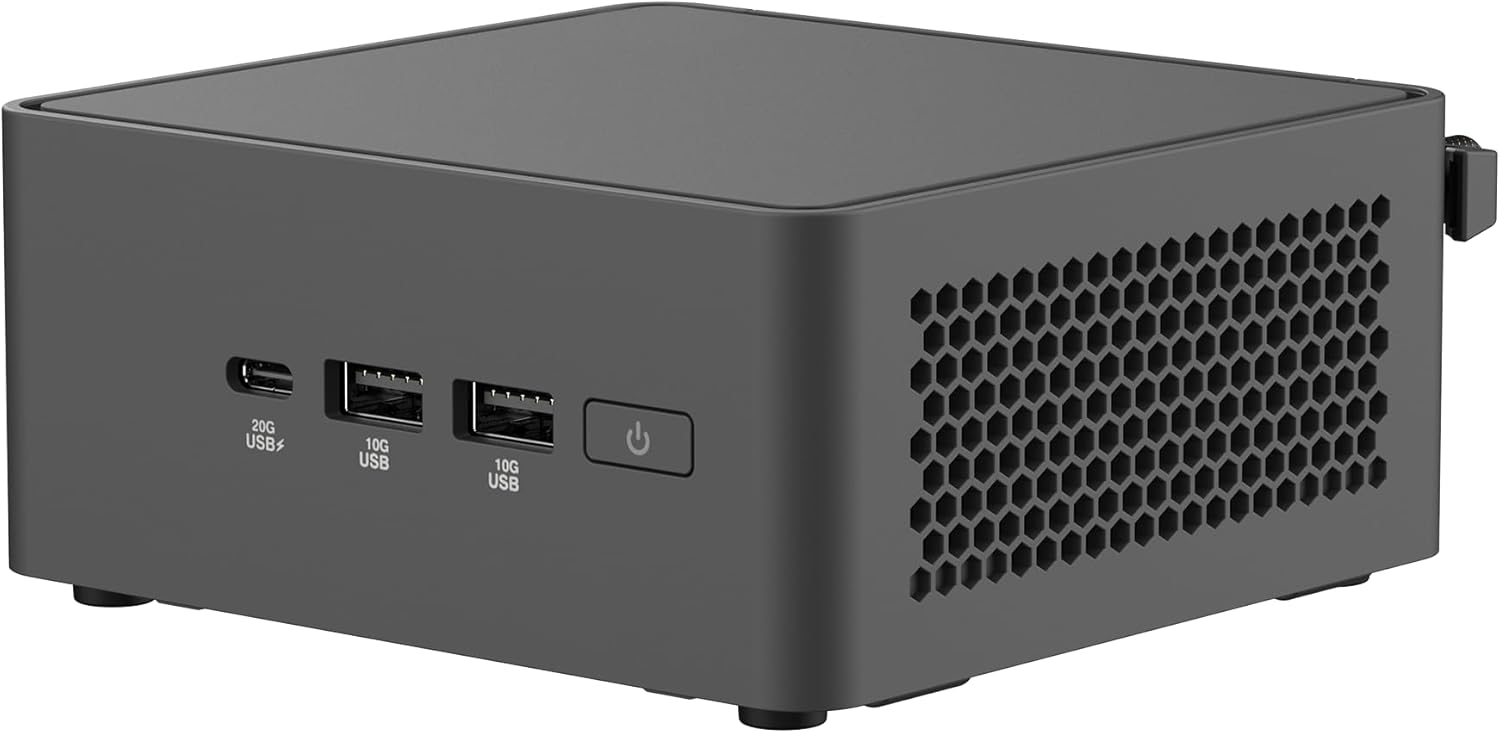
Image: The ASUS NUC 15 Pro Tall Mini PC with its top cover open, illustrating the toolless access for installing or upgrading RAM and storage components.
The chassis features a toolless design, allowing for easy access to internal components for RAM and storage upgrades. This design simplifies maintenance and customization.
4. Uppsetning
Follow these steps for the initial setup of your ASUS NUC 15 Pro Tall Mini PC.
- Upptaka: Fjarlægðu alla íhluti varlega úr umbúðunum.
- Festing (valfrjálst): If using the included VESA mount, attach it to the rear of a compatible display or a wall mount. Secure the mini PC to the VESA mount. This allows for a clutter-free workspace.

Image: The ASUS NUC 15 Pro Tall Mini PC shown mounted on the back of a display, demonstrating its VESA mounting capability for flexible configuration.
- Að tengja jaðartæki:
- Connect your monitor(s) to the HDMI 2.1 or Thunderbolt 4 ports. The device supports up to four 4K displays.
- Tengdu lyklaborðið og músina við tiltæk USB tengi.
- For wired network access, connect an Ethernet cable to the 2.5Gb Ethernet port.
- Connect speakers or headphones to the audio jack on the front panel.
- Rafmagnstenging: Connect the AC power adapter to the DC-In port on the rear panel, then plug the power cord into an electrical outlet.
- Upphafleg kveikt á: Ýttu á rofann á framhliðinni til að kveikja á litlu tölvunni.
- Uppsetning stýrikerfis: As a barebones unit, an operating system (e.g., Windows) will need to be installed. Follow the operating system's installation instructions.
5. Rekstur
This section covers basic operation of your mini PC.
5.1 Kveikt/slökkt
Press the power button on the front panel to turn the unit on. To shut down, use the operating system's shutdown procedure. A short press of the power button can also put the system to sleep.
5.2 Skjástillingar
Utilize the HDMI 2.1 and Thunderbolt 4 ports to connect multiple displays. Refer to your operating system's display settings for configuring multi-monitor setups. The device supports headless emulation and a sync power-off feature for energy efficiency.
5.3 Tengingar
- Wi-Fi 7: Tengstu þráðlausum netum til að fá háhraða internetaðgang.
- Bluetooth 5.4: Pair with compatible Bluetooth devices such as keyboards, mice, and audio peripherals.
- USB tengi: Use the various USB ports (USB 3.2 Gen 2x2 Type-C, USB 3.2 Gen2 Type-A, USB 2.0 Type-A) for connecting external devices and data transfer.
- Thunderbolt ™ 4: For high-speed data transfer and connecting advanced peripherals.
6. Viðhald
Proper maintenance ensures the longevity and optimal performance of your mini PC.
6.1 Toolless Chassis Access for Upgrades
The mini PC features a toolless 2.0 chassis design for easy upgrades. To access internal components:
- Ensure the device is powered off and disconnected from all power sources.
- Follow the instructions in the detailed hardware guide (typically provided with barebones kits) to open the chassis.
- Install or upgrade DDR5 RAM modules (up to 96GB supported).
- Install or upgrade SSD storage drives (dual storage design).
- Close the chassis securely.
6.2 Kælikerfi
The advanced cooling system is designed to maintain optimal performance and reliability. Ensure proper ventilation around the unit to prevent overheating. Avoid blocking air vents.
6.3 Þrif
Use a soft, dry cloth to clean the exterior of the mini PC. Do not use liquid cleaners or aerosols, as they may damage the components.
7. Bilanagreining
Þessi hluti býður upp á lausnir á algengum vandamálum sem þú gætir lent í.
7.1 Enginn kraftur
- Verify the power adapter and cord are securely connected to the mini PC and a working electrical outlet.
- Gakktu úr skugga um að aflhnappinum sé ýtt þétt niður.
7.2 Engin skjáúttak
- Check all display cable connections (HDMI, Thunderbolt).
- Gakktu úr skugga um að skjárinn sé kveikt á og stilltur á rétta inntaksuppsprettu.
- If using multiple displays, try connecting only one display at a time to isolate the issue.
7.3 System Instability or Overheating
- Ensure the mini PC has adequate ventilation and its air vents are not obstructed.
- Update drivers and BIOS to the latest versions from the ASUS support websíða.
- Ef vandamálin halda áfram skaltu hafa samband við þjónustudeild ASUS websíðuna eða hafðu samband við þjónustuver.
7.4 Tengingarvandamál (Wi-Fi/Bluetooth)
- Gakktu úr skugga um að Wi-Fi og Bluetooth séu virk í stillingum stýrikerfisins.
- Check for updated wireless drivers.
- Verify that your router or Bluetooth device is functioning correctly and within range.
8. Tæknilýsing
| Eiginleiki | Smáatriði |
|---|---|
| Nafn líkans | RNUC15CRHC70000U |
| Örgjörvi | Intel Series 2 Core 7 240H (2.5 GHz) |
| vinnsluminni | Allt að 96 GB DDR5 |
| Geymsla | Dual Storage Design (SSD, PCIE x 4 interface) |
| Grafískur hjálpargjörvi | Intel grafík (innbyggð) |
| Hámarks skjáupplausn | 3840x2160 pixlar (4K) |
| Sýna úttak | 2x HDMI 2.1, 2x Thunderbolt™ 4 (Supports up to 4x 4K displays) |
| Þráðlaus tenging | Wi-Fi 7 (802.11.be), Bluetooth 5.4 |
| Ethernet | 2.5Gb Ethernet |
| USB tengi (framan) | 1x USB 3.2 Gen 2x2 Type-C, 2x USB 3.2 Gen2 Type-A |
| USB tengi (aftan) | 1x USB 3.2 Gen2 Type-A, 1x USB 2.0 Type-A |
| Stýrikerfi | Windows (Barebones kit, OS not included) |
| Mál (LxBxH) | 4.61 x 4.41 x 2.13 tommur |
| Þyngd hlutar | 12.8 aura |
| Litur | Svartur |
9. Ábyrgð og stuðningur
Your ASUS NUC 15 Pro Tall Barebones Mini PC comes with a standard manufacturer's warranty. Please refer to the warranty card included with your product or visit the official ASUS support webvefsíðu fyrir ítarlegar ábyrgðarskilmála.
For technical assistance, driver downloads, or further support, please visit the ASUS support website. You can find the latest information and contact options at www.asus.com/support.


