1. Inngangur
Þakka þér fyrir kaupinasing the iFFALCON 40S55T 40-inch Full HD Google TV. This manual provides essential information for the safe and efficient use of your television. Please read it thoroughly before operating the device and retain it for future reference.
The iFFALCON 40S55T is a tunerless smart TV designed for streaming content, offering a Full HD display, Google TV operating system, Chromecast built-in, and Dolby Audio for an immersive entertainment experience.
2. Öryggisupplýsingar
Fylgið alltaf grunnöryggisráðstöfunum þegar sjónvarpið er notað til að draga úr hættu á eldsvoða, raflosti og meiðslum.
- Ekki láta sjónvarpið verða fyrir rigningu eða raka.
- Ekki opna sjónvarpiðasing; vísið öllum viðhaldi til hæfs starfsfólks.
- Tryggðu rétta loftræstingu í kringum sjónvarpið.
- Haldið sjónvarpinu frá beinu sólarljósi, hitagjöfum og sterkum segulsviðum.
- Use only the power cord and accessories supplied by the manufacturer.
- Taktu sjónvarpið úr sambandi í þrumuveðri eða þegar það er ekki notað í langan tíma.
3. Innihald pakka
Gakktu úr skugga um að allir hlutir séu til staðar í kassanum:
- iFFALCON 40S55T 40-inch Full HD Google TV
- Fjarstýring
- Sjónvarpsstandur (2 stykki)
- Skrúfur fyrir sjónvarpsstand
- Rafmagnssnúra
- Ábyrgðarkort
- Leiðbeiningar (þetta skjal)
4. Uppsetning
4.1 Festing sjónvarpsstandsins
- Leggið sjónvarpið varlega með framhliðina niður á mjúkan, sléttan flöt til að koma í veg fyrir að skjárinn skemmist.
- Stilltu hverjum standhluta saman við samsvarandi raufar neðst á sjónvarpinu.
- Festið standana með meðfylgjandi skrúfum. Gangið úr skugga um að þeir séu vel hertir.
4.2 Rafmagnstenging
Tengdu rafmagnssnúruna við aflgjafann á sjónvarpinu og stingdu henni síðan í vegginnstungu. Sjónvarpið fer í biðstöðu.
4.3 Initial Setup (Google TV & Network)
Upon first power-on, the TV will guide you through the initial setup process for Google TV. This includes:
- Val á tungumáli.
- Tengist við Wi-Fi net.
- Signing in with your Google account to access personalized content and apps.
- Að samþykkja skilmála.
4.4 Tengingar
The iFFALCON 40S55T offers various connection options for external devices.

Mynd: Yfirview of the TV's connectivity options, including HDMI, USB, Bluetooth, and Wi-Fi.
- HDMI tengi: Connect external devices like gaming consoles, Blu-ray players, or set-top boxes.
- USB tengi: Til að tengja USB geymslutæki til að spila margmiðlunarefni files.
- Wi-Fi: For wireless internet connection to access streaming services and online features.
- Bluetooth: For connecting wireless headphones, speakers, or other Bluetooth-enabled accessories.
4.5 Tunerless Operation
This TV is designed as a tunerless model, meaning it does not have a built-in tuner for terrestrial (over-the-air) broadcasts. To watch terrestrial, BS, or CS broadcasts, an external tuner is required and must be purchased separately.

Image: The iFFALCON 40S55T TV showcasing its smart features, highlighting its tunerless design and ability to enjoy internet video content without an antenna connection.
5. Að stjórna sjónvarpinu
5.1 Fjarstýring yfirview
The remote control provides access to all TV functions, including power, volume, channel navigation, and smart TV features. It also supports voice search via 'Hey Google'.

Image: The TV remote control, featuring quick access buttons for popular streaming services and a dedicated microphone button for voice commands.
- Aflhnappur: Kveikir eða slekkur á sjónvarpinu.
- Leiðsöguhnappar: Notaðu stefnupúðann og OK hnappinn til að fletta í gegnum valmyndir.
- Hljóðstyrks-/rásarhnappar: Adjust volume and change channels (if an external tuner is connected).
- Flýtileiðir í forritum: Direct access to popular streaming services like Netflix, YouTube, etc.
- Hljóðnemahnappur: Press and hold to activate 'Hey Google' voice search.
5.2 Eiginleikar Google TV
Your iFFALCON TV runs on Google TV, providing a personalized and integrated entertainment experience.
- Efnissöfnun: Google TV organizes movies, shows, and live TV from all your apps and subscriptions into one place.
- Sérsniðnar ráðleggingar: Byggt á þínum viewing history and preferences, Google AI suggests content you might enjoy.
- Raddleit: Use the 'Hey Google' feature on your remote to quickly find content, get information, or control smart home devices.
- Chromecast Innbyggt: Easily cast content from your smartphone, tablet, or computer directly to your TV screen.

Image: A smartphone screen mirroring content to the iFFALCON TV, demonstrating the Chromecast built-in feature for enjoying mobile content on a larger display.
5.3 Myndastillingar
The TV incorporates advanced image processing technologies to deliver a superior viewupplifun.
- AI PQ Processor: TCL's proprietary AiPQ Processor intelligently adjusts image quality at the pixel level, enhancing clarity, color, and contrast for a vivid and realistic picture.
- Full HD (FHD): Experience sharp and detailed images with Full High Definition resolution, offering 200% more detail than standard HD screens.

Image: A visual comparison illustrating the enhanced detail and clarity provided by Full HD resolution compared to standard HD.
- HDR10/HLG Support: Enjoy a wider range of colors and contrast with HDR10 and HLG compatibility, revealing stunning detail in both bright and dark scenes.

Mynd: Sjónvarpsskjárinn sýnirasing the vibrant and detailed picture quality achieved with HDR10/HLG technology.
- Ör dimming: This technology analyzes the image in hundreds of separate zones to adjust brightness and darkness independently, enhancing contrast and picture quality.

Image: A visual representation of Micro Dimming technology, illustrating how it enhances contrast and picture depth by adjusting brightness in specific areas of the screen.
5.4 Sound Settings (Dolby Audio)
The TV features Dolby Audio for clear, rich, and immersive sound.
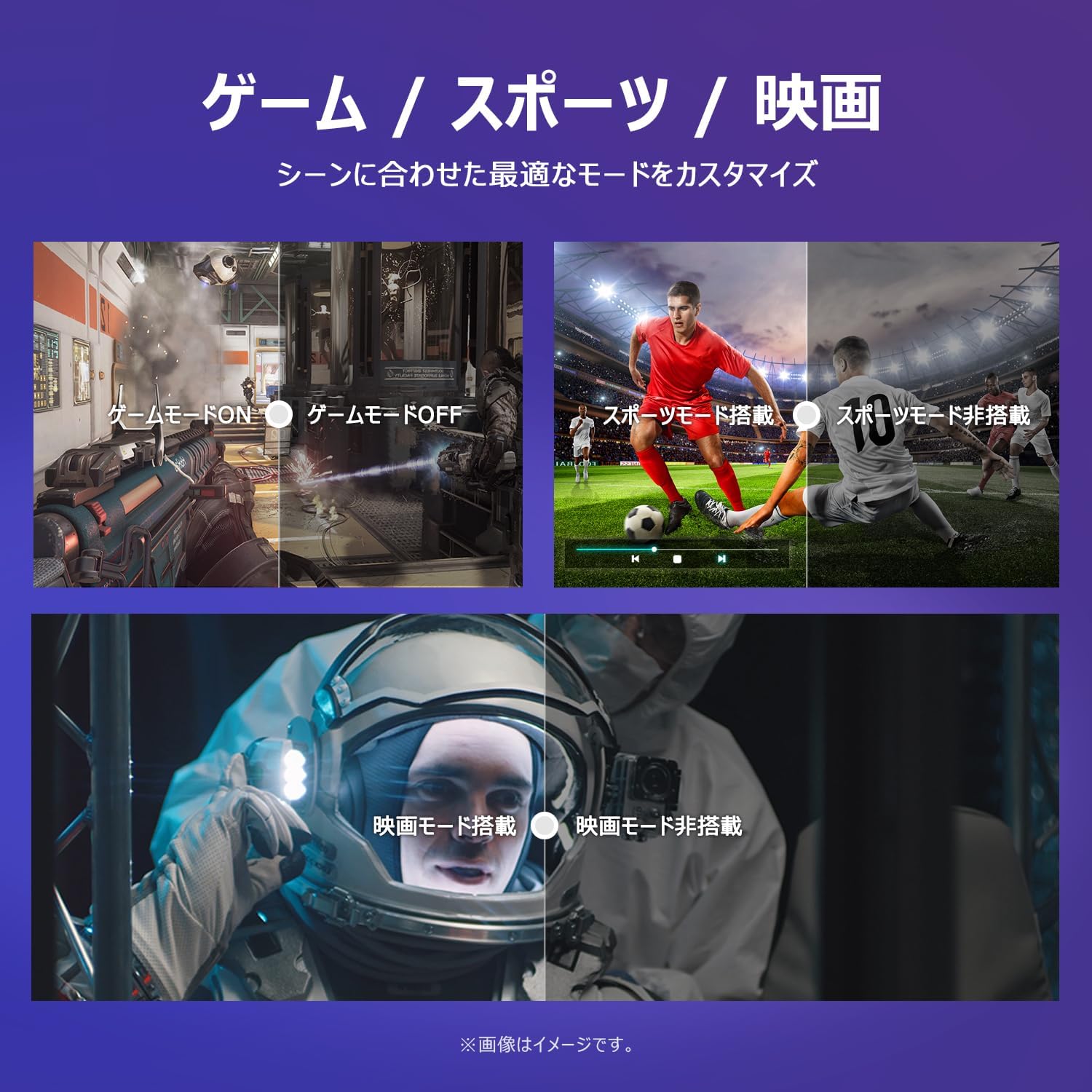
Image: The TV screen with a visual representation of sound, highlighting the immersive audio experience provided by Dolby Audio.
Access the sound settings menu to adjust modes like Standard, Music, Movie, or Custom to suit your preferences.
5.5 Leikjastilling
Activate Game Mode for an optimized gaming experience with reduced input lag.
Image: Visual comparisons demonstrating the optimized settings for Game Mode, Sports Mode, and Movie Mode, adapting the TV's performance to different content types.
The TV also offers dedicated Sports Mode and Movie Mode to enhance viewing for specific content types.
5.6 Kerfisstillingar
The quick settings menu allows you to customize frequently used system settings and rearrange their order for intuitive and convenient access.

Mynd: A view of the TV's quick system settings interface, illustrating how users can easily access and customize various functions like brightness, picture mode, and network settings.
6. Viðhald
Rétt umhirða og viðhald mun lengja líftíma sjónvarpsins.
- Að þrífa skjáinn: Þurrkið skjáinn varlega með mjúkum, lólausum klút. Fyrir þrjósk bletti skal nota skjáhreinsiefni sem er sérstaklega hannað fyrir sjónvörp, borið á klútinn, ekki beint á skjáinn.
- Að þrífa Casing: Notið mjúkan, þurran klút til að þurrka sjónvarpið.asing. Notið ekki slípiefni eða leysiefni.
- Loftræsting: Gakktu úr skugga um að loftræstiopin á bakhlið sjónvarpsins séu ekki stífluð til að koma í veg fyrir ofhitnun.
- Rafmagnssnúra: Athugið reglulega hvort rafmagnssnúran sé skemmd. Ef hún er skemmd skal hafa samband við þjónustuver til að fá nýja.
7. Bilanagreining
Ef þú lendir í vandræðum með sjónvarpið þitt skaltu skoða eftirfarandi algeng vandamál og lausnir. Ef vandamálið heldur áfram skaltu hafa samband við þjónustuver.
| Vandamál | Möguleg orsök | Lausn |
|---|---|---|
| Enginn kraftur | Rafmagnssnúra ekki tengd; Rafmagnsinnstungan virkar ekki | Ensure power cable is securely plugged in; Test outlet with another device |
| Engin mynd, en hljóð er til staðar | Rangur inntaksgjafi; Vandamál með utanaðkomandi tæki | Ýttu á „Inntak“ hnappinn á fjarstýringunni til að velja rétta upptökuna; Athugaðu tengingar ytri tækja |
| Ekkert hljóð, en mynd er til staðar | Hljóðstyrkurinn er slökktur eða of lágur; Vandamál með ytra hljóðkerfi | Unmute or increase volume; Check audio cable connections to external sound system |
| Fjarstýring virkar ekki | Rafhlöður tæmdar; Hindrun milli fjarstýringar og sjónvarps | Replace batteries; Remove any obstructions; Ensure remote is pointed at the TV's IR sensor |
| Get ekki tengst Wi-Fi | Rangt lykilorð; Vandamál með beini; Sjónvarpið of langt frá beininum | Verify Wi-Fi password; Restart router; Move TV closer to router or use a Wi-Fi extender |
8. Tæknilýsing
Detailed technical specifications for the iFFALCON 40S55T TV:

Image: Dimensional drawing of the iFFALCON 40S55T TV, indicating its physical measurements.
| Eiginleiki | Forskrift |
|---|---|
| Skjástærð | 40 tommur |
| Skjár Tegund | VA Liquid Crystal |
| Upplausn | Full HD (1920 x 1080) |
| Endurnýjunartíðni | 60 Hz |
| Hlutfall | 16:9 |
| Andstæðuhlutfall | 1000:1 |
| Stýrikerfi | Google sjónvarp |
| Hljóðúttak | 20 vött (2.1 rásir) |
| HDMI tengi | 2 |
| USB tengi | 1 |
| Þráðlaus tenging | Wi-Fi, Bluetooth |
| Vöruvíddir (B x H x D) | 89.2 x 55.8 x 18.4 cm (með standi) |
| Vöruþyngd | 4.63 kg |
| Samhæft við veggfestingu | Já |
| Meðfylgjandi fylgihlutir | Stand, Remote Control, Warranty Card, Power Cable |
9. Ábyrgð og stuðningur
Your iFFALCON 40S55T TV comes with a manufacturer's warranty. Please refer to the included warranty card for specific terms, conditions, and duration of coverage.
For technical support, troubleshooting assistance beyond this manual, or warranty claims, please contact iFFALCON customer service. Contact information can typically be found on the warranty card or the official iFFALCON websíða.
Please have your model number (40S55T) and purchase date ready when contacting support.