Inngangur
Þakka þér fyrir að velja Svartanview W50PRO Smartwatch. This manual provides essential information for setting up, operating, and maintaining your device. Please read it carefully to ensure optimal performance and a safe user experience. Keep this manual for future reference.
Innihald pakka
Gakktu úr skugga um að allir hlutir séu til staðar í pakkanum þínum:
- Svarturview W50PRO Smartwatch
- Silíkon ól
- Replacement Nylon Braided Strap
- Segulhleðslusnúra
- Notendahandbók (þetta skjal)

Image: Package contents and product dimensions.
Vara lokiðview
Svartiview W50PRO Smartwatch features a 1.45-inch HD touchscreen display, function buttons, a powerful flashlight, and a comfortable silicone strap. Its robust design is suitable for various activities.

Mynd: Svartview W50PRO Smartwatch with its key features labeled.
Uppsetning
1. Hleður tækið
Before first use, fully charge your smartwatch. Connect the magnetic charging cable to the charging points on the back of the watch and plug the USB end into a power adapter (not included) or a computer's USB port. The watch will display a charging indicator.
- Full hleðsla tekur venjulega um það bil 3 klukkustund.
- The 960mAh battery provides up to 30 days of typical use and 100 days of standby time.

Image: Battery capacity and charging information.
2. App Uppsetning
Sæktu og settu upp "Því í lagi" application on your smartphone. You can find it in the App Store (iOS) or Google Play Store (Android).
3. Device Pairing and Bluetooth Calls
To connect your smartwatch and enable Bluetooth calling:
- Download the Da Fit app from your phone's app store.
- Virkjaðu Bluetooth á snjallsímanum þínum.
- Open the Da Fit app and add your device.
- Confirm the pairing request on your phone and watch.
- Grant necessary notification permissions within the Da Fit app for calls and messages.
- Once paired, you can make and receive calls directly from your watch.

Image: Connection and calling setup guide.
Notkunarleiðbeiningar
1. Grunnleiðsögn
- Snertiskjár: Strjúktu til vinstri/hægri, upp/niður til að fletta í gegnum valmyndir og fá aðgang að eiginleikum. Ýttu til að velja.
- Aðgerðarhnappar: Use the physical buttons on the side of the watch for quick access to specific functions or to return to the home screen.
2. Flashlight and Compass
The W50PRO includes a built-in flashlight and compass for outdoor activities.
- Vasaljós: Activate the flashlight feature from the watch's menu. It offers fixed and intermittent modes for various situations.
- Áttaviti: Access the compass feature from the watch's menu for accurate directional guidance.
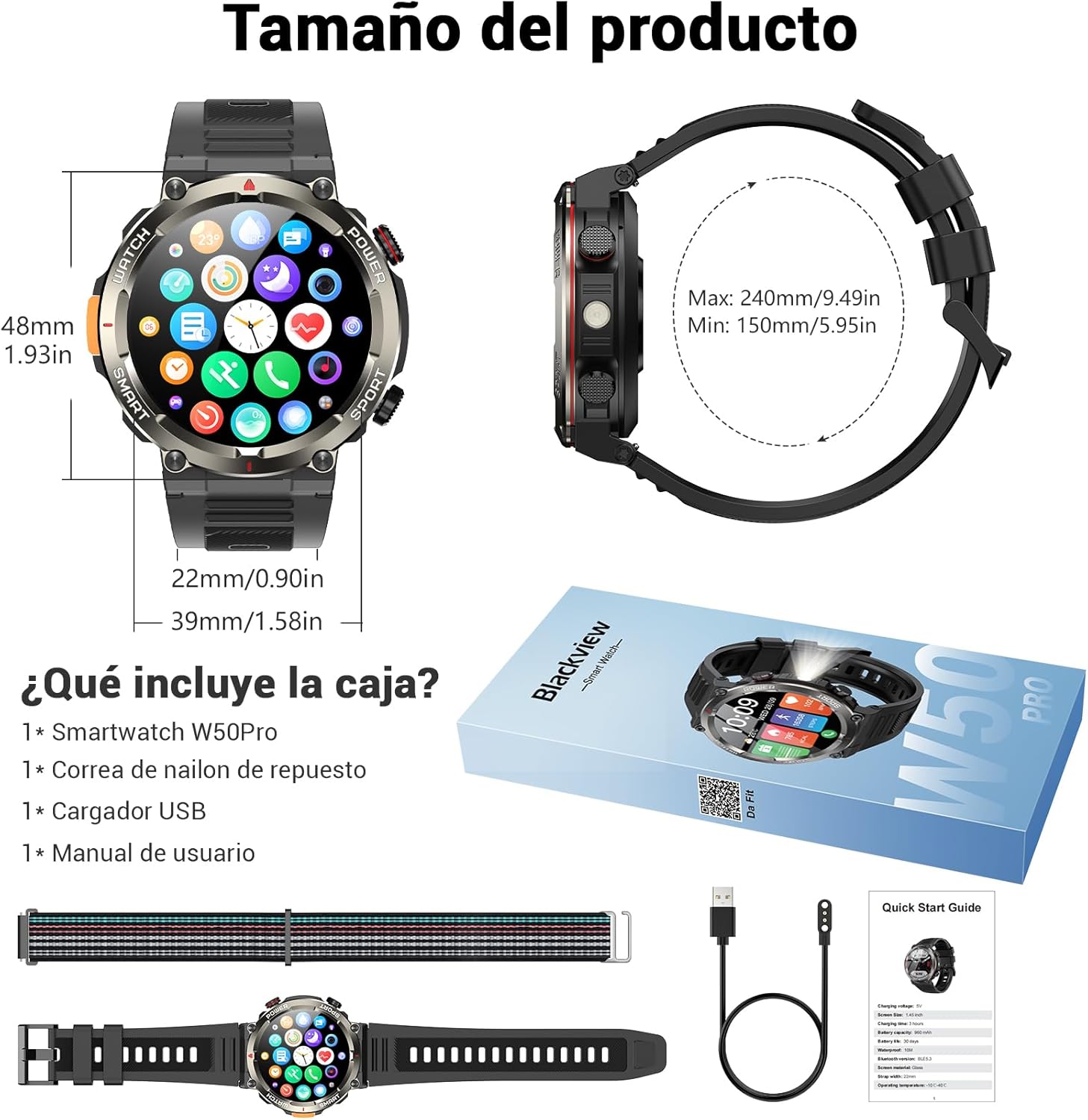
Image: Compass feature for outdoor navigation.

Image: Powerful LED flashlight in action.
3. Bluetooth-símtöl og tilkynningar
Once paired with your smartphone, the W50PRO allows you to manage calls and notifications directly from your wrist.
- Hringja/taka á móti símtölum: Use the integrated speaker and microphone to make or answer calls.
- Tilkynningar: Receive real-time alerts for text messages, emails, and social media apps.
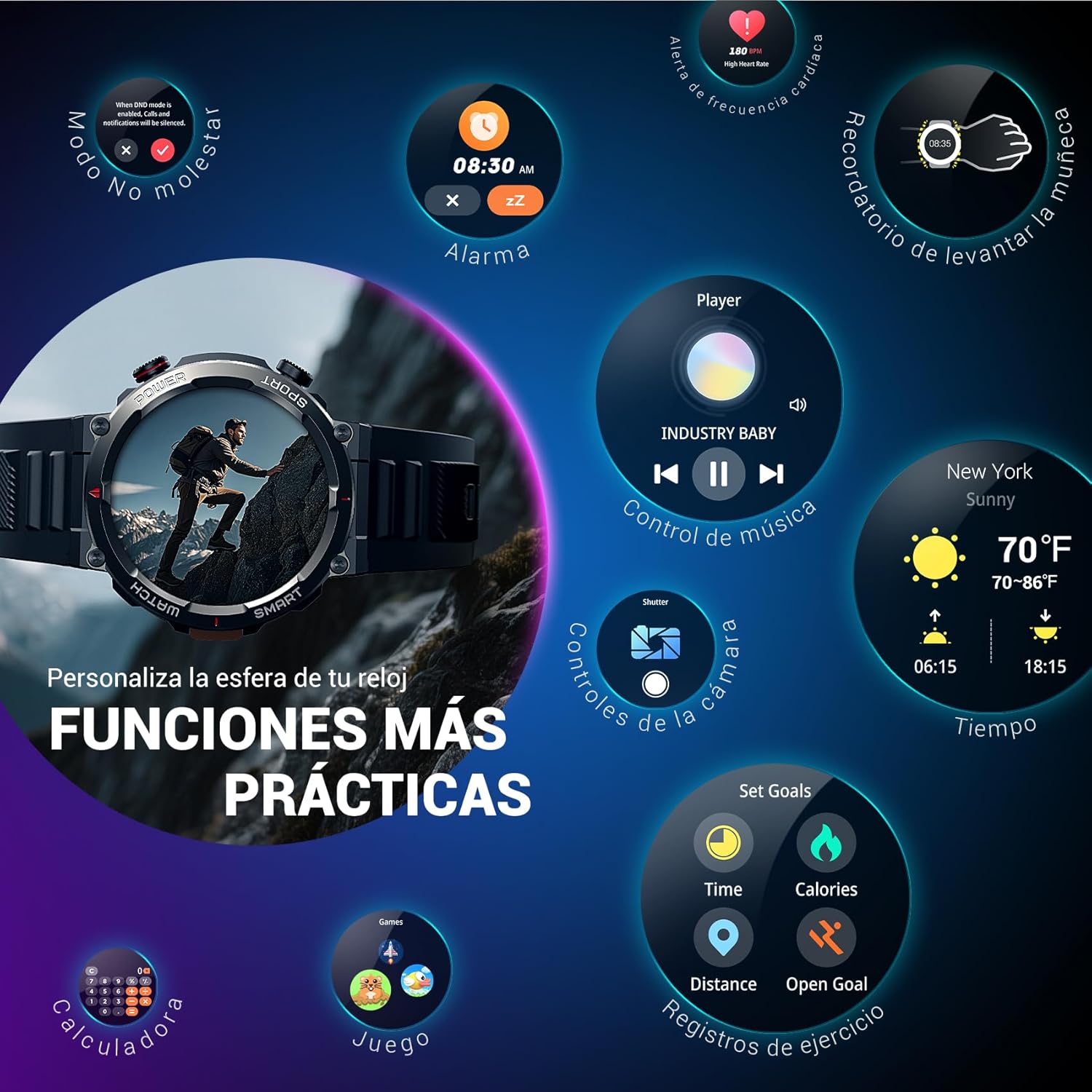
Image: Bluetooth calling and notification features.
4. Heilsufarseftirlit
The smartwatch is equipped with high-precision sensors to monitor various health indicators:
- Hjartsláttur: Rauntíma hjartsláttarmæling.
- Súrefni í blóði (SpO2): Fylgstu með súrefnisgildum í blóði þínu.
- Svefnmælir: Fylgist með svefngæðum og svefnmynstrum.
- Streitustig: Gefur innsýn í streitustig þitt.
All health data synchronizes with the Da Fit app for detailed analysis and trend tracking.

Image: Real-time health monitoring features.
5. Íþróttastillingar
The W50PRO offers over 100 integrated sports modes, including running, cycling, climbing, rope skipping, football, and basketball. It accurately records exercise time, distance, steps, calorie consumption, and heart rate changes, providing clear and intuitive performance data. Detailed data can be viewed í Da Fit appinu.

Mynd: Yfirview af 100+ íþróttastillingum.
6. Aðlaga úrskífur
The Da Fit app provides a wide selection of watch faces to suit various styles. You can also upload personal photos as wallpaper and adjust text color and widget layout to create a unique watch interface.

Image: Customizable watch faces.
7. Aðrar hagnýtar aðgerðir
Svartiview W50PRO includes additional features for daily convenience:
- Veðurspá
- Tónlistarstýring
- Fjarstýring myndavélar
- Viðvörun
- Kyrrsetuáminning
- Áminning um að drekka vatn
- Skeiðklukka
- Niðurteljari
- Finndu símann
- Reiknivél
- Leikir
- Birtustilling

Image: Multiple smart functions available on the smartwatch.
Viðhald
1. Þrif
Regularly clean your smartwatch and strap to prevent skin irritation and maintain device functionality. Use a soft, damp klút til að þurrka skjáinn og casing. For the strap, follow the manufacturer's cleaning recommendations based on the material (silicone or nylon).
2. Vatnsþol
Svartiview W50PRO Smartwatch features an IP68 water resistance rating. This means it is protected against dust ingress and can withstand immersion in water up to 1.5 meters for up to 30 minutes. It is suitable for daily use, such as hand washing or light rain. Avoid using it in hot water, saunas, or during diving, as steam and high pressure can compromise the seals.

Image: Durability features including IP68 water resistance.
3. Umhirða rafhlöðu
Til að lengja líftíma rafhlöðunnar:
- Forðastu mikinn hita.
- Ekki láta rafhlöðuna tæmast alveg oft.
- Hladdu tækið með meðfylgjandi segulhleðslusnúru.
Úrræðaleit
Ef þú lendir í vandræðum með Black-símann þinnview W50PRO Smartwatch, try the following:
- Kveikir ekki á tækinu: Gakktu úr skugga um að úrið sé fullhlaðint.
- Ekki er hægt að para við símann: Check if Bluetooth is enabled on both devices. Restart both the watch and phone. Ensure the Da Fit app has necessary permissions.
- Ónákvæmar heilsufarsupplýsingar: Gakktu úrið úr því að sitja þétt á úlnliðnum. Hreinsaðu skynjarana reglulega.
- Tilkynningar sem ekki bárust: Verify that notification permissions are granted in the Da Fit app and your phone's settings. Ensure the app is running in the background.
- Stuttur rafhlöðuending: Reduce screen brightness, disable unnecessary features, and limit frequent heart rate monitoring.
For persistent issues, refer to the Da Fit app's help section or contact customer support.
Tæknilýsing
| Eiginleiki | Forskrift |
|---|---|
| Vörumerki | Svarturview |
| Fyrirmynd | W50PRO |
| Skjárstærð | 1.45 tommur |
| Skjár Tegund | LCD |
| Upplausn | 360 x 360 dílar |
| Rafhlöðugeta | 960 mAh |
| Dæmigert rafhlöðuending | Allt að 30 dagar |
| Biðtími | Allt að 100 dagar |
| Hleðslutími | U.þ.b. 3 klst |
| Tengingar | Bluetooth |
| Mannviðmótsinntak | Buttons, Microphone |
| Vatnsþol | IP68 |
| Samhæfar símagerðir | iOS og Android |
| Vörumál | 8.8 x 2.2 x 18.1 cm |
| Vöruþyngd | 136 g |
Ábyrgð og stuðningur
Fyrir upplýsingar um ábyrgð og tæknilega aðstoð, vinsamlegast skoðið skjöl sem fylgja kaupunum eða heimsækið opinberu vefsíðu Black.view webGeymið kaupkvittunina vegna ábyrgðarkröfu.


