Inngangur
This manual provides comprehensive instructions for the setup, operation, maintenance, and troubleshooting of your KOORUI GN10 27-inch QHD 240Hz Mini-LED Gaming Monitor. Please read this manual thoroughly before using the product to ensure proper functionality and to prevent damage.
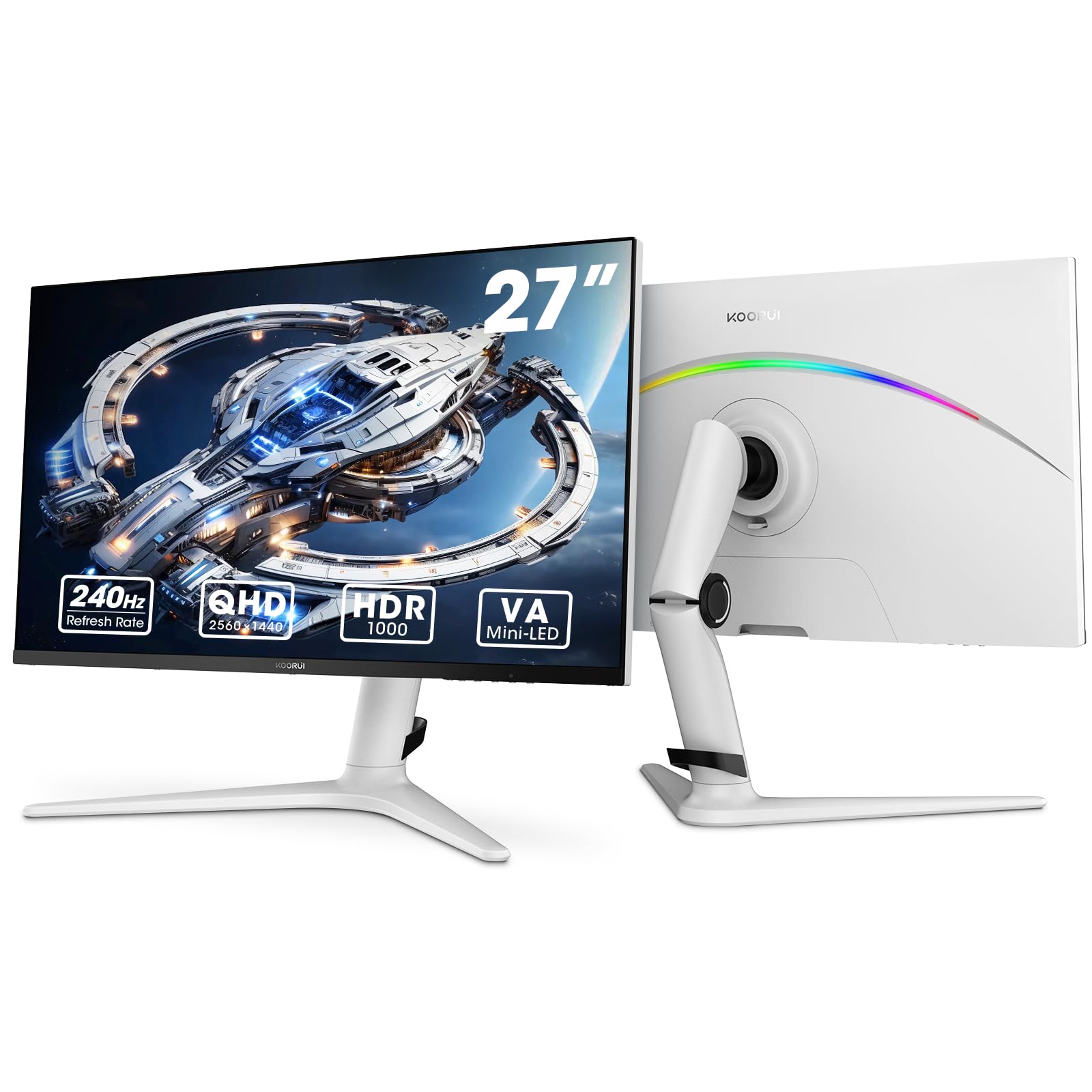
Figure 1: KOORUI GN10 27-inch QHD 240Hz Mini-LED Gaming Monitor.
1. Uppsetning
1.1 Upppakkning og innihald pakkans
Fjarlægið alla íhluti varlega úr umbúðunum. Gakktu úr skugga um að allir hlutir sem taldir eru upp hér að neðan séu til staðar:
- KOORUI GN10 Monitor
- Skjástandur (grunnur og armur)
- Rafmagnssnúra
- HDMI snúru (x2)
- DisplayPort (DP) snúra
- Notendahandbók (þetta skjal)
1.2 Samsetning stands
Fylgdu þessum skrefum til að setja saman skjástandinn:
- Attach the stand arm to the monitor panel. Ensure it clicks securely into place or is fastened with screws if provided.
- Connect the stand base to the stand arm. Tighten any screws to secure the base.
- Setjið samansetta skjáinn á stöðugt, slétt yfirborð.

Figure 2: Monitor stand showing height, tilt, swivel, and pivot adjustments.
The ergonomic stand allows for height, tilt, swivel, and pivot adjustments to optimize your viewing horn.

Figure 3: Monitor dimensions for placement planning.
1.3 Tenging við tæki
The monitor supports multiple input sources. Connect your computer or gaming console using the provided cables.
- DisplayPort (DP): For optimal performance, especially at 240Hz refresh rate and QHD resolution, use the DisplayPort cable.
- HDMI: Two HDMI 2.0 ports are available for connecting other devices such as gaming consoles (PS5, Xbox, Switch) or additional computers.
- Hljóðútgangur: Tengdu ytri hátalara eða heyrnartól við 3.5 mm hljóðútganginn.

Mynd 4: Aftan view of the monitor showing available ports (Audio Out, DP 1.4, HDMI 2.0 x2) and VESA mount points.
1.4 Byrjunarkveikt
- Tengdu rafmagnssnúruna við skjáinn og síðan í rafmagnsinnstungu.
- Press the power button, usually located on the back or bottom of the monitor, to turn it on.
- The monitor will automatically detect the input source. If not, use the OSD menu to select the correct input.
2. Notkunarleiðbeiningar
2.1 Skjávalmynd (OSD)
The OSD menu allows you to adjust various monitor settings. Access the OSD menu using the joystick or buttons typically located on the back or bottom of the monitor.
Algengir valkostir í OSD-valmyndinni eru meðal annars:
- Myndastillingar: Brightness, Contrast, Sharpness, Gamma.
- Litastillingar: Color Temperature, Hue, Saturation, Color Space (sRGB, DCI-P3).
- Inntaksval: Skiptu handvirkt á milli DisplayPort og HDMI inntaks.
- Hljóð: Hljóðstyrksstýring fyrir hljóðútgang.
- Leikjaeiginleikar: Adaptive Sync, Response Time (Overdrive), Game Modes.
- OSD stillingar: Language, OSD Timeout, Transparency.
2.2 Skjárstillingar
The KOORUI GN10 monitor offers advanced display features for an enhanced visual experience.
- Upplausn: The native resolution is QHD (2560 x 1440). Ensure your connected device is set to this resolution for optimal clarity.
- Endurnýjunartíðni: Supports up to 240Hz. Configure your graphics card settings to utilize this high refresh rate for smoother motion.
- Svartími: Features a 1ms (GtG) response time, reducing motion blur and ghosting in fast-paced content.
- HDR 1000: High Dynamic Range 1000 provides superior contrast and color depth. Enable HDR in your operating system and monitor settings for compatible content.

Figure 5: Visual comparison illustrating the enhanced contrast and detail with HDR 1000 enabled.

Figure 6: Comparison of QHD (2560x1440) and FHD (1920x1080) resolutions, highlighting increased detail with QHD.
2.3 Leikjaeiginleikar
The monitor includes features designed to enhance your gaming experience:
- Adaptive Sync (G-Sync Compatible): Synchronizes the monitor's refresh rate with your GPU's frame rate to eliminate screen tearing and stuttering. Ensure this feature is enabled in both the monitor OSD and your graphics card control panel.
- Game Display Modes: Access specific on-screen overlays via the OSD menu, such as:
- Krosshár: Býður upp á krosshár á skjánum til að bæta miðun.
- Tímamælir: Displays a countdown timer.
- FPS teljari: Shows your current frames per second.
- RTS Counter: A specific counter for Real-Time Strategy games.

Figure 7: Illustration of various exclusive game display modes and Adaptive Sync functionality.

Figure 8: Visual representation of smooth gaming experience with 240Hz refresh rate and 1ms response time.
2.4 RGB lýsing
The monitor features a crescent RGB light strip on the back. This lighting can be customized through the OSD menu to match your preference or gaming setup.

Mynd 9: Aftan view of the monitor highlighting the customizable RGB light strip.
3. Viðhald
3.1 Þrif á skjánum
Til að viðhalda útliti og virkni skjásins skaltu fylgja þessum þrifleiðbeiningum:
- Slökkvið alltaf á skjánum og takið rafmagnssnúruna úr sambandi áður en hann er þrifinn.
- Notaðu mjúkan, lólausan klút örlítið dampÞvoið með vatni eða skjáhreinsiefni án slípiefna.
- Ekki úða hreinsiefni beint á skjáinn. Berið það fyrst á klútinn.
- Forðist að nota alkóhól, ammóníak eða slípiefni, þar sem þau geta skemmt yfirborð skjásins.
- Þurrkaðu skjáinn varlega til að fjarlægja ryk og bletti.
- Þrífið skjáinn casing með mjúkum, þurrum klút.
3.2 Almenn umönnun
- Forðist að setja þunga hluti ofan á skjáinn eða snúrur hans.
- Ekki láta skjáinn verða fyrir beinu sólarljósi, miklum hita eða miklum kulda.
- Keep the monitor away from liquids and high humidity environments.
- Tryggið næga loftræstingu í kringum skjáinn til að koma í veg fyrir ofhitnun.
4. Bilanagreining
Ef þú lendir í vandræðum með skjáinn þinn skaltu skoða eftirfarandi algeng vandamál og lausnir:
| Vandamál | Möguleg orsök | Lausn |
|---|---|---|
| Engin mynd á skjánum |
|
|
| Flikrandi eða brengluð mynd |
|
|
| Ekkert hljóð frá hljóðútgangi |
|
|
| Adaptive Sync not working |
|
|
Ef vandamálið er enn til staðar eftir að þessar lausnir hafa verið prófaðar, vinsamlegast hafið samband við þjónustuver.
5. Tæknilýsing
| Eiginleiki | Smáatriði |
|---|---|
| Vörumerki | KOORUI |
| Gerðarnúmer | GN10 |
| Skjástærð | 27 tommur |
| Upplausn | QHD Wide 1440p (2560 x 1440) |
| Hlutfall | 16:9 |
| Skjáyfirborð | Mattur |
| Andstæðuhlutfall | 20,000,000:1 |
| Endurnýjunartíðni | 240 Hz |
| Skjátækni | Mini-LED |
| Viewí horn | 178 gráður |
| Birtustig | 350 Candela |
| Litasvið | 100% sRGB, 95% DCI-P3 |
| Svartími | 1 Millisecond (GtG) |
| HDMI tengi | 2 (HDMI 2.0) |
| DisplayPort | 1 (DP 1.4) |
| Hljóðútgangur | Já |
| Adaptive Sync | G-Sync samhæft |
| Viðbótar eiginleikar | Flicker-Free, Frameless, Height Adjustable, Tilt Adjustable, Swivel Adjustable, Rotatable |
| Litur | Hvítt/grátt |
| Gerð uppsetningar | Desk Mount, VESA 75x75mm compatible |
6. Ábyrgð og stuðningur
6.1 Upplýsingar um ábyrgð
The KOORUI GN10 monitor comes with a 3 ára takmörkuð ábyrgð. The display screen is backed for 1 year, and other accessories for 3 years. A 12-month replacement service is also provided for eligible issues.
This warranty covers manufacturing defects and malfunctions under normal use. It does not cover damage caused by misuse, accidents, unauthorized modifications, or external factors.
6.2 Þjónustuver
For technical assistance, warranty claims, or inquiries regarding missing accessories, please contact KOORUI customer support. Have your product model (GN10) and purchase information ready when contacting support.
Contact information can typically be found on the KOORUI official websíðunni eða í gegnum þjónustuver söluaðilans.
7. Sýnikennsla á vörumyndbandi
Myndband 1: Opinber vörusýningarmyndbandasing the KOORUI GN10 Gaming Monitor's features and design.


