Mikilvægar öryggisupplýsingar
Please read and understand all instructions before operating this evaporative cooler. Failure to follow these instructions may result in electric shock, fire, or serious personal injury.
- Aftengdu alltaf tækið frá rafmagninu áður en viðhald eða þrif eru framkvæmd.
- Ekki nota kælinn ef snúran eða klóið er skemmd.
- Ekki dýfa tækinu, snúrunni eða klónni í vatn eða aðra vökva.
- Keep the unit away from open flames, heat sources, and flammable materials.
- Gakktu úr skugga um að tækið sé staðsett á stöðugu, sléttu yfirborði til að koma í veg fyrir að það velti.
- Þetta tæki er ekki ætlað til notkunar af einstaklingum (þar á meðal börnum) með skerta líkamlega, skynræna eða andlega getu, eða skort á reynslu og þekkingu, nema þeir hafi fengið eftirlit eða leiðbeiningar um notkun tækisins af einstaklingi sem ber ábyrgð á öryggi þeirra.
- Ekki loka fyrir loftinntak eða úttak.
- Notið aðeins hreint vatn í vatnstankinum.
Vara lokiðview
The Hessaire DC18 Mobile Evaporative Cooler is designed to provide portable cooling by evaporating water. It can be powered by an included AC adapter or compatible 18V/20V tool batteries (battery not included).
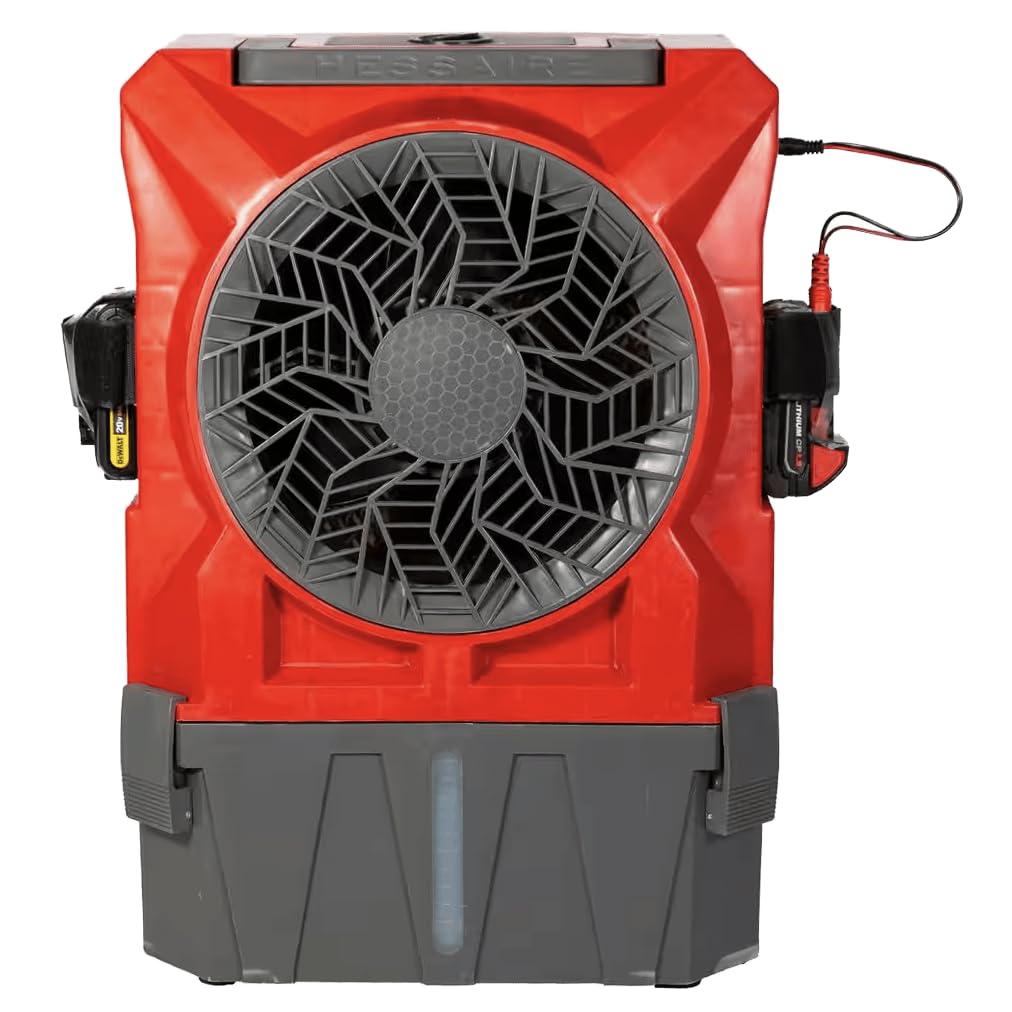
Mynd 1: Framan view of the Hessaire DC18 Mobile Evaporative Cooler. The image shows the red and gray unit with a large central fan, a water level indicator at the bottom, and battery ports on the sides. A power cable is visible on the right side.
Lykilhlutir:
- Viftugrill: Protects the fan blades and directs airflow.
- Stjórna hringja: Adjusts fan speed and power.
- Vatnsgeymir: Holds up to 2.8 gallons of water for evaporation. Features a visible water level indicator.
- Battery Ports: Located on both sides, compatible with major brand 18V or 20V tool battery platforms.
- Rafmagns millistykki tengi: For connecting the included 115V AC adapter.
- Kælipúði: Internal component responsible for water evaporation (not visible externally).
Uppsetning
- Upptaka: Carefully remove the cooler from its packaging. Inspect for any damage. Retain packaging for future storage or transport.
- Staðsetning: Place the cooler on a firm, level surface. Ensure there is adequate space around the unit for proper airflow (at least 12 inches from walls or obstructions).
- Að fylla á vatnstankinn:
- Locate the water fill opening, typically at the top or rear of the unit.
- Pour clean, fresh water into the tank. Do not overfill; observe the water level indicator. The tank capacity is 2.8 gallons.
- For optimal cooling, ensure the water level is sufficient before operation.
- Rafmagnstenging:
- AC Power: Insert the included 115V AC adapter into the AC adapter port on the unit, then plug the adapter into a standard electrical outlet.
- Rafhlöðuorka: If using battery power, insert a compatible 18V or 20V tool battery (not included) into one of the battery ports until it clicks into place. Ensure the battery is fully charged.
Rekstur
The Hessaire DC18 Mobile Evaporative Cooler features a simple control dial for operation.
- Kveikir á: Rotate the control dial clockwise from the "OFF" position. The fan will start.
- Stilling viftuhraða: Continue rotating the control dial clockwise to increase the fan speed. Rotate counter-clockwise to decrease the fan speed. The cooler offers variable speed control.
- Kæliaðgerð: The evaporative cooling function will activate automatically when the fan is running and water is present in the tank. The unit draws air through the wet cooling pad, causing water to evaporate and cool the air.
- Slökkt á: Rotate the control dial counter-clockwise until it reaches the "OFF" position.
Athugið: This unit is an evaporative cooler, not an air conditioner. It reduces heat stress by adding moisture to the air, which can lower the perceived temperature. Its effectiveness depends on ambient humidity levels.
Viðhald
Regular maintenance ensures optimal performance and extends the life of your evaporative cooler. Always unplug the unit before cleaning or maintenance.
Daglegt/vikulegt viðhald:
- Vatnsgeymir: Drain and refill the water tank with fresh water regularly, especially if the unit is used frequently. This prevents algae and mineral buildup.
- Þrif að utan: Þurrkaðu ytri yfirborð með mjúku, damp klút. Ekki nota slípiefni eða leysiefni.
Monthly/Seasonal Maintenance:
- Þrif á kælipúða: Refer to the specific instructions for accessing and cleaning the cooling pad. Mineral deposits can reduce efficiency. Gently rinse the pad with water. If heavily soiled, a mild detergent solution may be used, followed by thorough rinsing.
- Frárennslistappi: Ensure the drain plug (if applicable) is clear of debris.
- Geymsla: Before long-term storage, drain all water from the tank and allow the cooling pad to dry completely to prevent mold and mildew growth. Store the unit in a cool, dry place.
Úrræðaleit
If you experience issues with your Hessaire DC18 Mobile Evaporative Cooler, consult the following table before contacting customer support.
| Vandamál | Möguleg orsök | Lausn |
|---|---|---|
| Eining kviknar ekki. |
|
|
| Engin kælandi áhrif. |
|
|
| Óþægileg lykt. |
|
|
Tæknilýsing
- Fyrirmyndarheiti: Mobile (DC18)
- Vörumerki: Hessaire
- Loftflæðisgeta: 900 rúmfet á mínútu (CFM)
- Umfang svæðis: Approximately 300 sq. Ft.
- Stærð vatnstanks: 2.8 lítrar
- Aflgjafi: 115V AC Adapter (included) or 18V/20V Tool Batteries (not included)
- Stýringar tegund: Knob (Variable Speed)
- Gerð festingar: Frjálst
- Vörumál: 17 x 11 x 23 tommur (lengd x breidd x hæð)
- Þyngd hlutar: 42 pund
- Upprunaland: Bandaríkin
- UPC: 818015029189
Ábyrgð og stuðningur
Ábyrgð: This Hessaire DC18 Mobile Evaporative Cooler comes with a 1-year warranty from the date of shipment from the vendor. Please retain your proof of purchase for warranty claims.
For technical support, parts, or warranty inquiries, please contact Hessaire customer service. Refer to the official Hessaire webvefsíðunni eða kaupskjölunum þínum til að fá nýjustu upplýsingar um tengilið.
Tilföng á netinu: For additional information, FAQs, or instructional videos, visit the official Hessaire websíða. Þú getur líka heimsótt Hessaire verslun á Amazon.


