1. Inngangur
This manual provides essential information for setting up, operating, maintaining, and troubleshooting your Sony BRAVIA 2M2 Series 4K Ultra HD Smart LED Google TV, model K-55S25BM2. Please read this manual thoroughly before using your television to ensure proper and safe operation.
The Sony BRAVIA 2M2 Series TV features a 4K Ultra HD display, Google TV operating system, and advanced audio technologies for an immersive viewupplifun.
2. Uppsetning
2.1 Hvað er í kassanum
Gakktu úr skugga um að allir íhlutir séu til staðar í umbúðunum:
- 1 LED sjónvarpseining
- 1 straumsnúra
- 1 Fjarstýring
- 2 AAA rafhlöður (fyrir fjarstýringu)
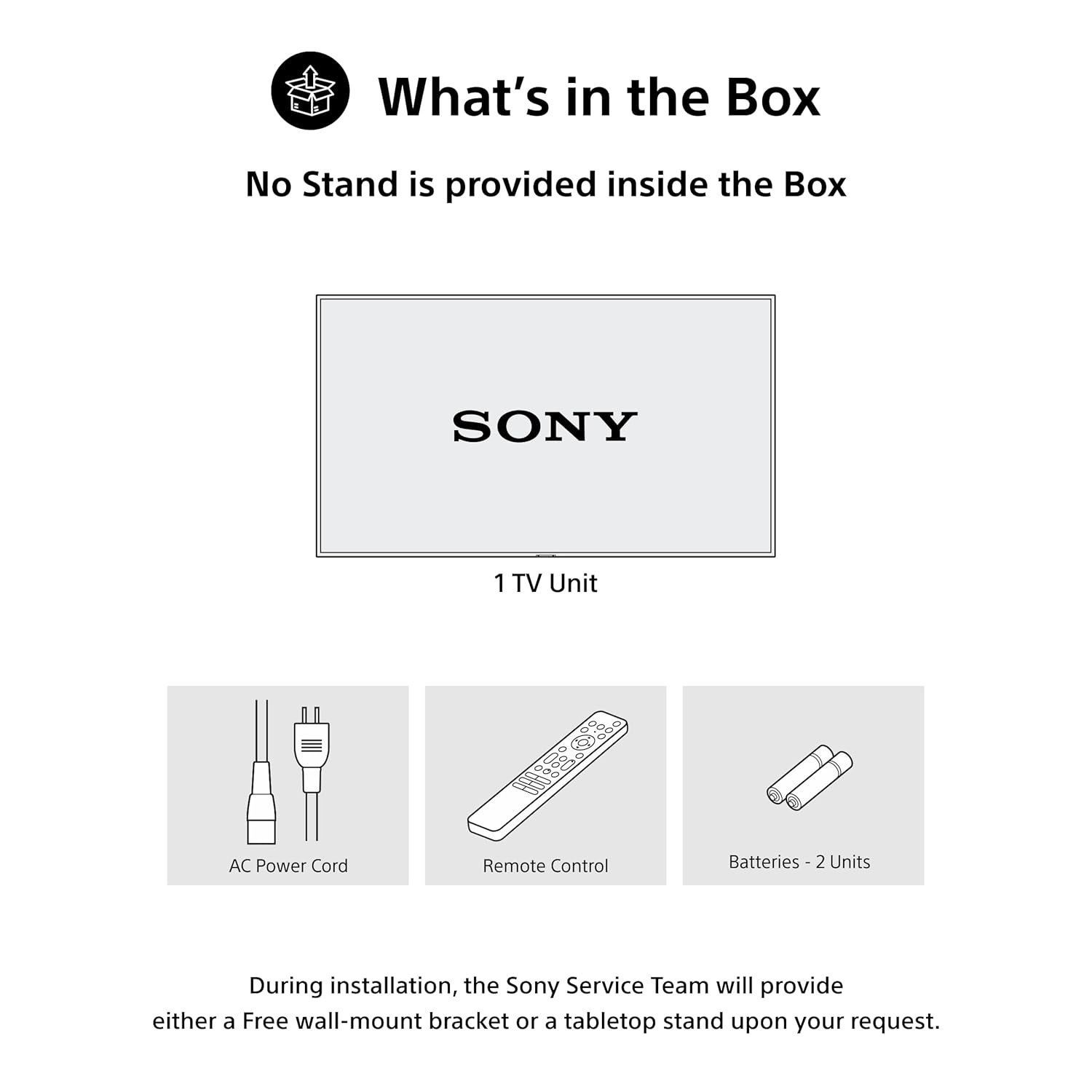
Figure 2.1: Included items in the product packaging. Note: A stand is not provided inside the box. During installation, the Sony Service Team will provide either a free wall-mount bracket or a tabletop stand upon your request.
2.2 Líkamleg uppsetning
The television can be installed using a wall mount or a tabletop stand. Ensure the chosen location provides adequate ventilation and is away from direct sunlight or heat sources. Refer to the separate installation guide for detailed instructions on mounting the TV.
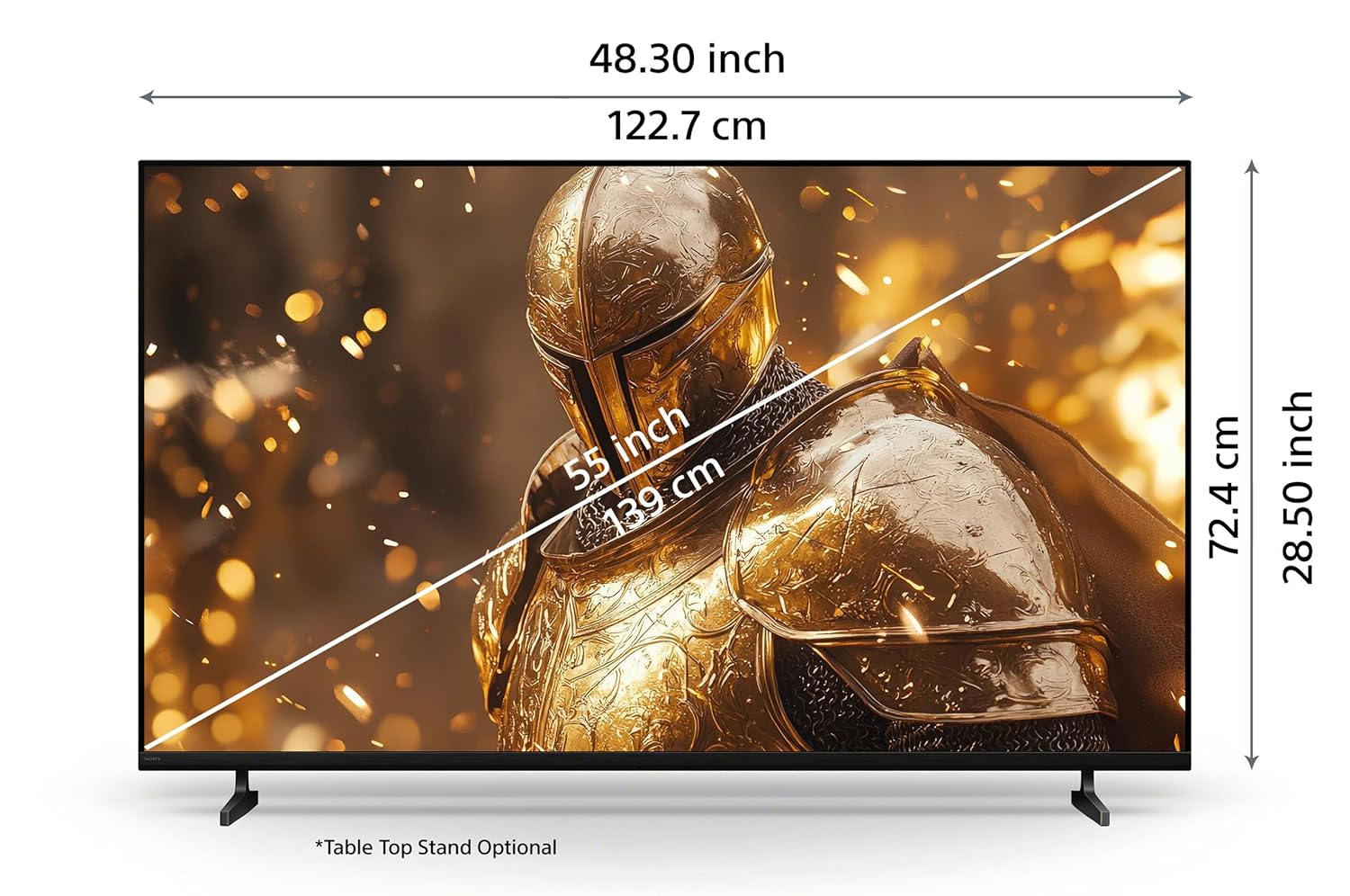
Figure 2.2: Product dimensions for the 55-inch model. Tabletop stand is optional.
2.3 Tæki tengd
Connect your external devices such as set-top boxes, Blu-ray players, gaming consoles, and USB storage devices to the appropriate ports on the TV. Ensure the TV is powered off before making any connections.
- HDMI tengi: The TV features 4 HDMI ports for high-definition audio and video input. HDMI 3 supports eARC/ARC for enhanced audio return channel functionality.
- USB tengi: Tvær USB tengi eru í boði fyrir tengingu við harða diska og önnur USB tæki.
- LAN tengi: Use the LAN port for a wired internet connection.

Mynd 2.3: Aftan view of the TV showing various connectivity ports.
3. Notkunarleiðbeiningar
3.1 Kveikt/slökkt
Press the power button on the remote control or on the TV to turn the television on or off. Ensure the power cord is securely connected to both the TV and a power outlet.
3.2 Aðgerðir fjarstýringar
The included remote control provides access to all TV functions. Insert the two AAA batteries into the remote control, observing the correct polarity.
- One Click Google Assistant: Use the dedicated button for voice commands.
- Hnappar fyrir flýtileiðir: Direct access to Sony Picture Core, YouTube, Netflix, Sony Liv, Prime Video, and Crunchyroll.

Figure 3.1: Remote control layout with key function buttons.
3.3 Viðmót Google TV
Navigate the Google TV interface to access apps, streaming services, and personalized content recommendations. Use the directional pad and select button on the remote to browse.

Figure 3.2: Google TV home screen displaying various applications and content.
3.4 Raddleit
Utilize the built-in Google Assistant for voice commands. Press the Google Assistant button on your remote and speak clearly to search for content, control your TV, or get information.

Figure 3.3: Voice search functionality via the remote control.
3.5 Þráðlaus tenging
The TV supports Wi-Fi, Bluetooth, Apple AirPlay 2, and Google Cast for seamless wireless connectivity.
- Wi-Fi: Tengstu við heimanetið þitt til að fá aðgang að internetinu og snjallsjónvarpseiginleika.
- Bluetooth: Pair Bluetooth headphones or other compatible audio devices.
- Apple AirPlay 2 / Google Cast: Stream videos, photos, and music directly from your iOS or Android devices to the TV.

Figure 3.4: Streaming content from a smartphone to the TV.
3.6 Leikjaeiginleikar
Sjónvarpið er búið eiginleikum til að auka spilunarupplifun þína:
- Leikjavalmynd: Access gaming-specific settings and adjustments for optimal performance.
- ALLM/eARC (HDMI 2.1 Compatible): Auto Low Latency Mode (ALLM) reduces input lag, and enhanced Audio Return Channel (eARC) provides high-quality audio passthrough to compatible sound systems.
4. Viðhald
4.1 Þrif á sjónvarpinu
To clean the screen, gently wipe it with a soft, dry cloth. For stubborn marks, slightly dampen the cloth with water. Do not use harsh chemicals or abrasive cleaners. For the TV frame and stand, use a soft, dry cloth.
4.2 Power Saving (Eco Dashboard)
The Eco Dashboard 2 provides real-time energy consumption insights and allows you to optimize settings for eco-friendly performance. This includes adjusting brightness based on ambient light and other power-saving options.

Figure 4.1: Eco Dashboard 2 for managing power consumption.
5. Bilanagreining
Ef þú lendir í vandræðum með sjónvarpið þitt skaltu skoða eftirfarandi algeng vandamál og lausnir:
- Enginn kraftur: Ensure the AC power cord is securely connected to the TV and a working power outlet. Check if the power outlet is functional.
- Engin mynd/hljóð: Verify that the correct input source is selected. Check all cable connections (HDMI, antenna, etc.) for secure fit. Restart connected devices.
- Fjarstýring svarar ekki: Athugið rafhlöðurnar í fjarstýringunni og skiptið um þær ef þörf krefur. Gakktu úr skugga um að engar hindranir séu á milli fjarstýringarinnar og innrauða skynjarans í sjónvarpinu.
- Vandamál með nettengingu: For Wi-Fi, ensure your router is on and within range. For wired connections, check the LAN cable. Try restarting your router and modem.
- Vandamál með myndgæði: Adjust picture settings (brightness, contrast, sharpness) in the TV menu. Ensure you are watching high-quality content (e.g., 4K content for optimal 4K display).
For more detailed troubleshooting or persistent issues, please contact Sony customer support.
6. Tæknilýsing
| Eiginleiki | Forskrift |
|---|---|
| Vörumerki | Sony |
| Fyrirmynd | K-55S25BM2 |
| Nafn líkans | Bravia |
| Skjástærð | 55 tommur (139 cm) |
| Upplausn | 4K Ultra HD (3840 x 2160) |
| Endurnýjunartíðni | 60 Hertz |
| Skjátækni | LED |
| Örgjörvi | 4K örgjörvi X1 |
| Stýrikerfi | Google sjónvarp |
| Hljóðúttak | 20 Watts, 2ch, Open Baffle Speaker |
| Hljóðeiginleikar | DTS Digital Surround, DTS:X, Dolby Atmos, Dolby Audio |
| HDMI tengi | 4 (ALLM/eARC compatible) |
| USB tengi | 2 |
| Þráðlaus tenging | Wi-Fi, Bluetooth |
| Snjallsjónvarpseiginleikar | Google TV, Watchlist, Google Assistant, Google Cast, Game Menu, Apple Airplay 2, Apple Homekit, Alexa |
| Orkumat | 2 stjörnur |
| Vörumál (LxBxH) | 122.7 x 8.2 x 72.4 cm |
| Þyngd hlutar | 13.2 kg |
7. Ábyrgð og stuðningur
7.1 Upplýsingar um ábyrgð
Your Sony BRAVIA TV comes with a 1-year comprehensive warranty on the product from the date of purchase. This includes the remote control for technical issues. Please retain your purchase invoice to avail warranty services.
7.2 Þjónustuver
For assistance, technical support, or service requests, please contact Sony customer care:
- Þjónustunúmer: 080 6500 6500
- Netfang: Sonyindia.care@ap.sony.com
- Websíða: Heimsókn sonyindia.co.in for product recycling information and further support.
Sony provides trained and verified experts for installation and support services.

Figure 7.1: Sony's customer support and installation services.


