Inngangur
This manual provides detailed instructions for the Kinglucky A8 Upgraded Clip-On Open-Ear Earbuds. Please read this manual thoroughly before using the product to ensure proper operation and to maintain optimal performance.
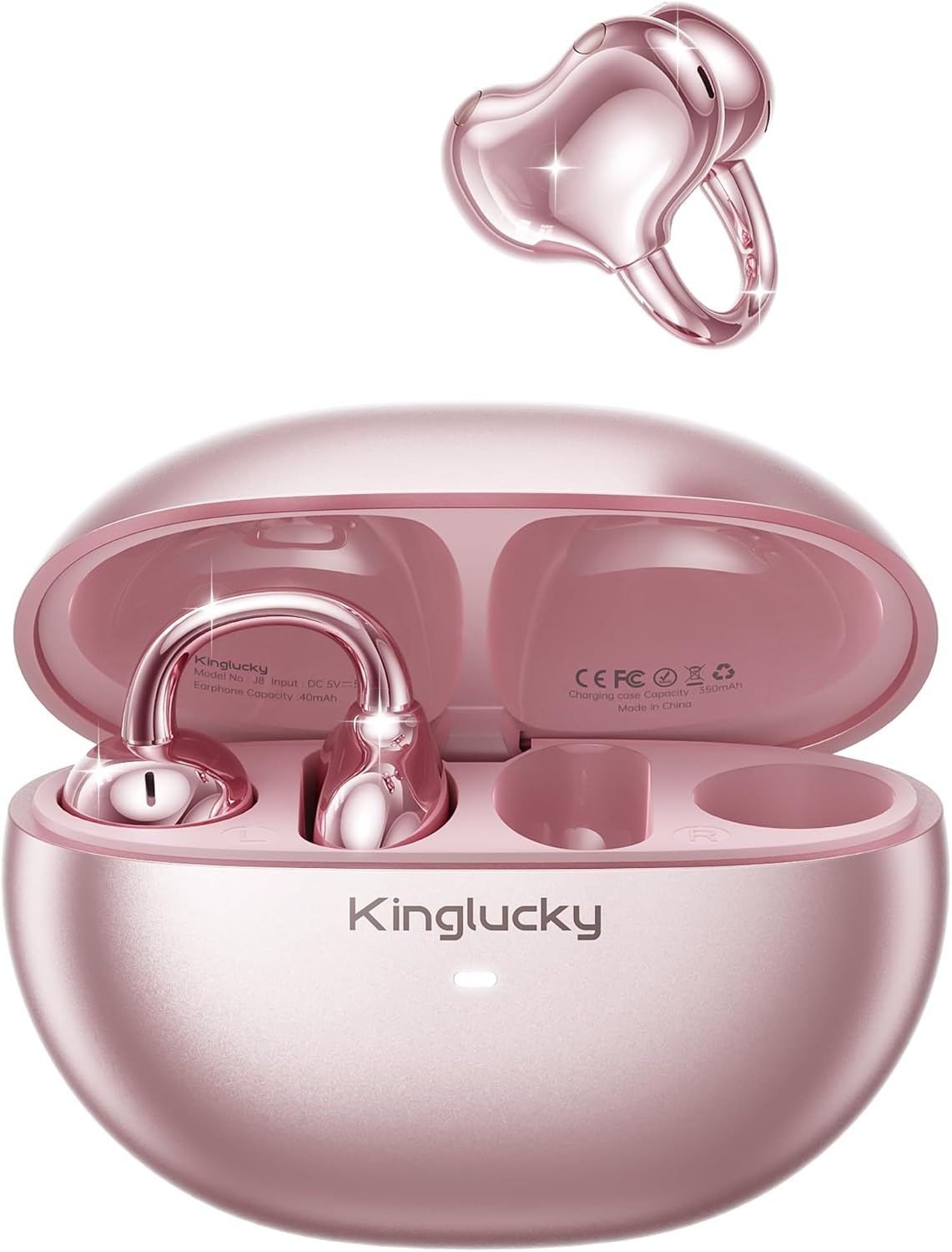
Image: Kinglucky A8 Clip-On Open-Ear Earbuds and their charging case. The earbuds are shown both inside and outside the case, highlighting their rose gold pink color and unique clip-on design.
Hvað er í kassanum
Gakktu úr skugga um að allir hlutir séu til staðar í pakkanum:
- Kinglucky A8 ClipFree Earbuds
- Hleðslutaska
- USB-C hleðslusnúra
- Notendahandbók (þetta skjal)

Image: A visual representation of the package contents, showing the gift wrapping box, the charging case, the ClipFree A8 earbuds, and a USB-C charging cable.
Uppsetning
1. Hleðsla eyrnatólanna og hulstrsins
Before first use, fully charge the earbuds and the charging case. Place the earbuds into the charging case. Connect the USB-C charging cable to the charging port on the case and plug the other end into a USB power source. The indicator light on the case will show charging status.
- A full charge provides up to 6 hours of playtime for the earbuds.
- The charging case extends total playtime to approximately 50 hours.
2. Að nota eyrnatólin
The Kinglucky A8 earbuds feature a flexible C-shaped clip design for comfortable and secure placement. Each earbud weighs approximately 4.0g.
- Gently clip the earbud onto the top edge of your ear.
- Adjust the earbud slightly up or down to find your most comfortable and secure fit. The open-ear design allows you to remain aware of your surroundings.

Image: A two-panel diagram illustrating the correct way to wear the clip-on earbuds. The first panel shows gently clipping the earbud onto the ear, and the second shows adjusting it for a perfect fit.
3. Pörun Bluetooth
The earbuds utilize Bluetooth 5.4 for stable and efficient connection.
- Opnaðu hleðsluhulstrið. Eyrnatólin fara sjálfkrafa í pörunarstillingu.
- Farðu í Bluetooth-stillingar í tækinu þínu (snjallsíma, spjaldtölvu o.s.frv.).
- Select "Kinglucky A8" from the list of available devices.
- Þegar tengingin er komin upp heyrist staðfestingarhljóð og vísirljósið á eyrnatólunum breytist.
Notkunarleiðbeiningar
Snertistýringar
The Kinglucky A8 earbuds feature intuitive touch controls on each earbud for managing audio playback and calls.

Image: A visual guide to the touch controls. It shows icons for music and calls, detailing single taps for volume/answer, double taps for play/pause, and press-and-hold for rejecting calls.
| Aðgerð | Virka |
|---|---|
| Einn smellur | Volume Up / Volume Down (depending on earbud) or Answer Call |
| Bankaðu tvisvar | Spila / gera hlé á tónlist |
| Haltu inni (2 sekúndur) | Hafna símtali / Virkja raddaðstoðarmann |
MultiPoint pörun
The Kinglucky A8 earbuds support MultiPoint Pairing, allowing simultaneous connection to two devices. This enables seamless switching between your phone, tablet, smartwatch, or computer without needing to manually disconnect and reconnect.

Image: A visual showing the Kinglucky A8 earbuds connected to both a smartphone and a laptop simultaneously, illustrating the MultiPoint Pairing feature.
Viðhald
Þrif
To maintain optimal performance and hygiene, regularly clean your earbuds and charging case. Use a soft, dry, lint-free cloth. Avoid using abrasive materials, alcohol, or chemical cleaners.
Vatnsheldni (IP56)
The Kinglucky A8 earbuds are rated IP56 for water resistance. This means they are protected against dust ingress and high-pressure water jets from any direction. They are suitable for use during workouts, light rain, and daily activities where sweat or splashes may occur. They are not designed for submersion in water.

Image: A graphic depicting the Kinglucky A8 earbuds with water droplets, emphasizing their IP56 water-resistant rating and suitability for active use.
Úrræðaleit
If you encounter issues with your Kinglucky A8 earbuds, refer to the following common solutions:
- Eyrnatól parast ekki:
- Gakktu úr skugga um að bæði heyrnartólin séu hlaðin.
- Settu eyrnatólin aftur í hulstrið, lokaðu því og opnaðu það síðan aftur til að fara aftur í pörunarstillingu.
- Slökktu og kveiktu á Bluetooth tækisins.
- Forget "Kinglucky A8" from your device's Bluetooth list and try pairing again.
- Ekkert hljóð eða lágt hljóðstyrkur:
- Check the volume levels on both your device's and the earbuds.
- Gakktu úr skugga um að eyrnatólin séu rétt tengd við tækið þitt.
- Hreinsið allt rusl af hátalarunum í eyrnatólunum.
- Hleðsluvandamál:
- Gakktu úr skugga um að hleðslusnúran og millistykkið virki rétt.
- Gakktu úr skugga um að hleðslutengurnar á eyrnatappanum og inni í hulstrinu séu hreinar og lausar við hindranir.
- Stöðug tenging:
- Gakktu úr skugga um að tækið þitt sé innan virks Bluetooth-drægnisviðs (venjulega 10 metrar/33 fet) án verulegra hindrana.
- Forðist sterk rafsegultruflanir.
If problems persist, please contact Kinglucky customer support for further assistance.
Tæknilýsing
| Eiginleiki | Smáatriði |
|---|---|
| Nafn líkans | A8 |
| Tengitækni | Þráðlaust (Bluetooth 5.4) |
| Staðsetning eyrna | Opið eyra (klemmufesting) |
| Form Factor | Sannkallað þráðlaust |
| Leiktími (eyrnatól) | Allt að 6 tímar á hleðslu |
| Heildarspilunartími (með hleðsluhulstri) | Allt að 50 klst |
| Eyrnalokkarþyngd | Approximately 4.0g each |
| Einkunn fyrir vatnsþol | IP56 |
| Hljóðnemar | Dual beamforming with ENC noise cancelling |
| Efni | Plast |
| Viðnám | 32 Ohm |
| Samhæf tæki | Cellphones and other Bluetooth-enabled devices |
Ábyrgð og stuðningur
Kinglucky products are designed for reliability and performance. For warranty information or technical support, please refer to the official Kinglucky websíðuna eða hafðu samband við þjónustuver þeirra beint.
You can visit the Kinglucky store for more information: Kinglucky Official Store