1. Inngangur
The Hama WM-450 Multi-Device Wireless Mouse is an optical mouse designed for versatile use across multiple devices. It features 7 buttons, a scroll wheel, and supports wireless connectivity via Bluetooth (two channels) and a 2.4 GHz radio frequency (one channel) using a USB-A receiver. This allows simultaneous connection to up to three devices, with quick switching between them. An integrated AI Assist button enhances productivity by activating an inter-program AI assistant. The mouse is designed for comfortable and silent operation.

Mynd 1.1: Lokiðview of the Hama WM-450 mouse highlighting its key features: Bluetooth connectivity, 10-meter wireless range, USB-A receiver, and battery power.
2. Uppsetning
2.1 Uppsetning rafhlöðu
- Finndu rafhlöðuhólfið á neðri hlið músarinnar.
- Opnaðu hlífina á rafhlöðuhólfinu.
- Insert the two AAA batteries (included) according to the polarity markings (+/-) inside the compartment.
- Lokaðu rafhlöðuhólfinu tryggilega.
2.2 Kveikt/slökkt
Slide the ON/OFF switch, located on the underside of the mouse, to the 'ON' position to power on the mouse. Slide it to 'OFF' when not in use to conserve battery life.
2.3 Connecting via USB-A Receiver (2.4 GHz Radio)
- Remove the USB-A receiver from its storage slot on the underside of the mouse.
- Plug the USB-A receiver into an available USB-A port on your computer, laptop, or compatible device.
- The mouse should be automatically recognized and ready for use. This connection uses the 2.4 GHz radio channel.
2.4 Tengist með Bluetooth
The mouse supports two Bluetooth channels for connecting to different devices.
- Gakktu úr skugga um að kveikt sé á músinni.
- Press the channel switch button (usually on the underside or top of the mouse) to select either Bluetooth Channel 1 or Bluetooth Channel 2. The corresponding indicator light will flash.
- On your device (PC, tablet, smartphone), go to Bluetooth settings and enable Bluetooth.
- Leitaðu að new devices. The mouse should appear as 'Hama WM-450' or similar.
- Select the mouse to pair. Follow any on-screen prompts.
- Once paired, the indicator light will stop flashing and remain solid for a few seconds, indicating a successful connection.

Image 2.1: The underside of the Hama WM-450 mouse, illustrating the battery compartment, the ON/OFF switch, and the integrated storage for the USB-A receiver.
3. Rekstur
3.1 Grunnaðgerðir
- Vinstri smellur: Aðalval og virkjun.
- Hægrismella: Accesses context menus.
- Skrunahjól: Skrollar í gegnum skjöl og web pages. The high-quality aluminum scroll wheel provides precise control.
- Hljóðlausir smellhnappar: The left and right click buttons are designed for silent operation, reducing noise in quiet environments.
3.2 Skipting milli margra tækja
To switch between connected devices (USB-A, Bluetooth 1, Bluetooth 2), press the dedicated channel switch button on the mouse. The mouse will instantly connect to the selected device.
3.3 Side Navigation Buttons
The mouse features two practical side buttons. These buttons typically function as 'Back' and 'Forward' for easier navigation in web vafrar, file explorers, and applications like Outlook.

Mynd 3.1: Nærmynd view of the two side navigation buttons on the Hama WM-450 mouse, used for 'Back' and 'Forward' functions.
3.4 DPI aðlögun
The mouse includes a DPI switch button, usually located near the scroll wheel. Press this button to cycle through different sensitivity settings: 800, 1200, and 1600 DPI (Dots Per Inch). Choose the DPI setting that best suits your preference and task.
3.5 AI Assist Button
The dedicated AI Assist button activates an inter-program AI assistant, designed to enhance productivity. Refer to your device's software documentation for specific functionalities enabled by this feature.
4. Viðhald
4.1 Þrif
To clean the mouse, use a soft, dry, lint-free cloth. For stubborn dirt, slightly dampen the cloth with water or a mild cleaning solution. Avoid using harsh chemicals, abrasive cleaners, or excessive moisture, as these can damage the mouse.
4.2 Skipt um rafhlöðu
When the mouse performance degrades or the indicator light signals low battery, replace the two AAA batteries. Always use fresh batteries of the same type.
4.3 Geymsla á USB móttakara
When transporting the mouse or not using the 2.4 GHz radio connection, store the USB-A receiver in its dedicated slot on the underside of the mouse to prevent loss.
5. Bilanagreining
- Músin svarar ekki:
- Gakktu úr skugga um að kveikt sé á músinni.
- Athugaðu rafhlöðuna og skiptu um ef þörf krefur.
- For USB-A connection, ensure the receiver is securely plugged into a working USB port. Try a different USB port.
- Til að tengjast með Bluetooth skaltu ganga úr skugga um að Bluetooth sé virkt í tækinu þínu og að músin sé pöruð. Reyndu að para músina aftur.
- Ensure the correct channel (USB-A, BT1, BT2) is selected on the mouse.
- Stöðug tenging:
- Move the mouse closer to the receiver/device. The effective range is up to 10 meters, but obstacles can reduce this.
- Forðist að nota músina nálægt öðrum þráðlausum tækjum sem gætu valdið truflunum.
- Hreyfing bendilsins er óregluleg eða hæg:
- Hreinsið ljósnemann á neðri hlið músarinnar.
- Ensure you are using the mouse on a suitable surface. Highly reflective or transparent surfaces may affect performance.
- Adjust the DPI setting to a higher value if the cursor is too slow.
- Side buttons or AI Assist button not working:
- Ensure your operating system or application supports these functions.
- Check for any specific software or driver requirements for your device.
6. Tæknilýsing
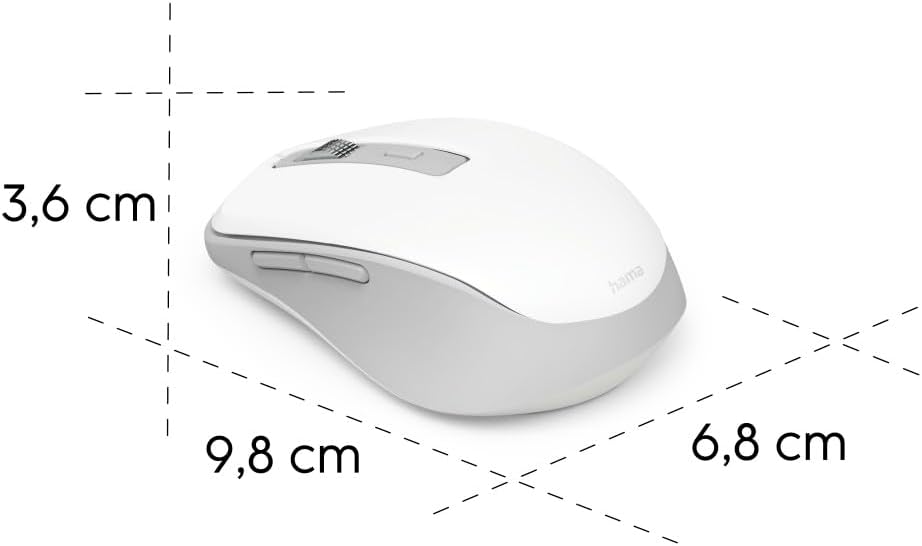
Image 6.1: Dimensional diagram of the Hama WM-450 mouse, indicating its length, width, and height.
| Vörumerki | Hama |
| Nafn líkans | WM-450 |
| Gerðarnúmer | 00173080 |
| Tengitækni | Bluetooth, 2.4 GHz Radio (USB-A) |
| Wireless Range | Allt að 10 metrar |
| Skynjaratækni | Optískur |
| DPI stillingar | 800, 1200, 1600 |
| Fjöldi hnappa | 7 (þar með talið smell með skrunhjóli) |
| Aflgjafi | 2 x AAA rafhlöður (meðfylgjandi) |
| Mál (L x B x H) | 9.8 x 6.8 x 3.6 cm (u.þ.b.) |
| Þyngd | 140 grömm |
| Samhæf tæki | PC, Tablet, Laptop, Smartphone, iPad |
| Sérstakir eiginleikar | Multi-device connectivity (3 devices), AI Assist button, Silent click buttons, Side navigation buttons, Retractable USB receiver, Polymer-coated mouse feet, High-quality aluminum scroll wheel. |
| Efnissamsetning | At least 20% recycled materials |
| Umbúðir | 100% plastic-free |
7. Ábyrgð og stuðningur
For warranty information, technical support, or service inquiries, please refer to the warranty card included with your product or visit the official Hama webvefsíðu. Upplýsingar um þjónustuver eru yfirleitt aðgengilegar á vefsíðu framleiðandans. websíða.


