1. Inngangur og yfirview
Welcome to the Vibox V-525 Gaming PC. This manual provides essential information for setting up, operating, maintaining, and troubleshooting your new computer. The Vibox V-525 is a high-performance gaming system featuring an AMD Ryzen 5 5500 processor, an Nvidia RTX 4060 8GB graphics card, 16GB of DDR4 RAM, and a 1TB SSD, pre-installed with Windows 11.
Please read this manual carefully before using your PC to ensure optimal performance and longevity.
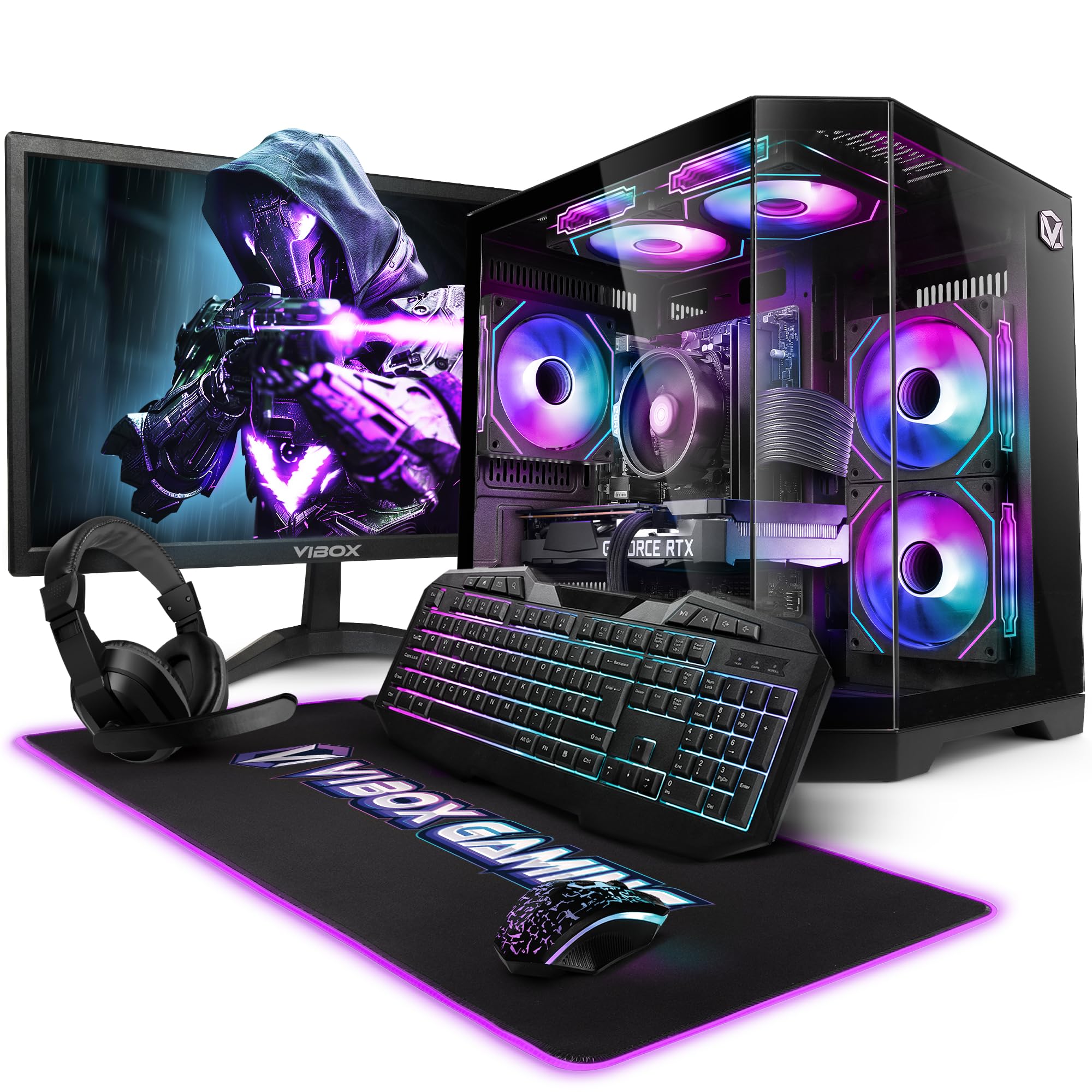
Figure 1.1: Vibox V-525 Gaming PC
2. Uppsetningarleiðbeiningar
2.1 Upptaka
Carefully remove all components from the packaging. Ensure you have the PC tower, 23-inch monitor, gaming keyboard, gaming mouse, headset, mouse pad, Wi-Fi adapter, and power cables.
2.2 Tengja jaðartæki
- Skjár: Connect the 23-inch monitor to the graphics card (Nvidia RTX 4060) using an HDMI or DisplayPort cable. Ensure the cable is securely fastened.
- Lyklaborð og mús: Connect the gaming keyboard and mouse to the available USB ports on the rear or front of the PC.
- höfuðtól: Plug your headset into the dedicated audio jacks on the front panel or rear I/O.
- Wi-Fi millistykki: Insert the 300 Mbps Wi-Fi adapter into an available USB port.
- Kraftur: Connect the power cable to the PC's power supply unit (PSU) and then to a wall outlet. Connect the monitor's power cable as well.
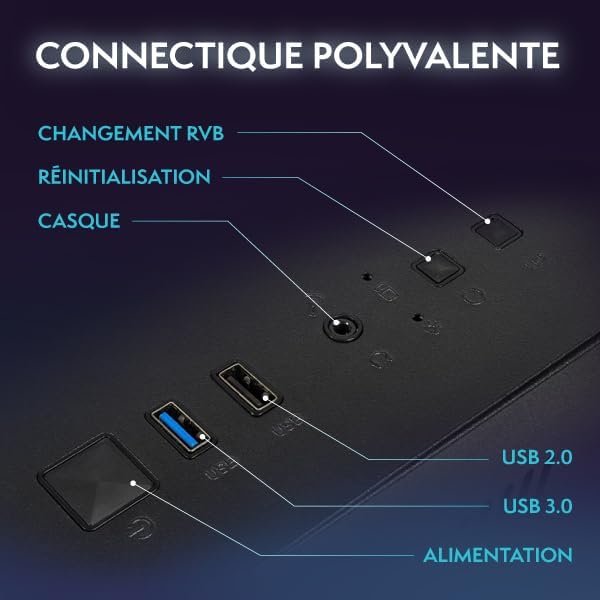
Figure 2.1: Front Panel Connectivity (Power, USB 2.0, USB 3.0, Headset, Reset, RGB Change)
2.3 Initial Boot-Up and Windows 11 Setup
- Ýttu á rofann á framhlið tölvunnar.
- Follow the on-screen instructions to complete the Windows 11 setup process. This typically involves selecting your region, language, creating a user account, and connecting to a network.
- Once Windows 11 is set up, ensure all drivers are installed. You can check this in Device Manager.

Figure 2.2: Windows 11 Home Features
3. Notkunarleiðbeiningar
3.1 Kveikt/slökkt
- Til að kveikja á: Ýttu á rofann á framhliðinni.
- Til að leggja niður: Click the Start button in Windows, then select Power > Shut down. Avoid simply holding the power button to turn off, as this can lead to data loss.
- Til að endurræsa: Smelltu á Start hnappinn og veldu síðan Power > Restart.
3.2 Basic Windows 11 Navigation
Windows 11 features a redesigned user interface. The Start menu is centrally located, and widgets provide quick access to information. Explore the settings menu to personalize your experience.
3.3 Tengist við Wi-Fi
- Ensure your USB Wi-Fi adapter is plugged in.
- Click the network icon (Wi-Fi symbol) in the taskbar.
- Veldu Wi-Fi netið sem þú vilt nota af listanum og smelltu á „Tengjast“.
- Sláðu inn öryggislykilinn fyrir netið (lykilorð) ef beðið er um það.
3.4 RGB lýsingarstýring
Your Vibox V-525 features Hex RGB Infinity 120mm fans. Use the 'RGB Change' button on the front panel to cycle through various lighting modes and colors. Refer to the software provided by Vibox (if applicable) for more advanced customization.

Figure 3.1: Hex RGB Infinity 120mm Fans
4. Viðhald
4.1 Cleaning Your PC
Regluleg þrif hjálpa til við að viðhalda bestu mögulegu afköstum og lengir líftíma íhluta.
- Að utan: Notaðu mjúkan, damp klút til að þurrka af ytra byrði kassans. Forðist sterk efni.
- Interior (Dust): Periodically, and with the PC powered off and unplugged, use compressed air to remove dust from inside the case, especially from fans, heatsinks, and vents. Pay attention to the Hex RGB Infinity fans and the GPU heatsink.
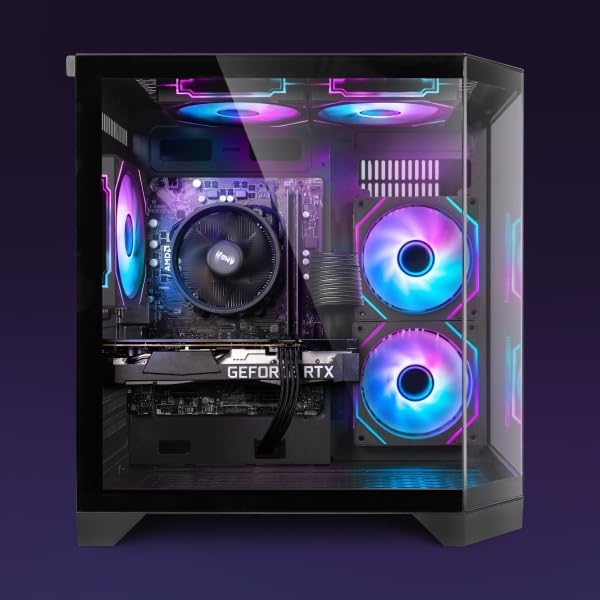
Mynd 4.1: Innri View of PC Components
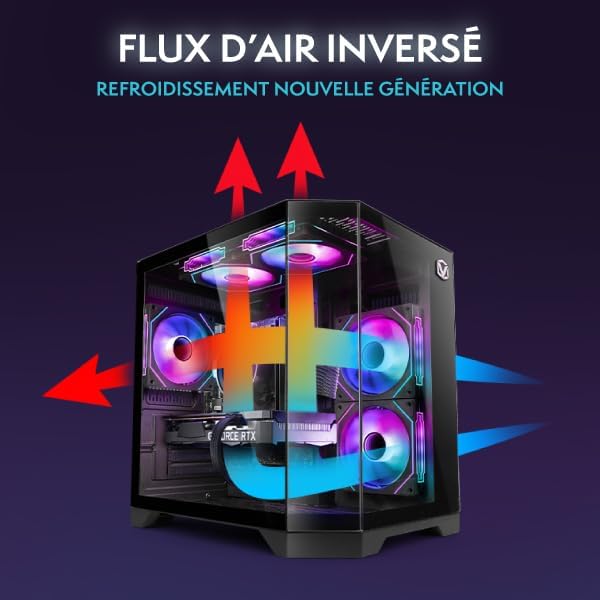
Figure 4.2: Reverse Airflow Next Generation Cooling Diagram
4.2 Hugbúnaðaruppfærslur
- Windows uppfærslur: Regularly check for and install Windows updates via Settings > Windows Update.
- Bílstjóri uppfærslur: Keep your graphics card drivers (Nvidia GeForce Experience) and other component drivers up to date for optimal performance and stability.
4.3 Gagnaafritun
Taktu reglulega öryggisafrit af mikilvægu fileá utanáliggjandi drif eða skýgeymslu til að koma í veg fyrir gagnatap.
5. Bilanagreining
Þessi hluti fjallar um algeng vandamál sem þú gætir rekist á.
5.1 Enginn kraftur
- Gakktu úr skugga um að rafmagnssnúran sé vel tengd bæði við tölvuna og innstunguna.
- Check if the power switch on the PSU (at the back of the PC) is in the 'On' position.
- Prófaðu aðra rafmagnsinnstungu.
5.2 Engin birting á skjánum
- Gakktu úr skugga um að rafmagnssnúra skjásins sé tengd og að skjárinn sé kveiktur.
- Ensure the video cable (HDMI/DisplayPort) is securely connected to both the graphics card (Nvidia RTX 4060) and the monitor.
- Prófaðu aðra myndsnúru eða skjá ef hún er til staðar.
5.3 Hæg afköst
- Athugaðu Verkefnastjórann (Ctrl+Shift+Esc) til að sjá hvort forrit nota of mikið af örgjörva, vinnsluminni eða harða diskaauðlindum.
- Gakktu úr skugga um að Windows og reklar séu uppfærðir.
- Keyrðu vírusleit.
- Ensure adequate airflow and clean any dust buildup (refer to Section 4.1).
5.4 Vandamál með nettengingu
- Verify the Wi-Fi adapter is properly installed and recognized by Windows.
- Endurræstu leiðina/módemið.
- Keyrðu Windows netvandamálarann.
6. Tæknilýsing
The following table details the key specifications of your Vibox V-525 Gaming PC:
| Hluti | Forskrift |
|---|---|
| Örgjörvi | AMD Ryzen 5 5500 (6 Cores, Max 4.2 GHz) |
| Skjákort | Nvidia GeForce RTX 4060 (8 GB GDDR6 RAM, HDMI 2.1, DisplayPort 1.4a) |
| vinnsluminni | 16 GB DDR4 Dual Channel (3200 MHz) |
| Geymsla | 1 TB SSD |
| Stýrikerfi | Windows 11 Home |
| Fylgjast með | 23-inch (Max Resolution: 1920 x 1080) |
| Tengingar | Wi-Fi (300 Mbps adapter included), 4 Total USB Ports |
| Skyndiminni | 16 MB |
| Málshönnun | 3-Panel Tempered Glass |
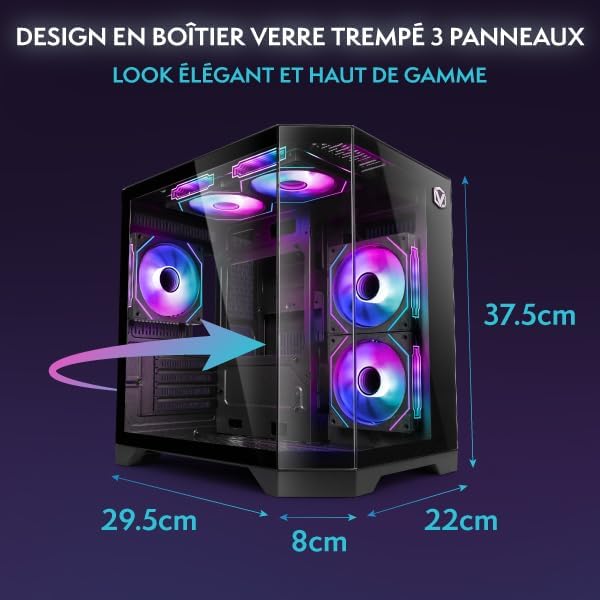
Figure 6.1: PC Case Dimensions
7. Ábyrgð og stuðningur
Your Vibox V-525 Gaming PC comes with a manufacturer's warranty. Please refer to the warranty card included in your product packaging for specific terms and conditions, including the warranty period and coverage details.
For technical support, troubleshooting assistance beyond this manual, or warranty claims, please contact Vibox customer service through their official webvefsíðu eða tengiliðaupplýsingar sem fylgja kaupskjölunum þínum.
Always provide your product model (V-525) and purchase date when contacting support.


