1. Inngangur
This manual provides essential information for setting up, operating, maintaining, and troubleshooting your new VIBOX III-445 PC Gamer. Please read this guide thoroughly before using your computer to ensure optimal performance and longevity.
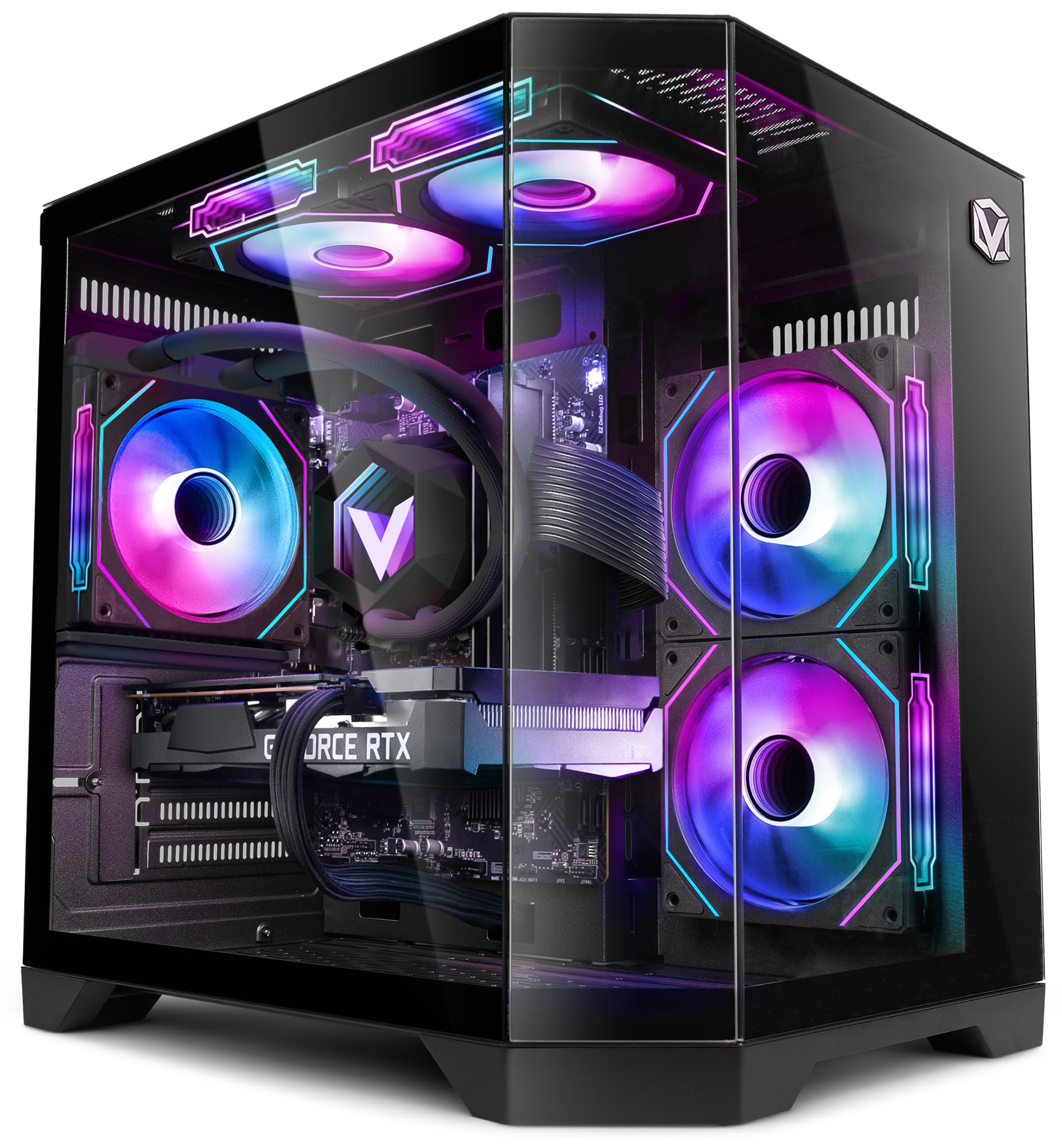
Figure 1: VIBOX III-445 PC Gamer, showcasing its internal components and RGB lighting.
2. Uppsetning
2.1. Upptaka og frumskoðun
- Takið tölvuna varlega úr umbúðunum.
- Inspect the computer for any visible damage that may have occurred during shipping.
- Remove any internal packaging materials, such as foam inserts, designed to protect components during transit.
- Ensure all accessories (power cable, Wi-Fi adapter, documentation) are present.
2.2. Tengja jaðartæki
Connect your monitor, keyboard, mouse, and other peripherals to the appropriate ports on the back and front of the PC. Refer to the image below for front panel connectivity.

Figure 2: Front panel connectivity. Includes power button, USB 2.0 ports, USB 3.0 ports, headphone jack, reset button, and RGB lighting control button.
- Skjár: Connect your monitor to the graphics card (Nvidia RTX 5060) using an HDMI or DisplayPort cable.
- Lyklaborð og mús: Tengdu við hvaða lausa USB tengi sem er.
- Kraftur: Connect the power cable to the PC and a wall outlet.
- Net: Use the included Wi-Fi adapter for wireless internet or connect an Ethernet cable to the LAN port for a wired connection.
2.3. Fyrsta ræsing og uppsetning Windows 11
- Ýttu á rofann á framhlið tölvunnar.
- Follow the on-screen instructions to complete the Windows 11 setup process. This typically involves selecting your region, language, creating a user account, and connecting to a network.
- Ensure all drivers are installed and updated after the initial setup. You can check for updates via Windows Update and the Nvidia website for graphics drivers.
3. Notkun tölvunnar
3.1. Windows 11 Home
Your VIBOX III-445 PC comes pre-installed with Windows 11 Home, optimized for gaming and productivity.

Figure 3: Windows 11 Home operating system.
- Faster Loading Times: Nýttu þér DirectStorage til að hraða hleðslu leikja.
- Aukin grafík: AutoHDR improves visual quality in supported games.
- Samþætting við Xbox Game Pass: Seamless access to a library of games.
- Bjartsýni á afköst örgjörva: Windows 11 is designed to leverage modern CPU architectures efficiently.
3.2. Lykilhlutar
The VIBOX III-445 is equipped with powerful components for a smooth computing experience.
Mynd 4: Yfirview of the VIBOX III-445's core components.
- Örgjörvi: Intel Core i7-12700KF (12 Cores, up to 5.0 GHz) for high-performance gaming, streaming, and content creation.
- Skjákort: Nvidia GeForce RTX 5060 (8GB GDDR7) for advanced graphics and gaming.
- vinnsluminni: 16GB DDR4 3200MHz Dual Channel for smooth multitasking.
- Geymsla: 500GB SSD for fast boot times and application loading.
3.3. Kælikerfi
The PC features an advanced cooling system to maintain optimal temperatures.

Figure 5: VIBOX AIO 120MM liquid cooler for stable processor temperatures.

Figure 6: Reversed airflow design for optimized air circulation and reduced heat accumulation.

Figure 7: Hex RGB Infinity 120mm fans for customizable lighting and enhanced airflow.
- VIBOX AIO 120MM: Provides compact and efficient liquid cooling for the CPU.
- Reversed Airflow: Optimizes air circulation to reduce heat buildup.
- Hex RGB Infinity 120MM Fans: High-performance fans with customizable RGB lighting.
4. Viðhald
4.1. Almenn þrif
- Að utan: Notaðu mjúkan, damp cloth to clean the exterior of the case. Avoid abrasive cleaners.
- Rykhreinsun: Periodically use compressed air to clean dust from fans, vents, and internal components. Ensure the PC is powered off and unplugged before cleaning.
- Síur: If your case has removable dust filters, clean them regularly to maintain optimal airflow.
4.2. Hugbúnaðaruppfærslur
- Windows uppfærslur: Regularly check for and install Windows updates to ensure system stability and security. Go to Settings > Windows Update.
- Bílstjóri uppfærslur: Keep your graphics card drivers updated by downloading the latest versions from the Nvidia website. Other component drivers can be updated via Windows Update or the motherboard manufacturer's websíða.
4.3. Kerfisafrit
- Taktu reglulega öryggisafrit af mikilvægum gögnum á utanaðkomandi drif eða skýgeymslu til að koma í veg fyrir gagnatap.
5. Bilanagreining
Þessi hluti fjallar um algeng vandamál sem þú gætir rekist á. Hafðu samband við tæknilega aðstoð ef um flóknari vandamál er að ræða.
5.1. Enginn kraftur
- Gakktu úr skugga um að rafmagnssnúran sé vel tengd bæði við tölvuna og innstunguna.
- Check if the power supply unit (PSU) switch on the back of the PC is in the 'ON' position.
- Prófaðu innstunguna með öðru tæki til að staðfesta að hún hafi rafmagn.
5.2. Engin birting á skjánum
- Verify that the monitor is powered on and connected to the graphics card (Nvidia RTX 5060) ports, not the motherboard's video outputs.
- Check the monitor's input source setting (HDMI, DisplayPort).
- Ensure the graphics card is properly seated in its slot.
5.3. Poor Performance or Freezing
- Lokaðu óþarfa bakgrunnsforritum.
- Gakktu úr skugga um að allir reklar, sérstaklega grafíkreklar, séu uppfærðir.
- Check system temperatures using monitoring software to rule out overheating.
- Keyrðu diskhreinsun og defragmentering (fyrir harða diska, ekki nauðsynlegt fyrir SSD diska).
5.4. Vandamál með Wi-Fi tengingu
- Ensure the Wi-Fi adapter is securely plugged into a USB port.
- Athugaðu Wi-Fi stillingarnar í Windows til að ganga úr skugga um að það sé virkt og tengt við rétt net.
- Endurræstu leiðina og mótaldið.
- Consider using a wired Ethernet connection if Wi-Fi signal is consistently weak or unstable.
6. Tæknilýsing
| Eiginleiki | Smáatriði |
|---|---|
| Vörumerki | VIBOX |
| Gerðarnúmer | III-445 |
| Röð | VTX-8 |
| Litur | VTX-8 svartur |
| Stýrikerfi | Windows 11 Home |
| Vörumerki örgjörva | Intel |
| Gerð örgjörva | Core i7-12700KF |
| Hraði örgjörva | 3.6 GHz (allt að 5.0 GHz aukning) |
| Fjöldi kjarna | 12 |
| Hámarks minnisstuðningur | 128 GB |
| Tækni á harða diskinum | SSD |
| Viðmót harða disksins | SSD |
| Geymslugeta | 500 GB |
| Vörumerki grafískra flísa | NVIDIA |
| Lýsing á skjákorti | Hollur |
| GPU | NVIDIA GeForce RTX 5060 |
| RAM-vinnsluminni skjákorts | 8 GB |
| Tegund grafíkvinnsluminni | GDDR6 |
| Örgjörvapoki | LGA 1700 |
| Tengingargerð | Wi-Fi |
| Vélbúnaðarviðmót | HDMI, USB |
| Fjöldi HDMI tengi | 1 |
| Fjöldi USB 2.0 tengi | 3 |
| Fjöldi USB 3.0 tengi | 3 |
| Tegund tengis | Ethernet, HDMI, USB, Wi-Fi |
| Samhæf tæki | Headphones, Keyboard, Printer, Monitor, Mouse |
| Stærðir hlutar (L x B x H) | 35 x 28 x 38 sentimetrar |
| Sérstök notkun vörunnar | Leikir, ljósmyndavinnsla, myndbandsvinnsla |
| PC gerð | Tölvuturn |
7. Ábyrgð
Your VIBOX III-445 PC Gamer comes with a manufacturer's warranty:
- Hlutar: 2 ár
- Vinnuafl: Ævi
Please retain your proof of purchase for warranty claims. For detailed terms and conditions, refer to the warranty documentation included with your product or visit the VIBOX official websíða.
8. Stuðningur
If you encounter issues not covered in this manual or require further assistance, please contact VIBOX customer support. Have your model number (III-445) and purchase details ready when contacting support.
For additional resources, visit the official VIBOX websíða:


