1. Inngangur
This manual provides detailed instructions for the Redragon M810 MAX 3-Mode Wireless Gaming Mouse. Designed for versatility and performance, this mouse offers wired, 2.4GHz wireless, and Bluetooth connectivity options, along with customizable features to enhance your computing and gaming experience.
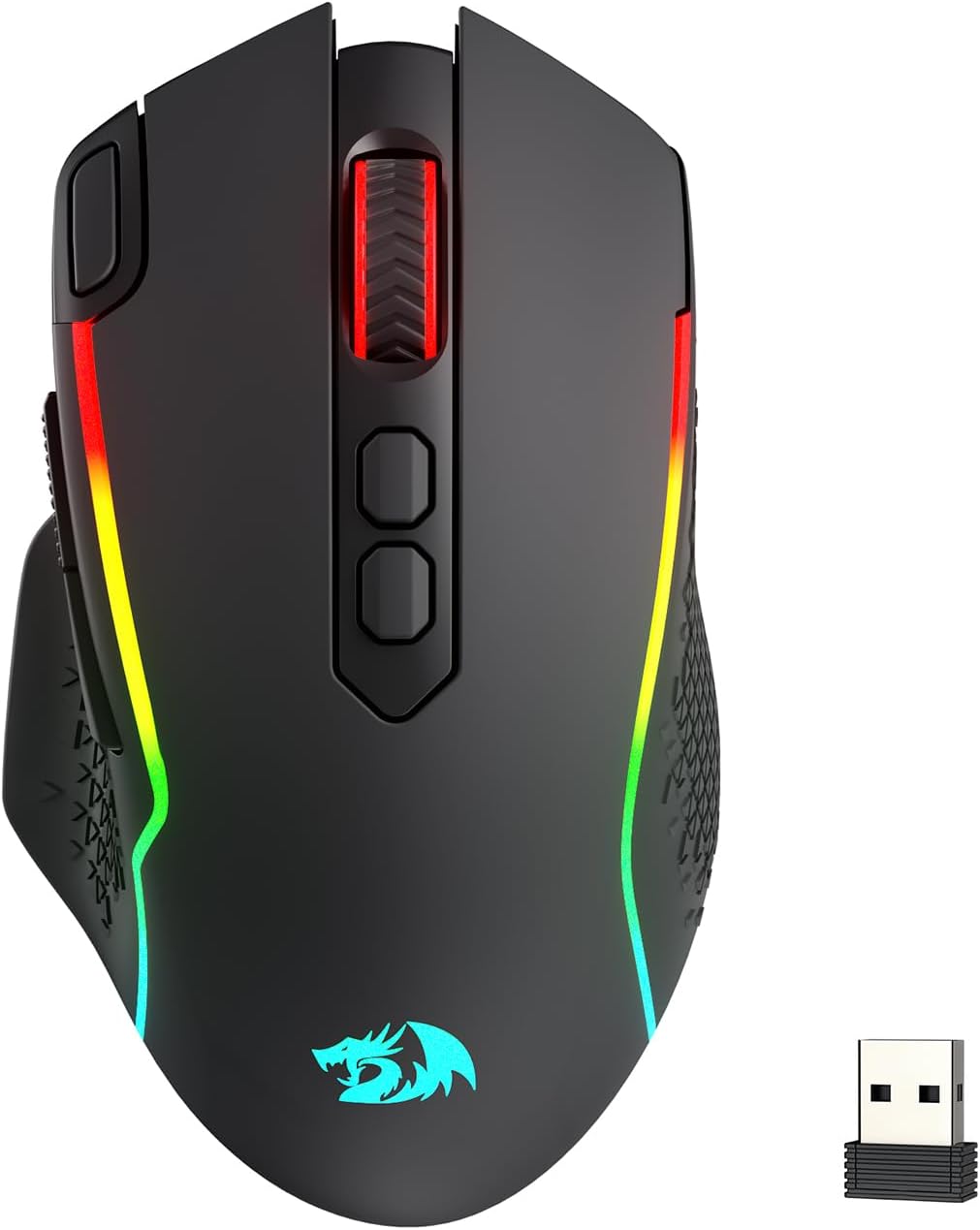
Image: The Redragon M810 MAX 3-Mode Wireless Gaming Mouse, showcasinmeð vinnuvistfræðilegri hönnun og RGB lýsingu.
2. Innihald pakka
Gakktu úr skugga um að allir hlutir séu til staðar í pakkanum þínum:
- Redragon M810 MAX Wireless Gaming Mouse
- USB-C til USB-A hleðslusnúru
- 2.4 GHz USB þráðlaus dongle
- Notendahandbók (þetta skjal)

Mynd: Yfirview of the Redragon M810 MAX mouse highlighting its key features such as 3-mode connection, PAW3311 sensor, 8 macro buttons, 1000mAh battery, 12000 MAX DPI, DIY RGB lighting, rapid fire button, and Pro Software.
3. Mouse Layout and Features
The Redragon M810 MAX is equipped with multiple buttons and features for optimal control:
- Vinstri hnappur: Staðlað vinstri smelliaðgerð.
- Hægri hnappur: Staðlað hægrismellti.
- Skrunahjól: For scrolling and middle-click. Features high texture for enhanced grip.
- DPI+ / DPI- Buttons: Adjust DPI levels on the fly.
- Hraðeldlykill: Pre-programmed for rapid firing (default 3-click burst).
- Áfram hnappur: Navigational button (default: forward).
- Afturábak hnappur: Navigational button (default: backward).
- Mode Switch (Underside): Toggles between different polling rates/refresh rates.
- On/Off/Eco Mode Switch (Underside): Powers the mouse on/off or activates eco mode for battery saving.
- Wireless Dongle Compartment (Underside): Secure storage for the 2.4GHz USB dongle.
- USB-C Port (Front): Fyrir snúrutengingu og hleðslu.
- Non-slip Side Wings: Textured grip on the sides for improved handling.

Mynd: Ítarleg view of the Redragon M810 MAX mouse, labeling its 8 freely programmable buttons: Left Button, Right Button, Scroll, Rapid Fire Key, DPI+, DPI-, Forward Button, and Backward Button.
4. Uppsetning og tenging
The M810 MAX offers three connection modes:
4.1. Þráðlaus tenging
- Tengdu USB-C endann á meðfylgjandi snúru við músina.
- Tengdu USB-A enda snúrunnar við lausa USB tengi á tölvunni þinni.
- Músin skiptir sjálfkrafa yfir í snúrubundna stillingu og byrjar að hlaða.
4.2. 2.4GHz þráðlaus tenging
- Locate the 2.4GHz USB wireless dongle stored in the compartment on the underside of the mouse.
- Tengdu dongle í laus USB tengi á tölvunni þinni.
- Turn on the mouse using the On/Off/Eco mode switch on the underside.
- Músin ætti að tengjast sjálfkrafa.
4.3. Bluetooth-tenging
- Turn on the mouse using the On/Off/Eco mode switch on the underside.
- Activate Bluetooth pairing mode on the mouse (refer to specific software instructions if needed, usually indicated by a blinking LED).
- Farðu í Bluetooth-stillingar í tölvunni þinni og leitaðu að nýjum tækjum.
- Select "Redragon M810 MAX" from the list of available devices to pair.

Image: The Redragon M810 MAX mouse demonstrating its tri-mode silky connection options: 2.4GHz wireless, Bluetooth, and wired USB-C, ensuring reliable transmission.
5. Rekstrarhamir og stillingar
5.1. Stilling á upplausnarstærð (DPI)
The mouse features 5 on-board DPI levels that can be adjusted using the DPI+ and DPI- buttons. The default settings are 400/800/1600/2400/3200 DPI. These levels can be customized further using the Redragon Pro driver software.

Image: The Redragon M810 MAX mouse illustrating its 12000 MAX DPI capability and adjustable DPI levels at 400, 800, 1600, 2400, and 3200, each indicated by a different color.
5.2. Aðlögun kosningahlutfalls
The polling rate can be adjusted via the mode switch on the underside of the mouse or through the Redragon Pro driver. The mouse supports a 1000Hz polling rate in dual mode for optimized performance.
5.3. Eco Mode
To conserve battery life, switch the mouse to Eco Mode using the On/Off/Eco mode switch on the underside. In this mode, the mouse's power consumption is optimized, extending usage time.
6. Customization (Redragon Pro Driver)
Unlock the full potential of your M810 MAX mouse with the Redragon Pro driver software. This software allows for extensive customization:
- Keybinding: All 8 programmable buttons can be assigned custom tactical keybinds for various games or work applications.
- DPI stig: Customize the 5 on-board DPI levels to suit your preferences.
- RGB lýsing: DIY endless lighting styles including dynamic streaming, breathing, and waving effects. Adjust colors, brightness, and speed.
- Atkvæðagreiðsluhlutfall: Fine-tune the polling rate for optimal responsiveness.

Image: The Redragon M810 MAX mouse displayed alongside the Redragon Pro driver software interface, showing options for DPI stages, report rate, sensor settings, and DPI light effects.
7. Hleðsla og rafhlöðuending
The M810 MAX features an ultra long-lasting core and a rechargeable battery. To charge the mouse, connect it to your computer using the provided USB-C cable. The mouse can be used in wired mode while charging.
- Maximum Battery Life (RGB off): Allt að 188 klst.
- Battery Life (RGB on): Um það bil 29 klst.

Image: The Redragon M810 MAX mouse highlighting its durable battery life, showing 188 hours with RGB off and 29 hours with RGB on.
8. Viðhald
To ensure the longevity and optimal performance of your Redragon M810 MAX mouse, follow these maintenance guidelines:
- Þrif: Use a soft, dry cloth to wipe the mouse surface. Avoid harsh chemicals or abrasive materials.
- Umhirða skynjara: Keep the optical sensor on the underside clean and free from dust or debris.
- Kapalstjórnun: Store the USB-C cable neatly to prevent kinks or damage.
- Geymsla: When not in use, store the wireless dongle in its designated compartment to prevent loss.
9. Bilanagreining
If you encounter issues with your Redragon M810 MAX mouse, try the following solutions:
- Músin svarar ekki:
- Gakktu úr skugga um að kveikt sé á músinni.
- Athugaðu stöðu rafhlöðunnar og hlaðið hana ef þörf krefur.
- For wireless connections, ensure the dongle is securely plugged in and within range.
- For Bluetooth, ensure the mouse is paired correctly and Bluetooth is enabled on your device.
- Try connecting via wired mode to rule out wireless issues.
- Töf eða aftengingar:
- Reduce distance between mouse and wireless dongle/Bluetooth device.
- Ensure no strong interference sources (e.g., other wireless devices) are nearby.
- Update mouse drivers via the Redragon Pro software.
- Vandamál með RGB lýsingu:
- Ensure RGB is not turned off in Eco Mode.
- Adjust lighting settings using the Redragon Pro driver.
10. Tæknilýsing
| Eiginleiki | Smáatriði |
|---|---|
| Vörumerki | Redragon |
| Gerðarnúmer | M810 PRO |
| Tengitækni | Bluetooth, 2.4 GHz, USB-C |
| Hreyfingarskynjunartækni | Sjónrænt (PAW3311 skynjari) |
| Hámarks DPI | 12000 |
| Forritanlegir hnappar | 8 |
| Battery Life (RGB off) | Allt að 188 klst |
| Battery Life (RGB on) | Um það bil 29 klst |
| Atkvæðagreiðsluhlutfall | 1000Hz (tvöfaldur stilling) |
| Þyngd hlutar | 8.8 aura |
| Sérstakur eiginleiki | Ergonomic Design, Programmable Buttons |
11. Ábyrgð og stuðningur
Fyrir upplýsingar um ábyrgð, tæknilega aðstoð eða frekari aðstoð, vinsamlegast farðu á opinberu vefsíðu Redragon. webvefsíðu eða hafðu samband við þjónustuver þeirra. Geymdu kaupkvittunina vegna ábyrgðarkröfu.
Opinber rauðdreki Websíða: www.redragonzone.com


