1. Inngangur
This user manual provides detailed instructions for the Bemi Cognita Tab 6+ E-Reader. Please read this manual carefully before using your device to ensure proper operation and to maximize your reading experience. Keep this manual for future reference.
1.1 Innihald pakka
- Bemi Cognita Tab 6+ E-Reader
- USB hleðslusnúra
Gangið úr skugga um að allir hlutir séu til staðar og í góðu ástandi þegar kassinn er opnaður.
2. Tæki lokiðview
Familiarize yourself with the physical components of your Bemi Cognita Tab 6+ E-Reader.

Mynd 2.1: Framan view of the Bemi Cognita Tab 6+ E-Reader. The device features a 6-inch E-Ink display with the Bemi logo and model name visible. The screen is designed to mimic paper for a comfortable reading experience.

Mynd 2.2: Framan og aftan view of the Bemi Cognita Tab 6+ E-Reader. This image highlights the device's thin design and the textured back cover, which provides a secure grip.

Mynd 2.3: Hlið view of the Bemi Cognita Tab 6+ E-Reader, illustrating the location of the power button and a small LED indicator. This button is used for turning the device on/off and waking it from sleep.
2.1 Key Components:
- 6-inch E-Ink Touchscreen: Glare-free display for comfortable reading.
- Aflhnappur: Located on the side for turning the device on/off and sleep/wake.
- USB-C tengi: Fyrir hleðslu og gagnaflutning.
- MicroSD kortarauf: Stækkanlegt geymslurými allt að 256GB.
- Side Control Buttons: For page turning and navigation.
- SMARTlight: Adjustable front light for reading in various conditions.
3. Uppsetning
3.1 Upphafshleðsla
Before first use, fully charge your Bemi Cognita Tab 6+ E-Reader. Connect the provided USB cable to the device's USB-C port and the other end to a compatible USB power adapter (not included) or a computer's USB port.
- Full hleðsla tekur venjulega um það bil 2-3 klukkustundir.
- Hleðsluljósið mun sýna hleðslustöðuna.
3.2 Kveikt/slökkt
- Til að kveikja á: Press and hold the Power button (refer to Figure 2.3) for a few seconds until the screen activates.
- Til að slökkva á: Ýttu á og haltu inni aflrofanum þar til slökkvivalmynd birtist og veldu síðan „Slökkva“.
- Að sofa/vaka: Briefly press the Power button to put the device into sleep mode or wake it up.
3.3 Wi-Fi tenging
Connecting to Wi-Fi allows you to download books, transfer files, and access online services.
- Á heimaskjánum pikkarðu á Stillingar táknmynd.
- Veldu Wi-Fi.
- Toggle the Wi-Fi switch to On.
- The device will scan for available networks. Select your desired network from the list.
- Sláðu inn lykilorðið ef beðið er um það og pikkaðu síðan á Tengdu.
3.4 Upphafleg stilling
Upon first power-on, you may be guided through initial setup steps, including language selection and time zone settings. Follow the on-screen prompts.
4. Notkunarleiðbeiningar
4.1 Að sigla um viðmótið
The Bemi Cognita Tab 6+ features a touch-sensitive E-Ink screen and physical side buttons for navigation.
- Snertibendingar: Tap to select, swipe to scroll, pinch to zoom (where supported).
- Hliðarhnappar: Use the physical buttons on the side to turn pages forward or backward during reading.
- G-skynjari: The device automatically rotates the screen orientation based on how you hold it, accommodating both right and left-handed users.
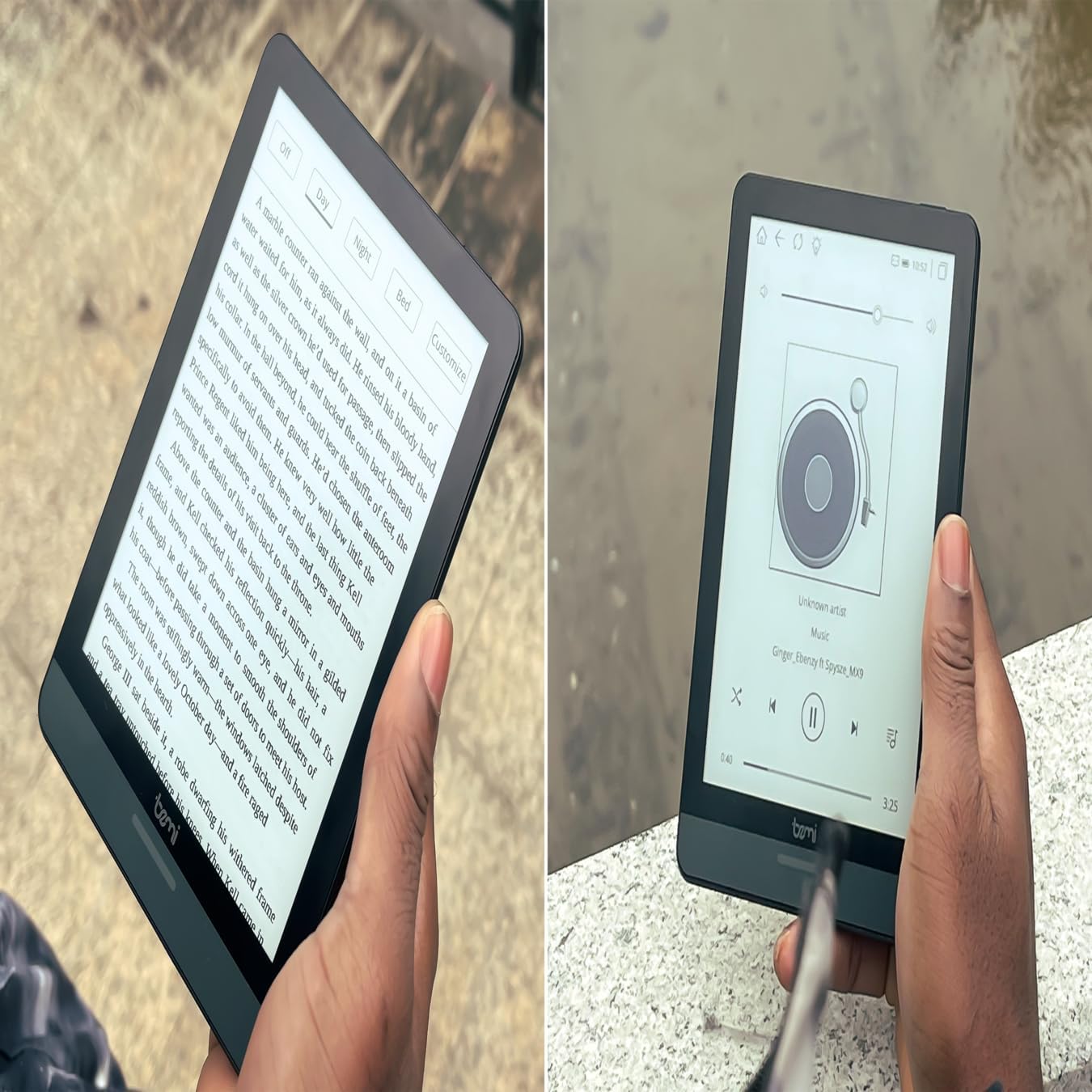
Mynd 4.1: User holding the Bemi Cognita Tab 6+ E-Reader while reading. The image shows the clear text display on the E-Ink screen, highlighting the device's readability.
4.2 Lesa bækur
Til að opna og lesa bók:
- From the home screen, tap on the Bókasafn or Bækur táknmynd.
- Browse your collection or use the search function to find a book.
- Tap on the book cover to open it.
- Use the touch screen or side buttons to turn pages.
4.3 Adjusting SMARTlight
The SMARTlight feature allows you to adjust both the brightness and color temperature of the screen's front light.
- During reading, tap the center of the screen to bring up the reading menu.
- Leitaðu að Ljós or SMARTlight táknmynd.
- Adjust the sliders for brightness (intensity) and color temperature (warm to cool) to your preference.
4.4 Flutningur Files
You can transfer e-books and other supported files to your device via Wi-Fi or USB cable.
- Í gegnum Wi-Fi: If your device supports cloud services or direct Wi-Fi transfer, follow the specific application instructions.
- Með USB snúru:
- Connect your E-Reader to a computer using the provided USB cable.
- The device will appear as a removable storage drive on your computer.
- Dragðu og slepptu því sem þú vilt files (e.g., EPUB, PDF, MOBI) into the appropriate folders on the E-Reader (e.g., "Books" folder).
- Taktu tækið örugglega úr tölvunni áður en þú aftengir snúruna.
4.5 Notkun microSD-korts
To expand storage, insert a microSD card (up to 256GB) into the designated slot.
- Gently insert the microSD card with the gold contacts facing down until it clicks into place.
- Til að fjarlægja, ýttu kortinu varlega inn á við þar til það flýgur út.
- Files on the microSD card will be accessible through the device's file manager or library.
5. Viðhald
5.1 Þrif á tækinu
- Notið mjúkan, lólausan klút til að þurrka varlega skjáinn og ytra byrði tækisins.
- Fyrir þrjósk óhreinindi, örlítið dýftampÞurrkið klútinn með vatni eða skjáhreinsiefni sem er sérstaklega hannað fyrir rafeindatæki.
- Forðist að nota sterk efni, slípiefni eða mikinn raka.
5.2 Umhirða rafhlöðu
- Til að lengja líftíma rafhlöðunnar skal forðast að tæma hana alveg oft.
- Geymið tækið á köldum, þurrum stað þegar það er ekki í notkun í langan tíma.
- Charge the device regularly, even if not used, to prevent deep discharge.
5.3 Geymsla
When not in use, store your E-Reader in a protective case to prevent scratches and damage to the screen.
6. Bilanagreining
If you encounter issues with your Bemi Cognita Tab 6+, refer to the following common solutions:
| Vandamál | Lausn |
|---|---|
| Tækið kveikir ekki. | Ensure the battery is charged. Connect the device to a power source for at least 30 minutes. If it still doesn't turn on, try a hard reset by holding the power button for 10-15 seconds. |
| Skjárinn er frosinn eða svarar ekki. | Perform a soft reset by holding the power button for 5-7 seconds until the device restarts. If the issue persists, try a hard reset. |
| Get ekki tengst Wi-Fi. | Check if Wi-Fi is enabled in settings. Verify the Wi-Fi password. Restart your E-Reader and your Wi-Fi router. Ensure you are within range of the Wi-Fi signal. |
| Books are not appearing in the library. | Tryggðu að files are in a supported format (e.g., EPUB, PDF). If transferred via USB, ensure they are in the correct folder. Try refreshing the library or restarting the device. |
| Rafhlaða tæmist fljótt. | Reduce screen brightness. Turn off Wi-Fi and Bluetooth when not in use. Close background applications. Ensure the device is not constantly searching for networks. |
7. Tæknilýsing
| Eiginleiki | Smáatriði |
|---|---|
| Nafn líkans | Bemi Cognita Tab 6+ |
| Skjástærð | 6 Inches (E-Ink Carta, 1024x758, 212 ppi) |
| Innra minni | 32 GB |
| Stækkanlegt geymsla | MicroSD card slot, up to 256 GB |
| Tengingar | Wi-Fi, Bluetooth |
| Stýrikerfi | Android 8.1 |
| Mannviðmótsinntak | Touchscreen, Side Control Buttons |
| Sérstakir eiginleikar | Adjustable SMARTlight, G-Sensor for auto-rotation, Glare-Free & Eye-Friendly E-Ink Display |
| Stærðir (u.þ.b.) | 7 mm þykkt |
| Innifalið íhlutir | USB snúru |
8. Ábyrgð og stuðningur
8.1 Upplýsingar um ábyrgð
Your Bemi Cognita Tab 6+ E-Reader comes with a standard manufacturer's warranty. Please refer to the warranty card included in your product packaging or visit the official Bemi webvefsíðu fyrir ítarlegar skilmála varðandi ábyrgðartíma og gildistíma.
Valfrjálsar verndaráætlanir kunna að vera í boði fyrir lengri þjónustu. Vinsamlegast hafið samband við söluaðila til að fá nánari upplýsingar.
8.2 Þjónustuver
For technical assistance, troubleshooting beyond this manual, or warranty claims, please contact Bemi customer support:
- Websíða: www.bemi-electronics.com
- Netfang: Refer to the Bemi websíða fyrir netfang fyrir tengiliði.
- Sími: Refer to the Bemi website for contact phone numbers.
When contacting support, please have your device model (Cognita Tab 6+) and purchase information ready.


