Inngangur
Welcome to the OUKITEL C3 Cell Phone user manual. This guide provides essential information to help you set up, operate, and maintain your new smartphone. Please read this manual thoroughly to ensure proper usage and to maximize your device's potential.
Hvað er í kassanum
Þegar þú opnar pakkann þinn fyrir OUKITEL C3 ættirðu að finna eftirfarandi hluti:
- 1x OUKITEL C3 Cell Phone
- 1x 10W hleðslutæki
- 1x Gagnasnúra
- 1x símahulstur
- 1x Notendahandbók

Image: Contents of the OUKITEL C3 package, including the phone, charger, data cable, phone case, and manual.
Video: An unboxing demonstration of the OUKITEL C3 Cell Phone, showing the phone and its included accessories.
Vara lokiðview
The OUKITEL C3 is a 4G Android smartphone featuring a 6.52-inch waterdrop screen, a 5000mAh battery, and a dual-camera system. It is designed for everyday communication and multimedia use.
Helstu eiginleikar:
- Skjár: 6.52-inch HD Waterdrop Screen (540x1200 resolution, 450nit brightness)
- Örgjörvi: Unisoc T310
- Minni: 16GB RAM (4GB fixed + 12GB virtual) + 64GB ROM, expandable up to 1TB via TF card
- Rafhlaða: 5000mAh with 10W fast charging and OTG reverse charging support
- Myndavélar: 13MP aðalmyndavél, 5MP frammyndavél
- Stýrikerfi: Android 14
- Tengingar: 4G Dual SIM, Bluetooth 5.0, Wi-Fi, GPS, GLONASS, Beidou, Galileo
- Öryggi: Face ID
- Stærðir: 9.3mm thickness, 198g weight
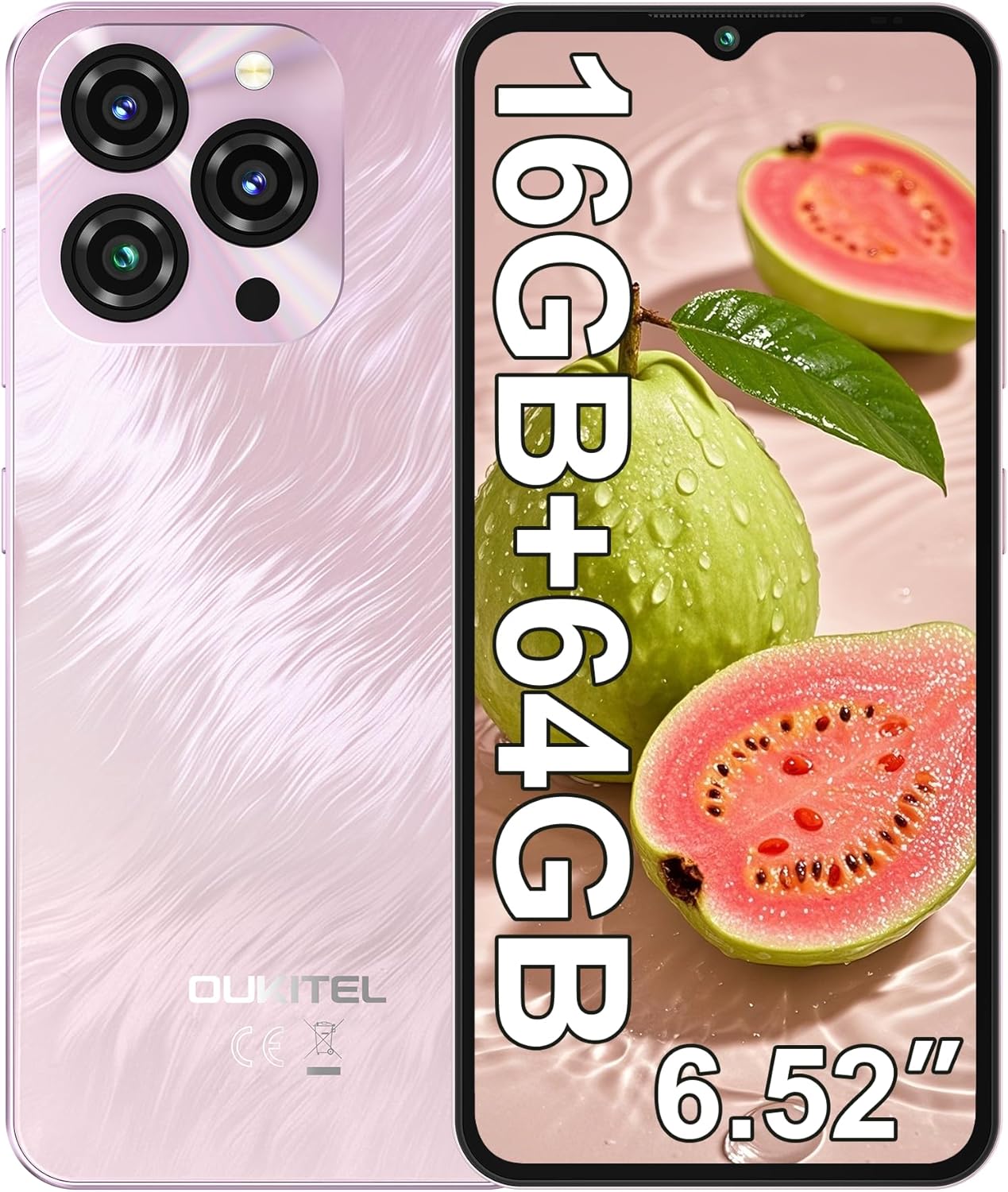
Image: The OUKITEL C3 Cell Phone, showcasinhönnun þess og myndavélareiningu.

Image: Close-up of the OUKITEL C3's 6.52-inch waterdrop display, highlighting its visual quality.

Image: Visual representation of the OUKITEL C3's slim 9.3mm thickness and 198g weight.
Uppsetning
1. Uppsetning SIM-korts og TF-korts
The OUKITEL C3 supports dual Nano SIM cards or one Nano SIM card and one TF (microSD) card for expanded storage.
- Finndu SIM-kortaskúffuna á hlið símans.
- Insert the SIM ejector tool (included in the box) into the small hole next to the tray and push gently until the tray pops out.
- Place your Nano SIM card(s) and/or TF card into the designated slots on the tray. Ensure the gold contacts face downwards and the cards are correctly oriented.
- Settu bakkann varlega aftur í símann þar til hann er jafn við hlið tækisins.

Image: Diagram showing the SIM card tray, 3.5mm audio jack, and USB-C port on the OUKITEL C3.
2. Fyrsta ræsing og uppsetning
- Press and hold the Power button (located on the right side of the phone) until the OUKITEL logo appears.
- Fylgdu leiðbeiningunum á skjánum til að velja tungumál, tengjast Wi-Fi neti og setja upp Google reikninginn þinn.
- You will also be guided through setting up security features like Face ID during this process.
3. Hleður tækið
Before first use, it is recommended to fully charge your OUKITEL C3.
- Connect the USB data cable to the 10W charger.
- Stingdu hleðslutækinu í rafmagnsinnstungu.
- Tengdu USB-C enda snúrunnar við hleðslutengið neðst á símanum.
- Rafhlöðutáknið á skjánum gefur til kynna hleðslustöðu.

Image: Illustration of the OUKITEL C3's 5000mAh battery and charging process.
Notkunarleiðbeiningar
1. Grunnleiðsögn (Android 14)
Your OUKITEL C3 runs on Android 14, offering an intuitive user experience.
- Heimaskjár: Strjúktu til vinstri eða hægri til að fletta á milli heimaskjáa. Ýttu og haltu inni auðu svæði til að sérsníða búnað, veggfóður og stillingar.
- App skúffa: Strjúktu upp frá neðri hluta skjásins til að fá aðgang að öllum uppsettum forritum.
- Tilkynningar og flýtistillingar: Strjúktu niður frá efst á skjánum til view tilkynningar og aðgangur að flýtistillingum (Wi-Fi, Bluetooth, o.s.frv.).
- Nýleg forrit: Swipe up from the bottom and hold (or tap the square navigation button if enabled) to see recently used applications.

Image: The OUKITEL C3 displaying the Android 14 operating system interface with various applications.
2. Notkun myndavélar
The OUKITEL C3 is equipped with a 13MP main camera and a 5MP front camera.
- Opnaðu forritið „Myndavél“ af heimaskjánum eða í forritaskúffunni.
- Switch between the front and rear cameras using the camera switch icon.
- Ýttu á lokarahnappinn til að taka mynd.
- Explore different modes like Video, Portrait, or Panorama if available in the camera app.

Image: Visual detailing of the OUKITEL C3's 13MP main camera and 5MP front camera capabilities.
3. Tengingar
- Wi-Fi: Farðu í Stillingar > Net og internet > Wi-Fi til að tengjast við tiltæk net.
- Bluetooth: Farðu í Stillingar > Tengd tæki > Bluetooth til að para við Bluetooth tæki eins og heyrnartól eða hátalara.
- GPS: Location services are enabled by default. You can manage them in Settings > Location. The phone supports GPS, GLONASS, Beidou, and Galileo for accurate positioning.
- OTG: The OUKITEL C3 supports USB On-The-Go (OTG), allowing you to connect USB devices like flash drives or keyboards using an OTG adapter (sold separately).
4. Face ID
Face ID provides a convenient and secure way to unlock your phone.
- Farðu í Stillingar > Öryggi og friðhelgi > Opnun tækis > Andlitsopnun.
- Follow the on-screen instructions to register your face. Ensure good lighting and hold the phone at eye level.
- Once registered, you can unlock your phone by simply looking at the front camera.
Viðhald
1. Umhirða rafhlöðu
- Forðist að láta símann verða fyrir miklum hita.
- Use only the provided charger and cable for optimal charging performance and safety.
- Til langtímageymslu skal hlaða rafhlöðuna í um 50% og slökkva á tækinu.
2. Hugbúnaðaruppfærslur
Regularly check for and install software updates to ensure your phone has the latest features, security patches, and performance improvements.
- Farðu í Stillingar > Kerfi > Kerfisuppfærsla.
- Tap "Check for update" and follow the instructions if an update is available.
3. Þrif á tækinu
- Notaðu mjúkan, lólausan klút til að þurrka skjáinn og bakhlið símans.
- Forðist að nota sterk efni eða slípiefni.
- Fyrir þrjósk óhreinindi, örlítið dýftampÞurrkið klútinn með vatni eða skjáhreinsiefni sem er hannað fyrir rafeindatæki.
Úrræðaleit
| Vandamál | Möguleg lausn |
|---|---|
| Síminn kviknar ekki á. | Gakktu úr skugga um að rafhlaðan sé hlaðin. Tengdu hleðslutækið og bíddu í nokkrar mínútur áður en þú reynir að kveikja aftur. |
| Get ekki hringt eða tekið á móti símtölum/smáskilaboðum. |
|
| Forrit eru hæg eða frjósa. |
|
| Rafhlaða tæmist fljótt. |
|
| Face ID not working. |
|

Image: Important information regarding OUKITEL C3's carrier compatibility, specifically T-Mobile support.
Tæknilýsing
| Eiginleiki | Smáatriði |
|---|---|
| Nafn líkans | OUKITEL C3 |
| Stýrikerfi | Android 14 |
| Skjár | 6.52 Inches HD Waterdrop Screen, 540 x 1200 Resolution, 60 Hz Refresh Rate |
| vinnsluminni | 16 GB (4GB fixed + 12GB virtual) |
| Innri geymsla (ROM) | 64 GB |
| Stækkanlegt geymsla | Allt að 1 TB með TF korti |
| Aðal myndavél | 13 MP |
| Myndavél að framan | 5 MP |
| Rafhlöðugeta | 5000 mAh |
| Hleðsla | 10W Fast Charging, Supports OTG Reverse Charging |
| Tengingar | 4G Cellular Technology, Bluetooth 5.0, Wi-Fi |
| Leiðsögn | GPS, GLONASS, Beidou, Galileo |
| Hljóð Jack | 3.5 mm |
| Tegund SIM-korts | Tvöfalt nanó-SIM-kort |
| Mál | 9.3mm þykkt |
| Þyngd | 198 grömm (u.þ.b. 14.9 únsur) |
| Supported Carrier | T-Mobile (Does not support Metro PCS, AT&T, Verizon) |
Myndband: Yfirview of the OUKITEL C3 Cell Phone's main features and specifications.
Ábyrgð og stuðningur
For warranty information and technical support, please refer to the warranty card included in your product package or visit the official OUKITEL webGeymið kaupkvittunina vegna ábyrgðarkröfu.
Samskiptaupplýsingar: Please refer to the contact details provided in your product documentation or on the OUKITEL official website for customer service and support.


