1. Inngangur
Þakka þér fyrir kaupinasing the WOLFANG Portable Projector WP05. This device is designed to provide a versatile and immersive viewing experience with its Android 11 operating system, high-definition resolution, and portable design. This manual provides essential information for setting up, operating, and maintaining your projector. Please read it thoroughly before use to ensure optimal performance and safety.
2. Öryggisupplýsingar
Please observe the following safety precautions to prevent damage to the projector and ensure user safety:
- Ekki horfa beint í linsuna á skjávarpanum þegar ...amp er á.
- Tryggðu rétta loftræstingu í kringum skjávarpann til að koma í veg fyrir ofhitnun.
- Notið aðeins straumbreytinn sem fylgir skjávarpanum.
- Haldið skjávarpanum frá vatni, raka og eldfimum efnum.
- Ekki reyna að taka skjávarpann í sundur eða gera við hann sjálfur. Hafðu samband við hæft þjónustufólk til að fá aðstoð.
- Geymið þar sem börn ná ekki til.
3. Innihald pakka
Gakktu úr skugga um að allir hlutir séu til staðar í pakkanum þínum:
- WOLFANG Portable Projector WP05
- Remote Control (with Air Mouse function)
- Rafmagns millistykki
- Notendahandbók

Mynd: Framan view of the WOLFANG Portable Projector WP05 retail box, showing the product name and a graphic of the projector.
4. Vöru lokiðview
Familiarize yourself with the components of your WOLFANG Portable Projector WP05.
Image: The WOLFANG Portable Projector WP05 shown from the front, highlighting its compact cylindrical design and lens.
Helstu eiginleikar:
- HD 1080P upplausn: Supports 1920 x 1080P resolution for clear visuals.
- Android 11 stýrikerfi: Built-in operating system with access to over 5,000 applications.
- Sjálfvirk keystone leiðrétting: ±45° auto vertical keystone correction for image alignment.
- 180° snúningsstandur: Flexible projection angle for walls, ceilings, or floors.
- Tvöfalt band Wi-Fi 6: Supports 2.4G and 5G networks for stable and fast streaming.
- Bluetooth 5.2: Til að tengja utanaðkomandi hljóðtæki.
- Innbyggður Hi-Fi hátalari: Integrated 3W speaker for audio output.
- Fyrirferðarlítill og flytjanlegur: Weighs approximately 0.6KG for easy transport.

Image: The WOLFANG Portable Projector WP05 being placed into a backpack, illustrating its compact and portable design with dimensions of 6.14 inches in length and 3.74 inches in width.
5. Uppsetning
5.1 Staðsetning
Position the projector on a stable, flat surface. The 180° rotatable stand allows for flexible projection angles, including walls, ceilings, or floors.

Image: The WOLFANG Portable Projector WP05 projecting onto a ceiling, demonstrating its 180-degree rotatable stand for versatile viewing stöður.
5.2 Rafmagnstenging
- Tengdu straumbreytinn við aflgjafainntak skjávarpans.
- Stingdu straumbreytinum í innstungu.
- Ýttu á rofann á skjávarpanum eða fjarstýringunni til að kveikja á honum.
5.3 Fókus og leiðrétting á lykilþráðum
The projector features automatic vertical keystone correction and manual focus adjustment.
- Sjálfvirk lóðrétt lykilsteinn: The projector automatically adjusts vertical image distortion.
- Handvirkur fókus: Rotate the focus ring on the projector to achieve a clear image.
- Manual 4-Corner Correction: For more precise adjustments, navigate to the settings menu to manually adjust each corner of the projection.
- Aðdráttaraðgerð: Adjust the projection size from 50% to 100% via the settings.

Image: A diagram illustrating the auto vertical keystone correction, manual 4-corner correction, and 50-100% zoom features of the WOLFANG Portable Projector WP05, along with a close-up of the manual focus ring.
6. Notkunarleiðbeiningar
6.1 Remote Control with Air Mouse
The included remote control features an Air Mouse function for easy navigation.
- Turn on the remote control's Air Mouse mode (refer to remote control instructions for specific button).
- Shake the remote control to activate the on-screen cursor.
- Use the directional buttons and OK button for menu navigation and selection.

Image: A hand holding the WOLFANG Portable Projector WP05 remote control, with an inset showing how to activate the Air Mouse function and use the OK and arrow buttons for navigation on a projected Netflix screen.
6.2 Android 11 OS and Built-in Apps
The projector runs on Android 11, providing access to a wide range of applications.
- Upon startup, you will see the Android home screen.
- Pre-installed apps include Netflix, YouTube, Prime Video, and access to the Google Play Store for additional downloads.
- Customize your desktop wallpaper and organize your apps as desired.

Image: The WOLFANG Portable Projector WP05 projecting a screen displaying various streaming service logos like Netflix, YouTube, Prime Video, HBO Max, and the Google Play Store icon, indicating built-in Android app functionality.
Image: A projected screen from the WOLFANG Portable Projector WP05 showing a customizable Android interface with icons for Netflix, YouTube, ScreenCast, File Manager, HDMI, Settings, App Store, Music, and Play Store, emphasizing its 'Customized Personal Cinema' capabilities.
6.3 Skjáspeglun
The projector supports fast screen mirroring via Wi-Fi 6 for iOS, Android, and Windows devices.
- Miracast: For Android and Windows devices.
- Airplay: Fyrir iOS tæki.
- Gakktu úr skugga um að tækið þitt og skjávarpinn séu tengd við sama Wi-Fi net.
- Select the appropriate screen mirroring option from the projector's menu.
- Initiate screen mirroring from your mobile device or computer.

Image: The WOLFANG Portable Projector WP05 projecting a dynamic image, with icons for Miracast and Airplay, and a smartphone displaying content being mirrored to the projector, highlighting its WiFi 6 fast screen mirroring capability.
7. Tengingar
7.1 Wi-Fi tenging
The projector supports dual-band Wi-Fi 6 (2.4G and 5G) for stable internet access and screen mirroring.
- Farðu til Stillingar á heimaskjá skjávarpans.
- Veldu Net og internet.
- Kveiktu á Wi-Fi og veldu netið sem þú vilt nota af listanum.
- Sláðu inn lykilorðið ef beðið er um það og tengstu.
7.2 Bluetooth-tenging
Tengdu utanaðkomandi Bluetooth hátalara eða heyrnartól til að fá betri hljóð.
- Farðu til Stillingar á heimaskjá skjávarpans.
- Veldu Tengd tæki or Bluetooth.
- Kveiktu á Bluetooth.
- Settu Bluetooth tækið í pörunarham.
- Veldu tækið þitt af listanum yfir tiltæk tæki til að para.
7.3 HDMI og USB tengingar
Skjávarpinn er með HDMI og USB tengi til að tengja ýmis ytri tæki.
- HDMI: Connect devices such as laptops, gaming consoles, TV sticks, or Blu-ray players. Select the HDMI input source from the projector's menu.
- USB: Tengdu USB-drif til að spila margmiðlunarefni files directly. Select the USB input source from the projector's menu.
8. Viðhald
Regular maintenance helps prolong the life of your projector.
- Linsuhreinsun: Notið mjúkan, lólausan klút sem er sérstaklega hannaður fyrir sjónlinsur til að þurrka varlega af skjávarpalinsunni. Notið ekki slípiefni.
- Rykhreinsun: Use a soft brush or compressed air to clean dust from the ventilation openings.
- Geymsla: Þegar skjávarpinn er ekki í notkun skal geyma hann á köldum, þurrum stað, fjarri beinu sólarljósi og miklum hita.
9. Bilanagreining
Ef þú lendir í vandræðum skaltu vísa til eftirfarandi algengra vandamála og lausna:
| Vandamál | Möguleg lausn |
|---|---|
| Enginn kraftur | Ensure the power adapter is securely connected to the projector and a working power outlet. |
| Engin mynd | Check if the projector is powered on. Verify the input source (HDMI, USB, etc.) is correctly selected. |
| Óljós mynd | Adjust the manual focus ring on the projector. Ensure the projection surface is flat. |
| Image distorted | The projector has auto vertical keystone correction. For further adjustment, use manual 4-corner correction in settings. |
| Ekkert hljóð | Check the volume settings on the projector and the connected source device. Ensure external Bluetooth speakers are properly paired. |
| Fjarstýring virkar ekki | Check the remote control batteries. Ensure there are no obstructions between the remote and the projector. |
10. Tæknilýsing
Technical specifications for the WOLFANG Portable Projector WP05:
| Eiginleiki | Smáatriði |
|---|---|
| Vörumerki | WOLFANG |
| Fyrirmynd | WP05 |
| Skjáupplausn | 1920 x 1080 (Full HD) |
| Hlutfall | 16:9, 4:3 |
| Stýrikerfi | Android 11 |
| Tengitækni | Wi-Fi 6 (2.4G/5G), Bluetooth 5.2 |
| Vélbúnaðarviðmót | HDMI, USB |
| Sérstakir eiginleikar | Built-in Smart System, Auto Keystone Correction, 180° Rotation |
| Hámarksmyndastærð | 300 tommur |
| Þyngd hlutar | 635 grömm |
| Stærðir pakka | 17.8 x 16.4 x 11.3 cm |
11. Ábyrgð og stuðningur
11.1 Upplýsingar um ábyrgð
The WOLFANG Portable Projector WP05 comes with a 24 mánaða ábyrgð from the date of purchase. Please retain your proof of purchase for warranty claims. The warranty covers manufacturing defects and malfunctions under normal use. It does not cover damage caused by misuse, accidents, unauthorized repairs, or natural disasters.
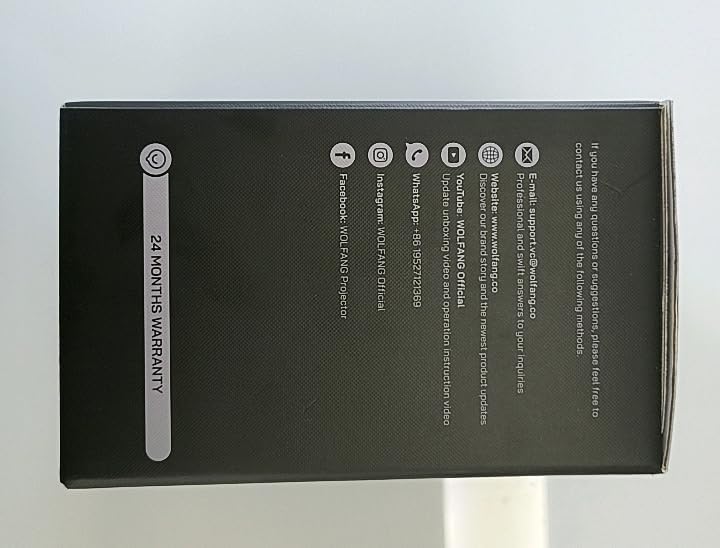
Mynd: Hlið view of the WOLFANG Portable Projector WP05 box, clearly displaying a '24 MONTHS WARRANTY' badge and contact information.
11.2 Þjónustuver
For any questions, suggestions, or support needs, please contact WOLFANG customer service using the following methods:
- Tölvupóstur: support.tvc@wolfang.co
- Websíða: www.wolfang.co
- YouTube: WOLFANG Official (for instruction videos and product updates)
- WhatsApp: +86 19527121353
- InstagVinnsluminni: WOLFANG opinbert
- Facebook: WOLFANG Projector


