1. Inngangur
Thank you for choosing the WOLFANG WDV01 Portable DVD Player. This manual provides essential information for setting up, operating, and maintaining your device. Please read it carefully before use to ensure optimal performance and longevity of your product.
The WOLFANG WDV01 is designed for portable entertainment, featuring a 9.5-inch unit with a 7.5-inch HD swivel screen, stereo speakers, and a long-lasting battery. It supports various disc and file formats, making it versatile for different media content.
2. Innihald pakka
Gakktu úr skugga um að allir hlutir séu til staðar í pakkanum:
- WOLFANG WDV01 Portable DVD Player
- Fjarstýring
- Notendahandbók
- AC hleðslutæki
- Bíll hleðslutæki
- 3-í-1 AV snúru

Image: Contents of the WOLFANG WDV01 package, showing the DVD player, remote control, user manual, AC charger, car charger, and AV cable.
3. Vöru lokiðview
3.1 Helstu eiginleikar
- Skjár: 9.5-inch unit with 7.5-inch HD eye-protection screen.
- Snúningur skjás: 270° horizontal rotation and 180° vertical flip for flexible viewing horn.
- Hljóð: Innbyggðir stereóhátalarar.
- Rafhlöðuending: Up to 6 hours of playback on a full charge.
- Rafmagnsvalkostir: AC power adapter and car charger included.
- Minni aðgerð: Breakpoint memory resumes playback from the last stopped point.
- Samhæfni fjölmiðla: Supports DVD, SVCD, VCD, CD-R/RW discs.
- File Stuðningur við snið: JPEG, WMA, MPG, MP3, DIVX, VOB, AVI.
- Ytri tenging: USB port, SD card slot (max 32GB), AV input, AV output, 3.5mm headphone jack.
3.2 Skipulag tækis
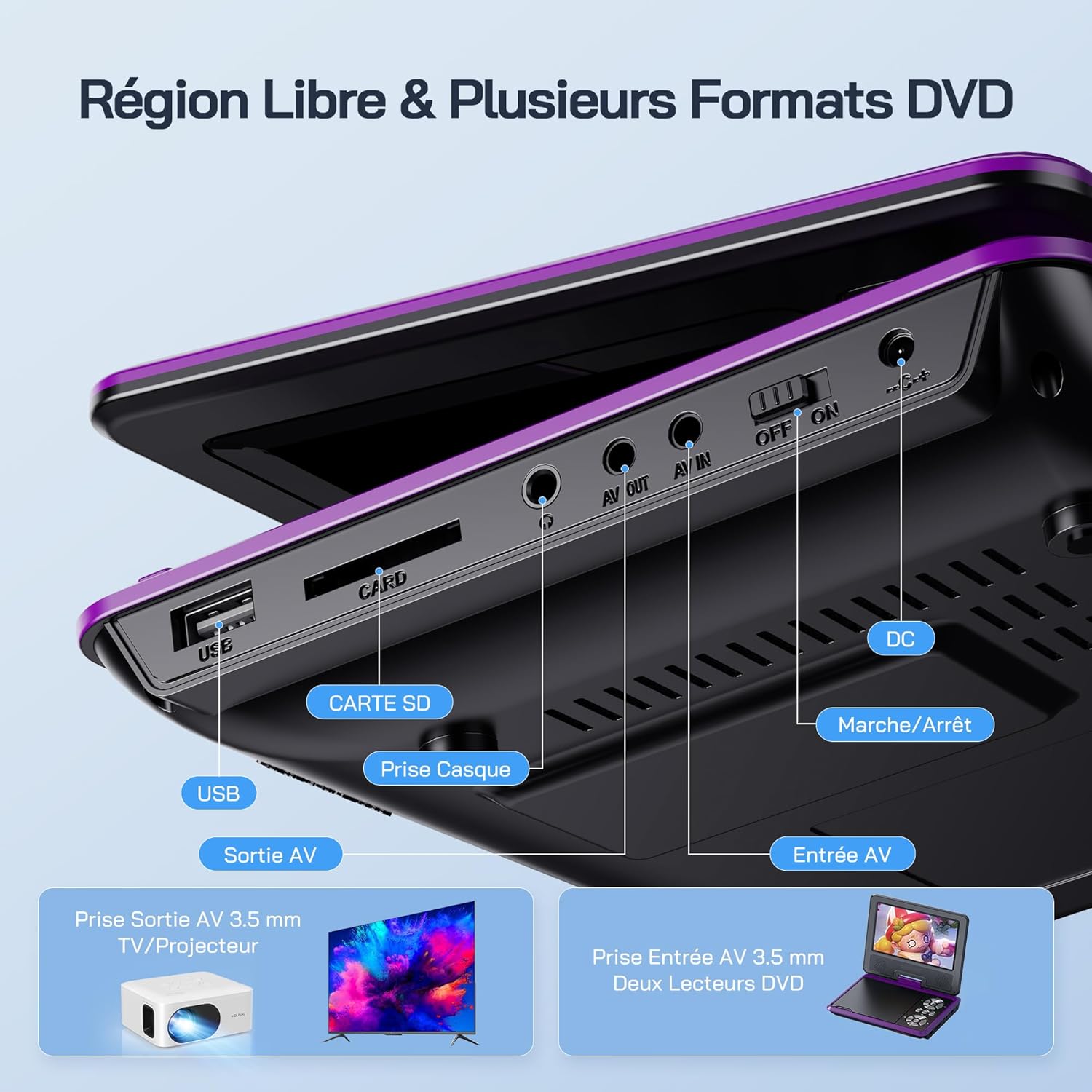
Mynd: Ítarleg view of the side panel of the WOLFANG WDV01, highlighting the USB port, SD card slot, headphone jack, AV OUT, AV IN, DC power input, and ON/OFF switch.
- USB tengi: Til að tengja USB glampilykla.
- SD kortarauf: Til að setja í SD/MMC kort.
- Heyrnartól tjakkur: 3.5 mm hljóðútgangur fyrir heyrnartól.
- AV ÚT: Audio/Video output for connecting to a TV or projector.
- AV IN: Audio/Video input for connecting external devices or another DVD player.
- DC IN: Rafmagnsinntak fyrir straumbreyti eða bílhleðslutæki.
- ON/OFF rofi: Rafmagnsstýring fyrir tækið.
4. Uppsetning
4.1 Upphafshleðsla
Before first use, fully charge the device. Connect the AC charger to the DC IN port on the player and plug it into a wall outlet. The charging indicator light will illuminate. Once fully charged, the light may change color or turn off, depending on the model.
4.2 Kveikt/slökkt
To power on the device, slide the ON/OFF switch to the "ON" position. To power off, slide it to the "OFF" position.
4.3 Skjástilling
The screen can be rotated 270 degrees horizontally and flipped 180 degrees vertically. Adjust the screen to your preferred viewing angle. This feature is particularly useful for mounting in a car or for shared viewing.

Image: Illustration demonstrating the 270-degree rotation and 180-degree flip capabilities of the WOLFANG WDV01 screen.
5. Notkunarleiðbeiningar
5.1 Að spila DVD/CD
- Opnaðu disklokið varlega.
- Place a compatible DVD or CD onto the spindle, label side up.
- Lokaðu disklokinu.
- The player will automatically detect and begin playback. If not, select "Disc" from the main menu.
Athugið: This device supports DVD, SVCD, VCD, CD-R/RW discs. It is not compatible with 1080p, 4K, or Blu-ray discs.
5.2 Playing from USB/SD Card
- Settu USB-lykil í USB-tengið eða SD-kort í SD-kortaraufina.
- From the main menu, select "USB" or "SD" depending on your media source.
- Fletta í gegnum möppur og files using the control buttons or remote control.
- Veldu viðkomandi file (JPEG, WMA, MPG, MP3, DIVX, VOB, AVI) to begin playback.
Athugið: Maximum supported Micro SD card capacity is 32GB. Video files should have a resolution up to 720x480. Image files should have a resolution up to 2650x1440.
5.3 Breakpoint Memory Function
The player automatically remembers the last playback position. When you power on the device again or re-insert the same disc/media, it will prompt you to resume playback from where you left off. This function may need to be activated in the system settings.

Image: Visual representation of the breakpoint memory feature, illustrating how the player can pause and resume video playback from the exact point of interruption.
5.4 Connecting to an External Display (TV/Projector)
Use the provided 3-in-1 AV cable to connect the player to a TV or projector.
- Tengdu annan endann á AV-snúrunni við AV OUT tengið á DVD-spilaranum.
- Connect the other end of the AV cable to the corresponding AV input ports (Yellow for Video, Red for Right Audio, White for Left Audio) on your TV or projector.
- Veldu rétta AV-inntaksuppsprettu á sjónvarpinu þínu eða skjávarpa.
- The player's screen content will now be displayed on the external screen.

Image: A WOLFANG WDV01 Portable DVD Player connected to a large television screen, displaying content for a family watching together, demonstrating the TV sync feature.
5.5 Connecting to Another DVD Player (AV IN)
The AV IN port allows you to connect another compatible device, such as a second DVD player, to display its content on the WOLFANG WDV01 screen.
- Connect one end of an AV cable to the AV OUT port of the external device.
- Connect the other end of the AV cable to the AV IN port on the WOLFANG WDV01.
- Switch the WOLFANG WDV01 to AV input mode (refer to the on-screen menu or remote control for this option).
6. Viðhald
6.1 Þrif á tækinu
- Gakktu úr skugga um að slökkt sé á tækinu og tekið úr sambandi áður en það er hreinsað.
- Notið mjúkan, þurran klút til að þurrka ytra byrði spilarans.
- Fyrir skjáinn skal nota mjúkan, lólausan klút sem er sérstaklega hannaður fyrir raftækjaskjái. Notið ekki slípiefni eða leysiefni.
- To clean the disc lens, use a specialized DVD lens cleaning disc. Do not attempt to clean the lens manually.
6.2 Umhirða rafhlöðu
- Forðist að láta tækið verða fyrir miklum hita (heitu eða köldu).
- If storing the device for an extended period, charge the battery to approximately 50% to prolong its lifespan.
- Ekki reyna að skipta um innbyggðu rafhlöðuna sjálf/ur. Hafðu samband við þjónustuver ef vandamál koma upp með rafhlöðuna.
6.3 Geymsla
Store the player in a cool, dry place away from direct sunlight and moisture. Keep it in its original packaging or a protective case when not in use to prevent damage.
7. Bilanagreining
| Vandamál | Möguleg orsök | Lausn |
|---|---|---|
| Enginn kraftur | Battery drained, power adapter not connected, power switch off. | Charge the battery, ensure power adapter is securely connected, slide power switch to ON. |
| Diskurinn spilar ekki | Incompatible disc format, disc dirty/scratched, disc inserted incorrectly. | Check disc compatibility (no Blu-ray/4K), clean disc, insert disc label side up. |
| Ekkert hljóð | Volume too low, headphones connected, audio settings incorrect. | Increase volume, disconnect headphones, check audio output settings. |
| Engin mynd í sjónvarpinu | AV cable loose, incorrect TV input selected. | Ensure AV cable is securely connected, select correct AV input on TV. |
| USB/SD kort ekki þekkt | Incompatible format, card/drive damaged, incorrect file kerfi. | Ensure media is formatted to FAT32, check for damage, try another USB/SD card. Max 32GB SD card. |
If the problem persists after trying these solutions, please contact WOLFANG customer support.
8. Tæknilýsing
| Eiginleiki | Smáatriði |
|---|---|
| Vörumerki | WOLFANG |
| Fyrirmynd | WDV01 |
| Skjástærð | 7.5 tommur |
| Einingastærð | 9.5 tommur (ská) |
| Skjáupplausn | Allt að 800 x 480 punktar |
| Samhæfni diska | DVD, SVCD, VCD, CD-R/RW |
| File Stuðningur við snið | Video: AVI, MPG, MP3, DIVX, VOB; Audio: WMA, MP3; Image: JPEG |
| Stuðningur við USB/SD kort | Max 32GB (Micro SD) |
| Video Resolution (USB/SD) | Allt að 720 x 480 punktar |
| Image Resolution (USB/SD) | Allt að 2650 x 1440 punktar |
| Rafhlöðuending | 4-6 tímar |
| Þyngd hlutar | 1100 grömm |
| UPC | 850067892205 |
9. Ábyrgð og stuðningur
9.1 Ábyrgð framleiðanda
The WOLFANG WDV01 Portable DVD Player comes with a 24 mánaða ábyrgð framleiðanda frá kaupdegi. Þessi ábyrgð nær til galla í efni og framleiðslu við eðlilega notkun. Hún nær ekki til tjóns sem orsakast af misnotkun, slysum, óheimilum breytingum eða eðlilegu sliti.
Vinsamlegast geymdu sönnunina þína fyrir kaupum fyrir ábyrgðarkröfur.
9.2 Þjónustuver
For any questions, technical assistance, or warranty claims, please contact WOLFANG customer support. Our team is available to assist you and aims to respond within 24 hours.
Contact information can typically be found on the official WOLFANG websíðuna eða í gegnum kaupvettvanginn þinn.


