1. Inngangur
Welcome to your new Baseus BC1 Open Ear Earbuds. This manual provides detailed instructions for setup, operation, and maintenance to ensure you get the best experience from your device. The Baseus BC1 earbuds feature a comfortable open-ear design, secure tri-curve clip, rich sound with powerful bass, clear calls with 4-mic AI noise reduction, IP55 water resistance, and precise button control.
2. Innihald pakka
Vinsamlegast athugið innihald pakkans til að ganga úr skugga um að allir hlutir séu til staðar:
- Baseus BC1 Open Ear Earbuds (Left & Right)
- Hleðslutaska
- Notendahandbók
- Type-C hleðslusnúra

3. Vöru lokiðview
The Baseus BC1 Open Ear Earbuds are designed for comfort and high-quality audio, allowing you to stay aware of your surroundings. The compact charging case provides extended battery life and convenient storage.

4. Uppsetning
4.1. Hleðsla
Áður en eyrnatólin eru notuð í fyrsta skipti skal hlaða þau að fullu og hleðsluhulstrið.
- Tengdu meðfylgjandi hleðslusnúruna af gerðinni C við hleðslutengið á hulstrinu og aflgjafa.
- Það tekur um það bil 1.5 klukkustundir að hlaða hulstrið að fullu.
- The earbuds offer up to 7.5 hours of listening on a single charge, and up to 38 hours total with the fully charged case.

4.2. Kveikt/slökkt
- Kveikt á: Opnaðu hleðslutækið og heyrnartólin kveikjast sjálfkrafa.
- Slökkva á: Place the earbuds back into the charging case and close the lid; they will power off automatically.
4.3. Pörun Bluetooth
- Opnaðu hleðsluhulstrið. Eyrnatólin fara sjálfkrafa í pörunarstillingu, sem blikkar með LED ljósi.
- Farðu í Bluetooth-stillingar í tækinu þínu (snjallsíma, spjaldtölvu o.s.frv.) og virkjaðu Bluetooth.
- Leitaðu að "Baseus BC1" in the list of available devices and select it to connect.
- Once connected, you will hear a confirmation tone, and the LED indicator on the earbuds will turn off.
4.4. Að nota eyrnatólin
For optimal comfort and sound quality, follow these steps to wear your earbuds:
- Gently clip each earbud onto your ear, ensuring the main body rests comfortably behind your earlobe.
- Adjust the earbud to find the most comfortable and secure position. The tri-curve ergonomic clip is designed to adapt to various ear shapes.
- Ensure the sound outlet is aligned with your ear canal to experience the best sound quality.


5. Notkunarleiðbeiningar
5.1. Hnappastýringar
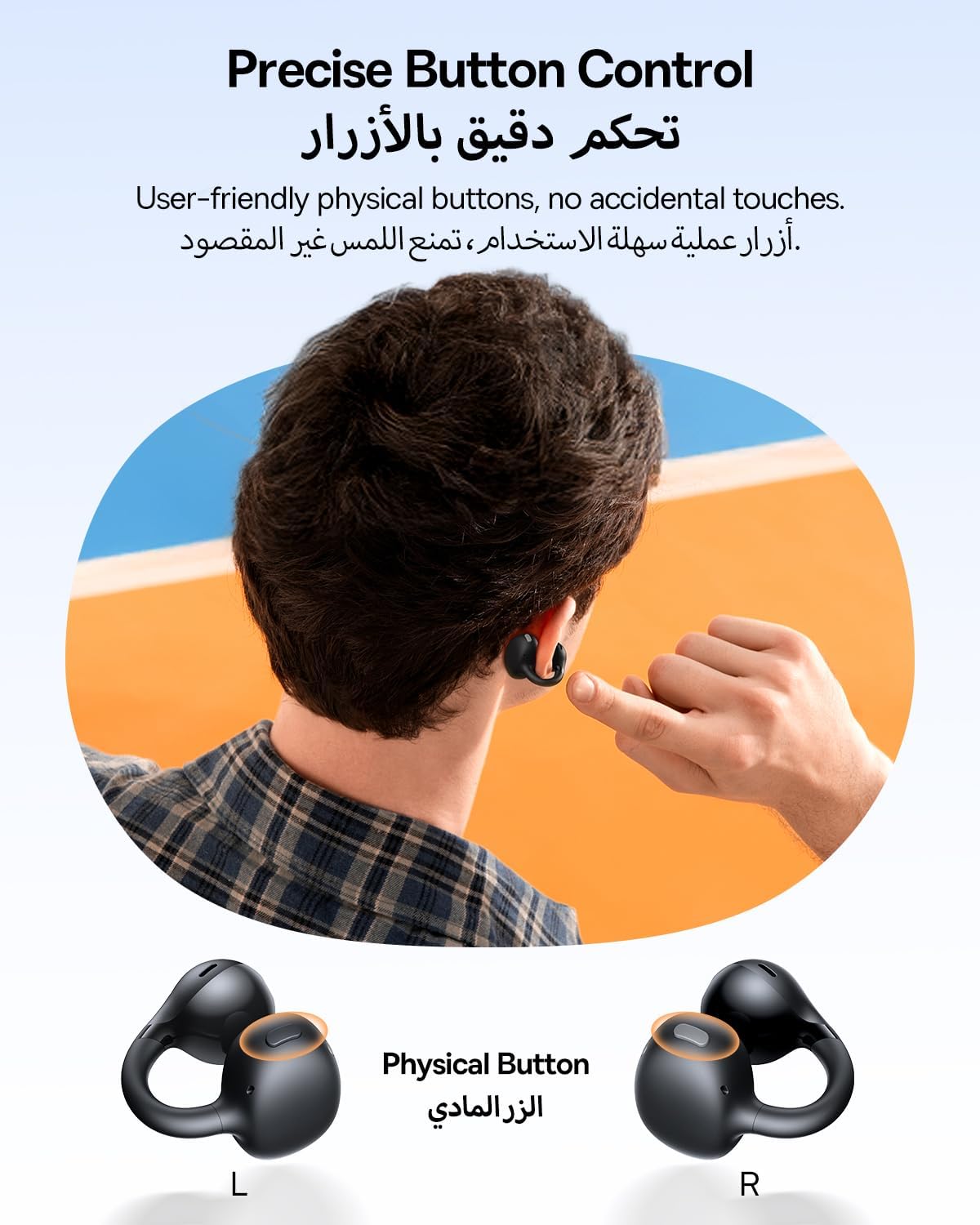
The Baseus BC1 earbuds feature physical buttons for precise control, minimizing accidental touches. The functions are as follows:
- Spila / gera hlé: Ýttu einu sinni á hnappinn á hvorum eyrnatólinu sem er.
- Hækka: Single press the button on the right earbud.
- Hljóðstyrkur niður: Single press the button on the left earbud.
- Næsta lag: Long press the button on the right earbud for 1.5 seconds.
- Fyrra lag: Long press the button on the left earbud for 1.5 seconds.
- Svara/slíta símtali: Double press the button on either earbud.
- Hafna símtali: Long press the button on either earbud for 1.5 seconds during an incoming call.
- Raddaðstoðarmaður: Triple press the button on the right earbud.
- Cycle Modes (Game/Movie/Normal): Triple press the button on the left earbud.
5.2. App Customization
Download the official Baseus app from your device's app store to unlock advanced features and personalize your listening experience:
- Sérhannaðar EQ: Adjust the equalizer settings to fine-tune the audio to your preference.
- Sound Profiles: Veldu úr ýmsum forstilltum hljóðforritumfiles for different music genres or listening scenarios.
- Touch Control Personalization: Reassign touch control functions to suit your needs.

5.3. Fjölpunktatenging
The Baseus BC1 earbuds support simultaneous connection to two devices, allowing seamless switching between them:
- Pair the earbuds with your first device (e.g., smartphone).
- Disconnect the earbuds from the first device's Bluetooth settings. The earbuds will re-enter pairing mode.
- Pair the earbuds with your second device (e.g., tablet or laptop).
- Manually reconnect the earbuds to the first device from its Bluetooth settings.
- The earbuds will now be connected to both devices simultaneously, allowing you to switch audio sources without re-pairing.

6. Viðhald
6.1. Þrif
To ensure optimal performance and longevity of your earbuds:
- Regularly clean the earbuds and the charging contacts inside the case using a clean, dry cotton swab.
- Ef nauðsyn krefur, létt dampen the cotton swab with alcohol for disinfection.
- Avoid issues such as the earbuds being unable to charge or power on due to prolonged lack of cleaning.
6.2. Geymsla
- Þegar eyrnatólin eru ekki í notkun skal geyma þau alltaf í hleðsluhulstrinu til að vernda þau fyrir ryki og skemmdum.
- If the earbuds will not be used for an extended period, charge the case at least once every three months to maintain battery health.
7. Bilanagreining
If you encounter any issues with your Baseus BC1 earbuds, please refer to the following common problems and solutions:
- Eyrnatól parast ekki: Ensure Bluetooth is enabled on your device and the earbuds are in pairing mode. Try forgetting previous pairings on your device and re-pairing.
- Aðeins einn eyrnatól virkar: Place both earbuds back in the charging case, close the lid for 10 seconds, then open it again. If the issue persists, perform a factory reset.
- Léleg hljóðgæði: Ensure the earbuds are worn correctly and the sound outlet is aligned with your ear canal. Check the EQ settings in the Baseus app.
- Eyrnatól hlaðast ekki: Clean the charging contacts on both the earbuds and the case. Ensure the charging cable is properly connected to a working power source.
7.1. Factory Reset
If the earbuds are not functioning correctly, a factory reset may resolve the issue:
- Remove the pairing information of the earbuds from your device's Bluetooth settings (e.g., "Forget This Device").
- Place both earbuds into the charging case, ensuring they are securely in place.
- Close the charging case for 3 seconds, then reopen it.
- With the charging case open, long press the button on the charging case for 10 seconds until the indicator light flashes white twice. This indicates that the reset is complete.
- After the factory reset, use the initial Bluetooth pairing method (Section 4.3) to reconnect and resume normal use.
8. Tæknilýsing
| Eiginleiki | Smáatriði |
|---|---|
| Nafn líkans | BC1 |
| Tegundarnúmer vöru | PM153 |
| Vörumerki | Baseus |
| Litur | Svartur |
| Staðsetning eyrna | Opið eyra |
| Heyrnartól Form Factor | Opið eyra |
| Tengitækni | Þráðlaust |
| Þráðlaus samskiptatækni | Bluetooth |
| Viðnám | 16 Ohm |
| Hávaðastýring | Engin |
| Heyrnartólstengi | Enginn Jack |
| Eftirlitsaðferð | Þrýstihnappur |
| Vatnsþolsstig | Vatnsheldur (IP55) |
| Hleðslutími | 1.5 klst |
| Þyngd hlutar | 111 grömm |
| Stærðir pakka | 13.4 x 8.5 x 4.2 cm |
| Innifalið íhlutir | Notendahandbók |
| Efni | Plast |
| Samhæf tæki | Phones, tablets, desktop computers, laptops, mobile phones, smart speakers, TVs, digital video game players |
9. Öryggisupplýsingar
- Avoid prolonged listening at high volume levels to prevent potential hearing damage.
- Ekki nota eyrnatólin í aðstæðum þar sem það gæti verið hættulegt að heyra ekki umhverfishljóð (t.d. við akstur, hjólreiðar eða gang í umferð).
- Haldið eyrnatólunum og hleðsluhulstrinu fjarri miklum hita, beinu sólarljósi og raka.
- Ekki reyna að taka í sundur, gera við eða breyta vörunni. Það getur ógilt ábyrgðina og valdið skemmdum.
- Keep out of reach of children and pets to prevent accidental ingestion or misuse.
- Fargið vörunni og rafhlöðunni á ábyrgan hátt í samræmi við gildandi reglur.
10. Ábyrgð og stuðningur
For warranty information, technical support, or any product-related inquiries, please refer to the official Baseus websíðuna eða hafið samband við dreifingaraðila á ykkar svæði.
You can also visit the official Baseus Store for more information: Baseus verslun


