1. Inngangur
This manual provides essential information for the NIMO 15.6" Gaming Laptop (Model N159). It covers product features, setup procedures, operating instructions, maintenance guidelines, troubleshooting tips, and detailed specifications. Please read this manual thoroughly before using your new laptop to ensure optimal performance and longevity.

Image: The NIMO 15.6" Gaming Laptop, showcasing its display and key features like fingerprint unlock, Type-C PD charger, and backlit keyboard.
2. Hvað er í kassanum
Gakktu úr skugga um að allir hlutir séu í umbúðunum:
- 1 x NIMO N159 fartölva
- 1 x Type-C 100W PD hraðhleðslutæki
- 1 x Notendahandbók (þetta skjal)
- Stýrikerfi Windows 11 Home (fyrirfram uppsett)
- Warranty Information (2 Years Warranty, 90 Days Return)
3. Vöru lokiðview
3.1 Helstu eiginleikar
- Örgjörvi: AMD Ryzen 7 7735HS (8 Cores, 16 Threads, up to 4.75GHz)
- Grafík: Integrated AMD Radeon 680M GPU
- Skjár: 15.6" Full HD (1920x1080) IPS Anti-Glare Display
- Minni: 16GB DDR5 RAM (upgradeable)
- Geymsla: 1TB PCIe 4.0 SSD diskur (hægt að uppfæra)
- Hleðsla: 100W Type-C PD Fast Charger
- Öryggi: Fingerprint Reader for secure unlock
- Lyklaborð: Backlit Keyboard with Numeric Keypad
- Hljóð: Dual 2W stereo speakers, dual beamforming microphones
- Webkambur: 2MP with physical camera shutter
- Stýrikerfi: Windows 11 Home

Image: An illustration detailing the AMD Ryzen 7 7735HS processor, highlighting its 8 cores, 16 threads, and integrated Radeon 680M graphics for balanced performance.
3.2 Gáttir og tengi
Familiarize yourself with the available ports on your NIMO laptop:

Image: A detailed diagram illustrating the location and type of ports on the NIMO laptop, including USB 2.0, USB 3.2 Gen1, Type-C Gen2 (multifunction), HDMI 2.0, Audio Jack, Micro SD Reader, and Kensington Lock.
- USB 2.0 tengi: Til að tengja eldri USB tæki.
- USB 3.2 Gen1 Ports (x4): Fyrir háhraða gagnaflutning með samhæfum USB tækjum.
- Type-C Gen2 Ports (x2, Multifunction): Supports data transfer, video output, and power delivery (100W PD fast charging).
- HDMI 2.0 tengi: Til að tengja við ytri skjái eða sjónvörp.
- Hljómtæki: Til að tengja heyrnartól eða ytri hátalara.
- Micro SD lesari: For reading Micro SD memory cards.
- Kensington Lock Slot: Til að tryggja fartölvuna þína með samhæfum lás.
4. Uppsetning
4.1 Byrjunarkveikt
- Taktu fartölvuna og allan fylgihluti úr kassanum.
- Connect the 100W Type-C PD Fast Charger to one of the Type-C ports on the laptop and then to a power outlet.
- Opnaðu lokið á fartölvunni. Tölvan gæti kviknað sjálfkrafa eða þú gætir þurft að ýta á rofann.
- Fylgdu leiðbeiningunum á skjánum til að ljúka uppsetningunni á Windows 11 Home, þar á meðal vali á tungumáli, nettengingu og stofnun notandareiknings.
4.2 Hleðsla rafhlöðunnar
Before first use, it is recommended to fully charge the laptop battery. The 100W Type-C PD Fast Charger can provide approximately 5 hours of usage time with just 1 hour of charging.

Image: A visual representation of the 100W Type-C lightning-fast charger connected to the NIMO laptop, demonstrating its ability to charge quickly and efficiently.
5. Notkunarleiðbeiningar
5.1 Kveikja/slökkva og svefnhamur
- Kveikt á: Ýttu á rofann sem er staðsettur á lyklaborðinu.
- Slökkva á: Smelltu á Start hnappinn í Windows og veldu síðan Power > Shutdown.
- Svefnhamur: Smelltu á Start hnappinn, veldu síðan Power > Sleep eða lokaðu fartölvunni.
5.2 Using the Fingerprint Unlock
The fingerprint reader is integrated into the touchpad for quick and secure access.
- During Windows setup or later in Windows Settings, configure your fingerprint for login.
- To unlock, simply place your registered finger on the fingerprint reader on the touchpad.
5.3 Adjusting the Backlit Keyboard
The keyboard backlight can be adjusted for comfortable typing in various lighting conditions.

Image: A visual guide demonstrating the fingerprint unlock feature on the touchpad and the functionality of the backlit keyboard, including how to cycle through brightness settings using the F9 key.
- Ýttu á F9 key to cycle through backlight settings:
- 1 Tap: Light (Temporary)
- 2 Taps: Light (Temporary)
- 3 Taps: Light (Constant)
- 4 Taps: Off
5.4 Notkun WebLokara fyrir myndavél
For privacy, the laptop includes a physical camera shutter.
- Slide the shutter to the left to open the camera.
- Slide the shutter to the right to close and cover the camera lens.

Image: A visual guide demonstrating the physical camera shutter, showing both the 'Camera Open' and 'Camera Close' statuses for enhanced privacy.
6. Viðhald
6.1 Þrif á fartölvunni
- Always power off the laptop and disconnect the charger before cleaning.
- Notaðu mjúkan, lólausan klút örlítið dampÞvoið með vatni eða skjáhreinsiefni fyrir skjáinn.
- Notið mjúkan, þurran klút fyrir lyklaborðið og undirvagninn. Forðist sterk efni eða slípiefni.
- Use compressed air to clear dust from vents periodically.
6.2 Umhirða rafhlöðu
- Forðastu að tæma rafhlöðuna alveg oft.
- Geymið fartölvuna á köldum og þurrum stað ef hún er ekki notuð í langan tíma.
- Ekki láta fartölvuna verða fyrir miklum hita.
6.3 Hugbúnaðaruppfærslur
Athugaðu reglulega hvort uppfærslur á stýrikerfum og bílstjórum séu til staðar og settu upp þær til að tryggja bestu mögulegu afköst og öryggi.
7. Bilanagreining
| Vandamál | Möguleg orsök | Lausn |
|---|---|---|
| Tölvan kviknar ekki á. | Vandamál með lága rafhlöðu eða straumbreyti. | Connect the charger and wait a few minutes before attempting to power on. Ensure the charger is properly connected to both the laptop and the power outlet. |
| Skjárinn er auður eða svartur. | Laptop in sleep mode, display settings issue, or hardware problem. | Press any key or the power button to wake from sleep. Try connecting an external monitor to check if the display output works. Restart the laptop. |
| Baklýsing lyklaborðsins virkar ekki | Backlight turned off or at lowest setting. | Ýttu á F9 key repeatedly to cycle through brightness levels and turn on the backlight. |
| Fingerprint unlock not working. | Finger not properly placed, or sensor issue. | Ensure your finger is clean and dry and covers the sensor completely. Re-register your fingerprint in Windows Settings if the issue persists. |
| Hæg frammistaða. | Too many applications running, insufficient storage, or outdated drivers. | Close unnecessary applications. Check available storage space. Update Windows and device drivers. |
Ef þú lendir í vandamálum sem ekki eru talin upp hér eða þarft frekari aðstoð, vinsamlegast hafðu samband við þjónustuver NIMO.
8. Tæknilýsing
| Vörumerki | NIMO |
| Nafn líkans | NIMO N159B |
| Skjástærð | 15.6 tommur |
| Skjáupplausn | 1920 x 1080 Pixels (FHD IPS) |
| Örgjörvi | AMD Ryzen 7 7735HS (8 Cores, 4.75 GHz Max Turbo) |
| vinnsluminni | 16 GB DDR5 (4800 MHz) |
| Harður diskur | 1024 GB SSD diskur (PCIe 4.0) |
| Grafískur hjálpargjörvi | AMD Radeon 680M (innbyggt) |
| Stýrikerfi | Windows 11 Home |
| Þráðlaus gerð | 802.11a/b/g/n/ac |
| USB 2.0 tengi | 1 |
| USB 3.0 tengi | 4 |
| Meðal rafhlöðuending | 5 Hours (54Wh, 11.4V/4700mAh) |
| Þyngd hlutar | 3.8 pund |
| Vörumál | 14.07 x 8.98 x 0.76 tommur |
| Litur | Blár |
| Aftan WebCam Upplausn | 2 MP |
| Sérstakir eiginleikar | Baklýst lyklaborð, fingrafaralesari, HD hljóð, tölulegt takkaborð |
9. Ábyrgð og stuðningur
9.1 Ábyrgð framleiðanda
Your NIMO N159 laptop is covered by a comprehensive 2 árs ábyrgð framleiðanda from Nimo Direct Inc. This warranty covers defects in materials and workmanship under normal use. For warranty claims, please contact customer support.

Image: A technician working on a laptop's internal components, representing the 2-year support provided for Nimo products.
9.2 Skilareglur
Nimo Direct Inc. offers a 90 daga vandræðalaus skilastefna. You may return any Nimo product for any reason within 90 days of purchase. Please refer to your purchase documentation for specific return procedures.
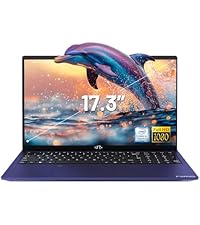
Image: A delivery person handing a package to a customer, illustrating the 90-day return policy for Nimo products.
9.3 Þjónustuver
For any product-related questions, technical assistance, or warranty claims, please contact our professional after-sales service team. Our dedicated support team is available to resolve issues or facilitate replacements.
- Netfang: service@nimopc.com
- Á netinu: Heimsæktu opinbera NIMO website or product page for contact options.

Image: Customer service representatives wearing headsets, indicating professional customer assistance available via phone and live chat.


