1. Inngangur
This manual provides essential information for the safe operation, assembly, maintenance, and troubleshooting of your Varstrom VS10 Electric Scooter. Please read this manual thoroughly before first use to ensure proper function and to prevent injury or damage.
2. Öryggisleiðbeiningar
Operating an electric scooter carries inherent risks. Adhere to the following safety guidelines:
- Always wear a helmet and appropriate protective gear (knee pads, elbow pads).
- Fylgdu öllum staðbundnum umferðarlögum og reglugerðum.
- Ekki hjóla í bleytu, mikilli rigningu eða á hálu yfirborði.
- Avoid riding at night or in low visibility conditions. If unavoidable, ensure all lights are functional and wear reflective clothing.
- Haldið öruggum hraða og fjarlægð frá öðrum ökutækjum og gangandi vegfarendum.
- Ekki framkvæma brellur eða skyndilegar hreyfingar.
- Gakktu úr skugga um að vespan sé fullhlaðin og allir íhlutir séu öruggir fyrir hverja ferð.
- Hámarksburðargeta er 120 kg. Ekki fara yfir þessi mörk.
- This scooter is intended for adult use only.
3. Innihald pakka
Gakktu úr skugga um að allir hlutir séu til staðar í pakkanum:
- Varstrom VS10 Electric Scooter
- Hleðslutæki
- Notendahandbók (þetta skjal)
4. Vöru lokiðview
Familiarize yourself with the main components of your Varstrom VS10 Electric Scooter.

Mynd: Hlið view of the Varstrom VS10 Electric Scooter, showcasinheildarhönnun þess og íhluti.
Helstu eiginleikar:
- Mótor: 500W Brushless DC Motor for efficient power delivery.
- Rafhlaða: 48V 15.6Ah Lithium-ion battery for extended range.
- Dekk: 10-inch puncture-proof solid tires.
- Fjöðrun: Front dual suspension and rear dual suspension for ride comfort.
- Lýsing: Integrated headlight, bright rear brake light, and dual handlebar turn signals.
- Skjár: Intelligent LED screen showing speed, battery level, and riding mode.
- Stjórna: App control via smartphone for various settings.
- Færanleiki: Quick folding mechanism for easy storage and transport.
5. Samsetning og uppsetning
5.1 Að taka vespuna upp
The scooter is shipped in a folded state. Follow these steps to unfold it:
- Settu vespuna á slétt yfirborð.
- Finndu lás samanbrjótanlega búnaðarins nálægt botni stýrissúlunnar.
- Release the latch and carefully lift the steering column until it locks into the upright position. Ensure the locking mechanism is fully engaged.
- Raise the handlebars and secure them if they are folded down.

Image: Illustration showing the folded and unfolded dimensions of the Varstrom VS10 Electric Scooter, demonstrating its compact storage capability.
5.2 Upphafshleðsla
Áður en þú ferð í fyrstu ferðina skaltu hlaða rafhlöðu vespunnar að fullu.
- Gakktu úr skugga um að slökkt sé á vespu.
- Locate the charging port, typically on the side of the deck.
- Tengdu hleðslutækið við hleðslutengið og stingdu því síðan í venjulegan innstungu.
- Hleðsluvísirinn á hleðslutækinu sýnir venjulega rautt meðan á hleðslu stendur og verður grænn þegar hann er fullhlaðinn.
- Hleðslutími er um það bil 6-7 klukkustundir. Ekki ofhlaða.

Mynd: Ítarleg view of the scooter's battery compartment and charging specifications, highlighting the 48V 15.6Ah battery and 6-7 hour charging time.
6. Rekstur
6.1 Kveikt/slökkt
- To power on: Press and hold the power button on the LED display until the screen illuminates.
- To power off: Press and hold the power button until the screen turns off.
6.2 LED skjár og stjórntæki
The integrated LED display provides real-time information and control options.

Image: Close-up of the scooter's intelligent LED screen, displaying current speed, selected gear (riding mode), and battery level.
- Hraðaskjár: Sýnir núverandi aksturshraða.
- Rafhlöðuskjár: Gefur til kynna hleðslu rafhlöðunnar sem eftir er.
- Gear Shift (Riding Modes): Press the 'Set/Switch' button to cycle through Eco, Drive, and Sport modes.
6.3 Akstursstillingar
- Eco Mode: Lowest speed, maximum range, suitable for beginners or crowded areas.
- Akstursstilling: Medium speed, balanced performance for daily commuting.
- Íþróttastilling: Highest speed, maximum power, for experienced riders on open roads.
6.4 hraðastilli
To activate cruise control, maintain a consistent speed for a few seconds. The scooter will beep, and cruise control will engage. To disengage, press the brake lever or accelerate.
6.5 Ljósakerfi
The scooter is equipped with a comprehensive lighting system for visibility and safety.
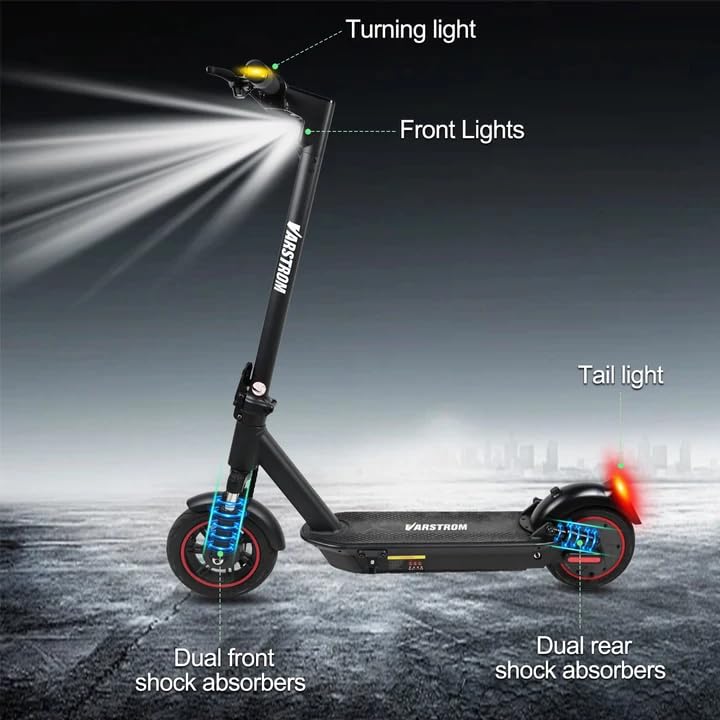
Image: Diagram illustrating the scooter's front lights, turning lights on the handlebars, tail light, and the dual front and rear shock absorbers.
- Framljós: Turn on/off via the app or dedicated button (if available).
- Tail Light/Brake Light: The rear light illuminates when the scooter is powered on and brightens when the brake is applied.
- Stefnuljós: Activate turn signals using the controls on the handlebars to indicate your turning direction.
6.6 Hemlun
The scooter features front braking. Apply the brake lever gently to slow down. For emergency stops, apply firm and even pressure to the brake lever. Avoid sudden braking at high speeds.
6.7 Tuya Smart App Control
Enhance your riding experience by connecting your scooter to the Tuya Smart app.

Image: Screenshot of the Tuya Smart App interface, showing options to unlock the scooter, control cruise, turn on/off headlights, switch riding modes, and set speed limits.
- Download the 'Tuya Smart' app from your smartphone's app store.
- Gakktu úr skugga um að vespan þín sé kveikt á og að Bluetooth sé virkt í símanum þínum.
- Open the app and follow the instructions to add a new device. You may need to hold the brake and power button simultaneously to activate Bluetooth pairing mode.
- Í gegnum appið geturðu:
- Unlock/Lock the scooter remotely.
- Adjust lights.
- Skipta um akstursstillingar.
- Set cruise control.
- Toggle units (km/mph).
- View real-time ride data.
- Enable/disable zero start (safety feature).
7. Viðhald
7.1 Umhirða rafhlöðu
- Hlaðið rafhlöðuna reglulega, jafnvel þótt hún sé ekki í notkun, til að viðhalda heilbrigði hennar.
- Forðastu að tæma rafhlöðuna alveg.
- Geymið vespuna á köldum, þurrum stað fjarri beinu sólarljósi og miklum hita.
- Notaðu aðeins meðfylgjandi hleðslutæki.
7.2 Þrif
Þurrkaðu vespuna með auglýsinguamp cloth. Do not use high-pressure water jets or immerse the scooter in water, as this can damage electrical components.
7.3 Dekkjaskoðun
Although the tires are puncture-proof solid tires, regularly inspect them for any signs of damage, cracks, or embedded debris.
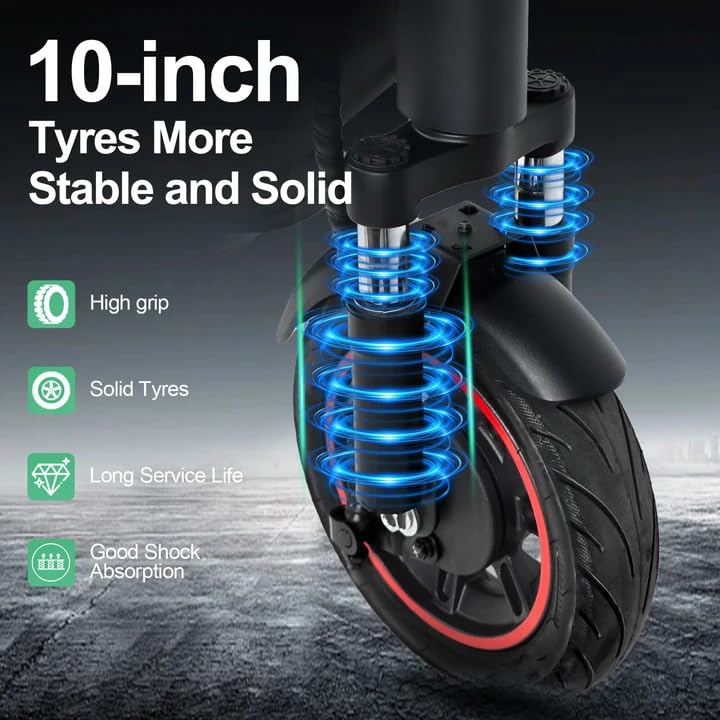
Image: Close-up of the scooter's 10-inch solid tires and dual suspension system, emphasizing stability and shock absorption.
8. Bilanagreining
| Vandamál | Möguleg orsök | Lausn |
|---|---|---|
| Vespu kviknar ekki á | Lítil rafhlaða; Lausar tengingar; Bilun í rofanum | Charge the battery; Check all visible connections; Contact support if issue persists. |
| Minnkuð drægni eða afl | Low battery; Overload; Cold weather; Tire damage | Fully charge battery; Ensure load is within limits; Battery performance decreases in cold; Inspect tires. |
| Forrit tengist ekki | Bluetooth off; Scooter not in pairing mode; App issue | Ensure phone Bluetooth is on; Activate scooter's Bluetooth pairing mode (brake + power button); Restart app/phone. |
| Bremsur bregðast ekki við | Brake cable loose or damaged | Inspect brake cable and lever; Seek professional service if necessary. |
9. Tæknilýsing
| Parameter | Gildi |
|---|---|
| Mótor | 500W Brushless (50N·m torque) |
| Rafhlaða | 48V 15.6Ah litíum |
| Hámarks svið | Up to 60 km per charge |
| Hámarkshraði | 25 km/klst |
| Hleðslutími | 6-7 tímar |
| Dekk | 10-inch Puncture-Proof Solid Tires |
| Fjöðrun | Front Dual Suspension + Rear Dual Suspension |
| Hámarks álag | 120 kg |
| Klifurhorn | 15° |
| Unfolding Size (LWH) | 117 x 53 x 120 cm |
| Folding Size (LWH) | 117 x 53 x 56 cm |
| Þyngd | 19.6 kg |
| Sérstakir eiginleikar | Digital Display, Foldable, Rechargeable, App Control, Cruise Control, Turning Indicator Light |

Mynd: Útskurður view illustrating the 500W brushless DC motor, highlighting its power and efficiency, alongside key performance metrics.
10. Ábyrgð og stuðningur
For warranty information, technical support, or service inquiries, please refer to the purchase documentation or contact your retailer. Keep your proof of purchase for warranty claims.


