Inngangur
This manual provides essential information for the safe and efficient operation of your AOC XL2-211 Smart Projector. Please read it thoroughly before using the device and retain it for future reference.
The AOC XL2-211 is a portable 1080P Full HD smart projector featuring Android 12.0, Wi-Fi 6, Bluetooth 5.0, and a fully enclosed optical engine for dust protection. It offers a large projection screen size from 40 to 250 inches, integrated stereo speakers, and versatile connectivity options.
Öryggisupplýsingar
Fylgið eftirfarandi öryggisráðstöfunum til að koma í veg fyrir skemmdir á skjávarpanum og tryggja öryggi notanda:
- Ekki horfa beint í linsuna á skjávarpanum þegar ...amp er á.
- Gakktu úr skugga um rétta loftræstingu til að koma í veg fyrir ofhitnun. Ekki loka fyrir loftræstiop.
- Notið aðeins straumbreytinn sem fylgir skjávarpanum.
- Haldið skjávarpanum frá vatni eða öðrum vökvum.
- Ekki reyna að taka skjávarpann í sundur eða gera við hann sjálfur. Hafðu samband við hæft þjónustufólk.
- Settu skjávarpann á stöðugt, jafnt yfirborð.
Innihald pakka
Gakktu úr skugga um að allir hlutir séu til staðar í pakkanum:
- AOC XL2-211 Smart Projector
- Rafmagnssnúra
- HDMI snúru
- Fjarstýring
- Notendahandbók (þetta skjal)

Image: The AOC XL2-211 Smart Projector and its included accessories, including the power cable, HDMI cable, and remote control.
Vara lokiðview
Skjávarpa íhlutir
Kynntu þér helstu íhluti skjávarpans:
- Myndvarpslinsa: Sendir frá sér myndina.
- Aflhnappur: Kveikir/slökkvið á skjávarpanum.
- Fókusskynjari: Notað til að stilla fókus sjálfkrafa.
- Loftgrill: Ensure proper airflow for cooling.
- Inntakshöfn: HDMI, USB, Audio Out (3.5mm jack).
- Rafmagnsinntak: Tengist við rafmagnssnúruna.

Mynd: Aftan view of the AOC XL2-211 projector, highlighting the HDMI, USB, and power input ports.
Uppsetning
1. Rafmagnstenging
- Tengdu rafmagnssnúruna við aflgjafainntak skjávarpans.
- Stingdu hinum enda rafmagnssnúrunnar í vegginnstungu.
2. Upphafleg staðsetning
- Place the projector on a stable surface or mount it on a tripod (not included).
- Ensure the projection surface is flat and clear of obstructions.
- The projector supports flexible placement, including tabletop and tripod mounting.
3. Kveikt/slökkt
- Ýttu á aflhnappinn á skjávarpanum eða fjarstýringunni til að kveikja á honum.
- Haltu rofanum inni til að slökkva á honum.
4. Fókus og leiðrétting á lykilsteini
The projector features automatic focus and keystone correction for a clear, rectangular image.
- Sjálfvirkur fókus: The projector will automatically adjust the focus upon startup or movement. You can enable/disable this in the settings.
- Sjálfvirk keystone leiðrétting: The projector automatically corrects image distortion caused by angled projection. This can also be adjusted in settings.
- Handvirk stilling: For fine-tuning, manual focus and keystone correction options are available in the Projection Settings menu.

Image: The AOC XL2-211 projector displaying its intelligent auto-focus and keystone correction capabilities, ensuring a clear image from various angles.
Notkunarleiðbeiningar
1. Leiðsögn og viðmót
The projector runs on Android 12.0, providing a user-friendly interface. Use the remote control to navigate through menus and select options.
- Heimaskjár: Access installed applications, settings, and media sources.
- Stillingarvalmynd: Adjust network, Bluetooth, projection, language, and other system settings.
2. Tengimöguleikar
The projector offers multiple ways to connect and display content:
Wireless Connectivity (Wi-Fi 6 & Bluetooth 5.0)
- Wi-Fi: Connect to your home network for internet access and streaming. Navigate to Stillingar > Þráðlaust að tengja.
- Skjáspeglun: Wirelessly cast content from your smartphone (iPhone, Android) or tablet. Ensure both devices are on the same Wi-Fi network.
- Bluetooth: Connect external Bluetooth speakers or headphones for enhanced audio. Go to Stillingar > Bluetooth to pair devices.

Image: The AOC XL2-211 projector displaying content mirrored from a smartphone, illustrating seamless wireless sharing.
Þráðlaus tenging
- HDMI: Connect devices like laptops, gaming consoles, or TV decoders using an HDMI cable.
- USB: Tengdu USB-lykla til að spila margmiðlunarefni files beint.
- Hljóðútgangur (3.5 mm tengi): Tengdu heyrnartól með snúru eða ytri hátalara.
Mynd: Ítarleg view of the AOC XL2-211 projector's input panel, showing HDMI, USB, and audio ports for versatile connections.
3. Spilun fjölmiðla
The projector supports various media formats and streaming applications.
- Straumspilunarforrit: Access pre-installed apps like Netflix, Hulu, Disney+, Prime Video, and YouTube.
- Fjölmiðlar á staðnum: Play videos, photos, and music from a connected USB drive.
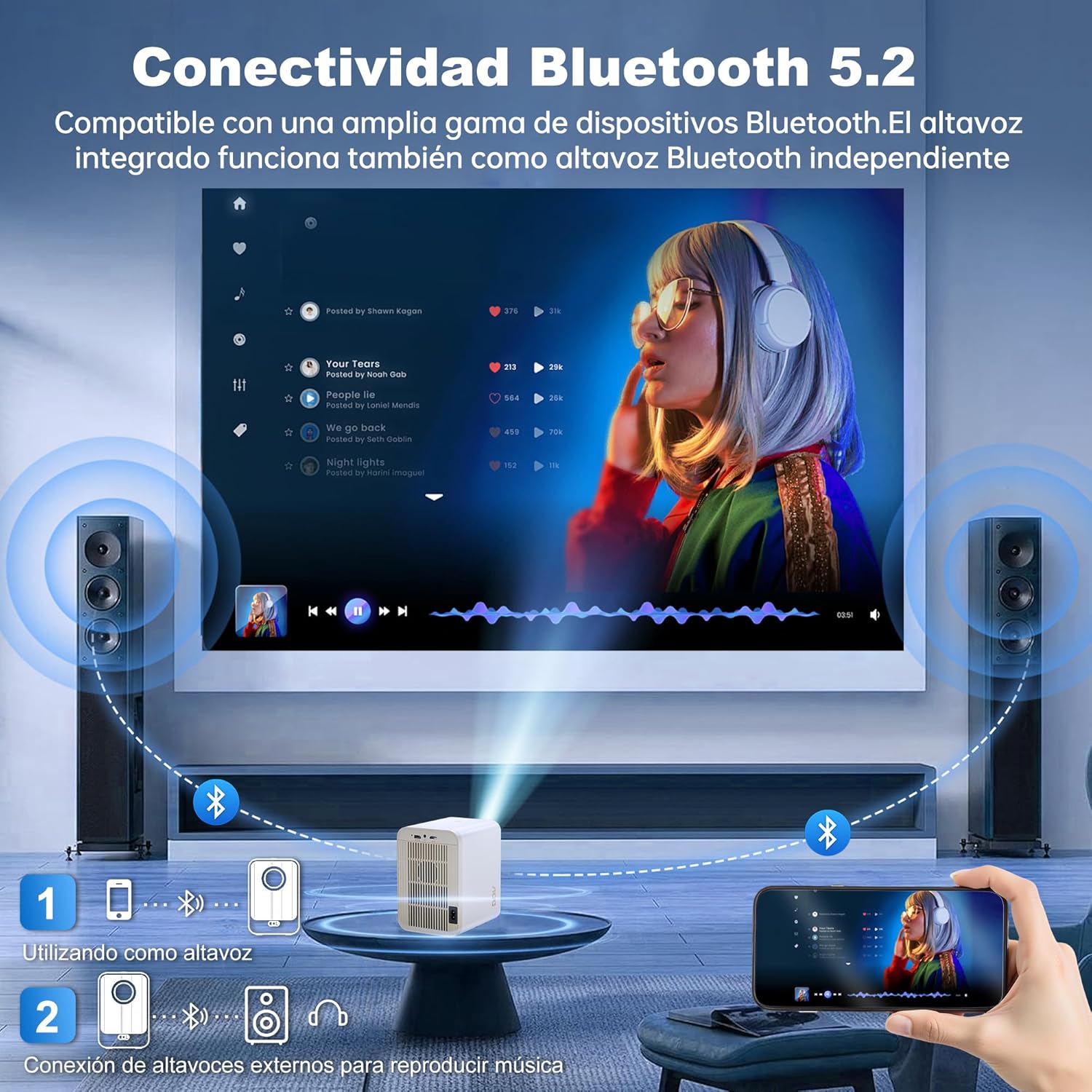
Image: The AOC XL2-211 projector displaying its smart interface with various streaming applications, ready for entertainment.
4. Hljóðútgangur
The projector includes built-in 2x12W stereo speakers. For alternative audio experiences:
- Connect Bluetooth speakers or headphones via Stillingar > Bluetooth.
- Use the 3.5mm audio jack for wired external speakers or headphones.

Image: The AOC XL2-211 projector wirelessly connected to external Bluetooth speakers, demonstrating enhanced audio capabilities.
Viðhald
1. Þrif á skjávarpanum
- Gakktu úr skugga um að skjávarpinn sé slökktur og aftengdur áður en hann er þrifinn.
- Notið mjúkan, þurran klút til að þurrka ytra byrði skjávarpans.
- For the lens, use a lens cleaning cloth and specialized lens cleaning solution. Do not use abrasive materials.
- The fully enclosed optical engine minimizes dust accumulation, but regular external cleaning is recommended.
2. Geymsla
- Geymið skjávarpann á köldum, þurrum stað fjarri beinu sólarljósi og miklum hita.
- If storing for an extended period, place it back in its original packaging or a protective case.
Úrræðaleit
| Vandamál | Möguleg orsök | Lausn |
|---|---|---|
| Engin mynd sýnd | Rafmagnssnúra aftengd, rangur inntaksgjafi, linsulok á. | Check power connection, select correct input source (HDMI/USB), remove lens cap. |
| Myndin er óskýr | Úr fókus, röng keystone-leiðrétting. | Allow auto-focus to adjust, or manually adjust focus/keystone in Projection Settings. |
| Ekkert hljóð | Volume too low, external audio device not connected/paired, internal speakers disabled. | Increase volume, ensure Bluetooth device is paired or wired audio is connected, check audio settings. |
| Get ekki tengst við Wi-Fi/Bluetooth | Incorrect password, device too far, interference. | Verify password, move device closer to router/projector, restart devices. |
| Fjarstýring virkar ekki | Lítil rafhlöður, hindrun. | Replace batteries, ensure no obstruction between remote and projector. |
Tæknilýsing
| Eiginleiki | Smáatriði |
|---|---|
| Vörumerki | AOC |
| Gerðarnúmer | XL2-211 |
| Innfæddur upplausn | 1280 x 800 pixlar |
| Stuðningsupplausn | 1920 x 1080 pixlar (Full HD) |
| Birtustig | 12000 lúmen (300 ANSI) |
| Andstæðuhlutfall | 12000:1 |
| Stýrikerfi | Android 12.0 |
| vinnsluminni | 1GB |
| ROM | 8GB |
| Þráðlaus tenging | Wi-Fi 6 (2.4G/5G), Bluetooth 5.0 |
| Inntakshöfn | HDMI, USB, Audio (3.5mm jack), TF Card |
| Úttakshöfn | Audio (3.5mm jack) |
| Ræðumaður | Built-in 2x12W Stereo Speakers |
| Vörpustærð | 40-250 tommur |
| Form Factor | Færanlegt |
| Vörumál | 19 x 21 x 26 cm |
| Þyngd hlutar | 750 grömm |
| Orkunotkun | 40 vött |
Ábyrgð og stuðningur
Upplýsingar um ábyrgð
Your AOC XL2-211 Smart Projector comes with a eins árs ábyrgð frá kaupdegi, sem nær yfir framleiðslugalla. Vinsamlegast geymið kaupkvittunina vegna ábyrgðarkröfu.
Þjónustudeild
For technical assistance, troubleshooting, or warranty inquiries, please contact AOC customer support. Refer to the official AOC websíðu fyrir nýjustu tengiliðaupplýsingar.
Tilföng á netinu: Heimsæktu AOC Brand Store fyrir frekari upplýsingar um vörur og algengar spurningar.
Myndbandssýning
Watch this official video for a visual guide on setting up and using your AOC XL2-211 Smart Projector, including unboxing, connectivity, and key features.
Video: An official demonstration of the AOC XL2-211 Smart Projector, showcasing its unboxing, setup, and various functionalities.