1. Vöru lokiðview
The KLIM Cassette Player Boombox is a versatile audio device combining classic cassette playback with modern features like AM/FM radio, Bluetooth connectivity, and USB playback/recording. Its portable design allows for use at home or on the go.
Helstu eiginleikar:
- Kassettuspilari og upptökutæki
- AM/FM útvarpsmóttakari
- Bluetooth Connectivity for wireless streaming
- USB tengi fyrir MP3 spilun og upptöku
- Integrated Microphone for direct recording
- Headphone Jack for private listening
- Dual Power: AC power cord or 4 x C-type batteries (not included)
- Portable design with a carrying handle
Hvað er í kassanum:
- KLIM Cassette Player Boombox
- Rafmagnssnúra
- Notendahandbók

Mynd 1: Framan view of the KLIM Cassette Player Boombox, showcasing its controls and cassette compartment.
2. Uppsetning
Kveikt á tækinu:
The KLIM Cassette Player Boombox can be powered in two ways:
- AC Power: Connect the included AC power cord to the device's power input and then to a standard wall outlet.
- Rafhlöðuorka: For portable use, insert 4 x C-type batteries (not included) into the battery compartment located on the underside of the device. Ensure correct polarity.

Mynd 2: Neðri hlið view showing the battery compartment for portable power.
3. Notkunarleiðbeiningar
3.1. Cassette Player/Recorder
- Slide the function selector to 'TAPE'.
- Press the 'OPEN' button to open the cassette compartment.
- Insert a cassette tape with the open side facing up.
- Lokaðu kassettuhólfinu.
- Use the 'PLAY', 'STOP/EJECT', 'FFWD' (Fast Forward), and 'REW' (Rewind) buttons to control playback.
- To record, ensure a blank tape is inserted. Press the 'REC' button to start recording from the built-in microphone, radio, or USB.

Mynd 3: Efst view of the boombox with a cassette tape inserted into the compartment.
3.2. AM/FM útvarp
- Slide the function selector to 'RADIO'.
- Dragðu út sjónaukann fyrir bestu móttöku.
- Use the 'BAND' switch to select between AM and FM frequencies.
- Rotate the 'TUNING' knob to find your desired radio station.
3.3. Bluetooth-tenging
- Slide the function selector to 'BT' (Bluetooth).
- The device will enter pairing mode, indicated by a flashing light or audible prompt.
- Kveiktu á Bluetooth á snjallsímanum eða spjaldtölvunni og leitaðu að tiltækum tækjum.
- Select 'KLIM Cassette Player' (or similar name) from the list to pair.
- Þegar þú hefur parað tækið geturðu streymt hljóði þráðlaust úr því.
3.4. Spilun og upptaka með USB snúru
- Slide the function selector to 'USB'.
- Settu inn USB-lykil sem inniheldur MP3 hljóð files í USB tengið.
- The device will automatically begin playing the audio files. Notaðu spilunarstýringarnar (spila/gera hlé, sleppa) til að fletta.
- To record to USB, ensure a USB drive is inserted. Press the 'REC' button while in radio or cassette mode to record the audio source directly to the USB drive.
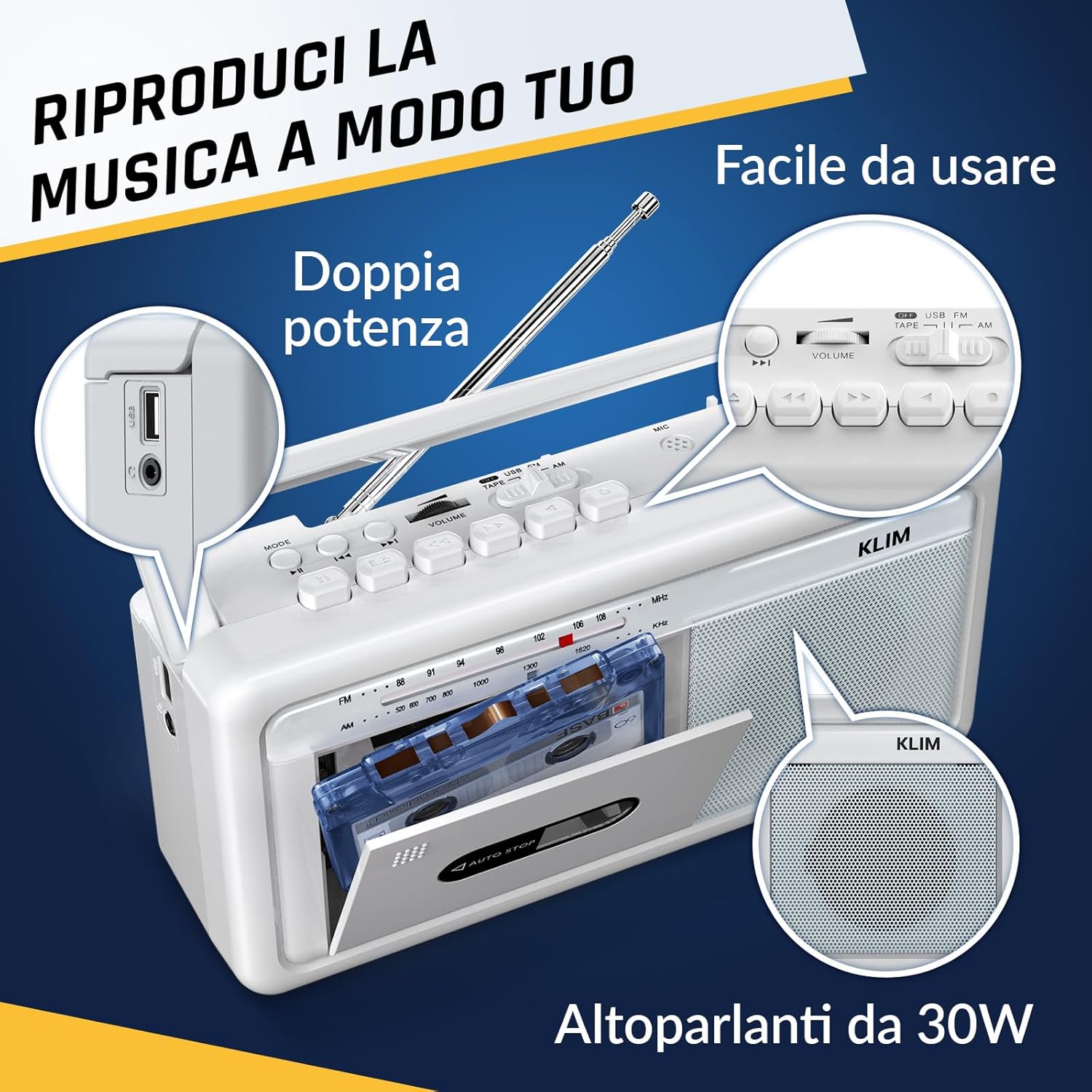
Mynd 4: Hlið view highlighting the USB port for media playback and recording.
3.5. Notkun heyrnartóla
Connect standard 3.5mm headphones to the headphone jack for private listening. The internal speakers will automatically mute when headphones are connected.
Video 1: Instructions on how to record a tape to USB using the WTB-795 model. This video demonstrates the USB recording functionality.
Myndband 2: Yfirview of a retro cassette player with USB, Bluetooth, and AM/FM radio features, similar to the KLIM Cassette Player Boombox.
4. Viðhald
- Haldið tækinu hreinu með því að þurrka það með mjúkum, þurrum klút. Forðist að nota fljótandi hreinsiefni eða leysiefni.
- Regularly clean the cassette head and pinch rollers with a cotton swab lightly dampmeð ísóprópýlalkóhóli til að tryggja bestu mögulegu hljóðgæði og koma í veg fyrir skemmdir á segulbandinu.
- Haldið tækinu frá beinu sólarljósi, hitagjöfum og miklu ryki eða raka.
- Þegar tækið er ekki í notkun í langan tíma skal fjarlægja rafhlöðurnar til að koma í veg fyrir leka.
5. Bilanagreining
| Vandamál | Möguleg lausn |
|---|---|
| Enginn kraftur | Check if the AC power cord is securely connected. If using batteries, ensure they are inserted correctly and are not depleted. |
| Ekkert hljóð frá hátalara | Increase the volume. Ensure headphones are not connected. Check the function selector is in the correct mode (TAPE, RADIO, BT, USB). |
| Léleg útvarpsmóttaka | Extend the telescopic antenna fully. Adjust the antenna direction. Try moving the unit to a different location. |
| Segulband spilar/upptekur ekki | Ensure the tape is inserted correctly. Check if the tape is damaged. Clean the cassette head and pinch rollers. |
| Bluetooth tengist ekki | Ensure the unit is in Bluetooth mode. Make sure your device's Bluetooth is enabled and within range. Try unpairing and re-pairing the device. |
| Vandamál með USB-spilun | Gakktu úr skugga um að USB-drifið sé rétt sniðið (FAT32) og innihaldi samhæft hljóðkort. files (MP3, WAV, WMA, AAC, FLAC). Try a different USB drive. |
6. Tæknilýsing
- Vörumerki: KLIM
- Gerð: Kassettuspilari
- Vörumál: 25 x 13.1 x 7.6 cm
- Þyngd hlutar: 1 kg
- Samhæf tæki: MP3 spilari, snjallsími, spjaldtölva
- Hljóðútgangsstilling: Stereo
- Stutt hljóðsnið: Cassette, Analog Radio, MP3, WAV, WMA, AAC, FLAC, Bluetooth
- Aflgjafi: Corded Electric (AC) / 4 x C-type Batteries (not included)
- Tengingartækni: USB, Bluetooth
- Litur: Frost hvítt
- Vörunúmer: KLSIN4825
7. Ábyrgð og stuðningur
The KLIM Cassette Player Boombox comes with a 5 árs ábyrgð. For any questions, technical assistance, or warranty claims, please contact KLIM customer support. Our team is available 24/7 to assist you.
Please refer to the contact information provided in your product packaging or visit the official KLIM websíðuna til að fá frekari upplýsingar.