1. Inngangur
This manual provides detailed instructions for the installation, operation, and maintenance of your MakeSkyBlue 60A MPPT Solar Charge Controller V124 with CloudBOX. This advanced controller is designed for stable, efficient, and intelligent solar charging in various applications, including home, RV, cabin, and off-grid power systems.
Helstu eiginleikar:
- Upgraded 60A MPPT Controller with CloudBOX: New generation controller for stable, efficient, and intelligent solar charging.
- Advanced MPPT Charging Technology: True 100% MPPT algorithm and intelligent DSP control for faster, more precise power point tracking, improving efficiency by up to 30% compared to PWM controllers.
- Smart Battery Management: Automatic detection of 12V/24V/48V systems and 3-stage charging (Bulk, Absorption, Float). Supports AGM, Gel, and Flooded batteries.
- Comprehensive Protection System: Protection against overcharge, over-discharge, overheating, reverse polarity, and short circuit.
- User-Friendly & Expandable Design: LCD display for real-time data and charging status. Supports parallel connection.
2. Öryggisupplýsingar
Vinsamlegast lesið allar leiðbeiningar og viðvaranir vandlega fyrir uppsetningu og notkun. Ef þessum leiðbeiningum er ekki fylgt getur það valdið raflosti, eldsvoða eða alvarlegum meiðslum.
Almennar öryggisráðstafanir:
- Setjið stjórntækið upp á vel loftræstum stað, fjarri eldfimum efnum.
- Tryggið rétta jarðtengingu kerfisins.
- Do not disassemble or attempt to repair the controller. Contact qualified personnel for service.
- Haldið börnum frá íhlutum sólarorkukerfisins.
Rafmagnsöryggi:
- Always disconnect the solar panel array and battery bank before installing or servicing the controller.
- Notið viðeigandi rofa og öryggi fyrir allar tengingar.
- Ensure all wiring is correctly polarized (+ to + and - to -). Reverse polarity can damage the controller and other components.
- Notið einangruð verkfæri til að koma í veg fyrir óviljandi skammhlaup.
- Verify that the solar panel open-circuit voltage (VOC) does not exceed the controller's maximum input voltage (160VDC).
3. Vöru lokiðview
The MakeSkyBlue 60A MPPT Solar Charge Controller V124 is a robust device designed for optimal solar energy harvesting. It features a durable aluminum casing for heat dissipation and an intuitive LCD display for monitoring.
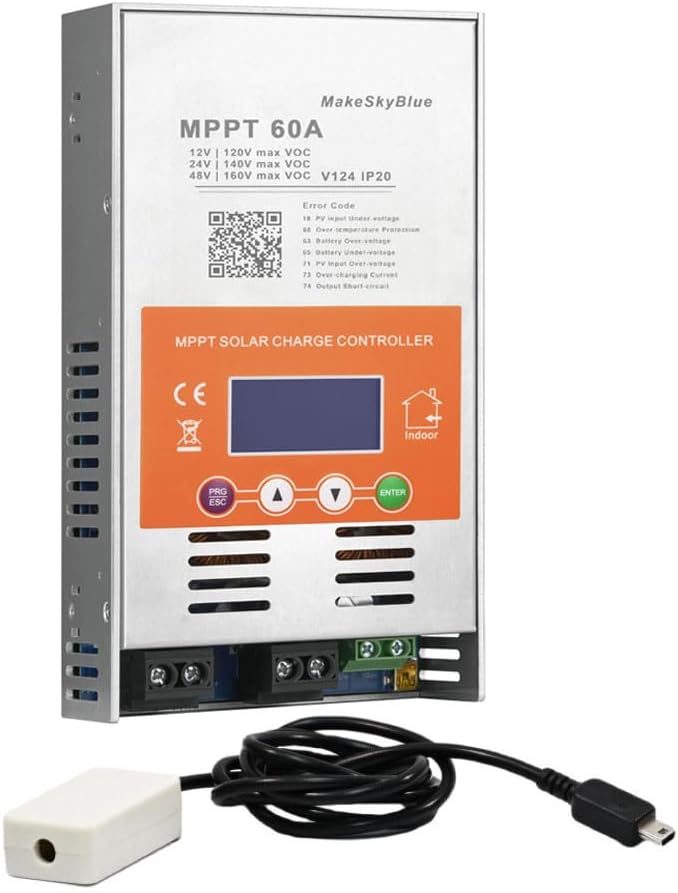
Figure 1: MakeSkyBlue 60A MPPT Solar Charge Controller V124 with CloudBOX
Íhlutir:
- MPPT Solar Charge Controller Unit
- CloudBOX (for remote monitoring/control)
- Notendahandbók
Líkamleg lýsing:
The controller features a metallic enclosure with ventilation slots and a cooling fan for temperature management. The front panel includes an LCD display and control buttons. Connection terminals for solar input, battery, and DC load are located at the bottom.

Figure 2: Controller Dimensions (8.46 x 4.52 x 1.96 inches)
LCD skjár:
The LCD provides real-time data and status indicators. It typically shows:
- PV Inntak Voltage (PV)
- Rafhlaða Voltage (BATT)
- Charging Current (CHARGE)
- Load Output (LOAD)
- Operating Mode (e.g., 24H for continuous load, 00H for light control)
- Hitastig (TEMP)
- Error Codes (FAULT)
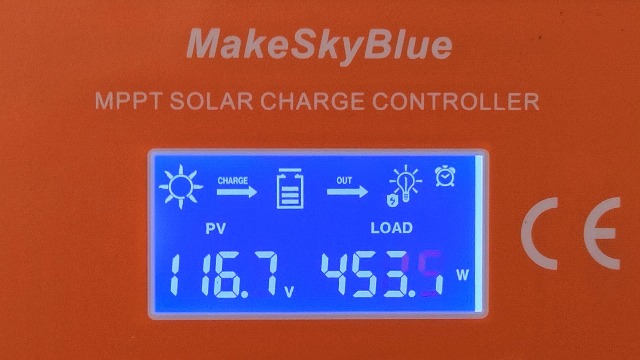
Figure 3: LCD Display Interface
4. Uppsetning og uppsetning
Rétt uppsetning er mikilvæg fyrir örugga og skilvirka notkun sólarhleðslustýringarinnar. Fylgdu þessum skrefum vandlega.
4.1 Mounting the Controller:
- Choose a dry, well-ventilated indoor location, protected from direct sunlight, high temperatures, and moisture.
- Ensure adequate clearance (at least 75mm) around all sides of the controller for proper airflow and heat dissipation.
- Securely mount the controller to a stable surface using appropriate screws.

Figure 4: Temperature Protection and Mounting Considerations
4.2 Raflagnatengingar:
Tengdu íhlutina í eftirfarandi röð til að koma í veg fyrir skemmdir:
- Tengdu rafhlöðuna: Connect the battery to the controller's battery terminals (+ to + and - to -). Ensure a secure connection. The controller will automatically detect the system voltage (12V/24V/48V).
- Tengdu sólarplöturnar: Connect the solar panel array to the controller's PV input terminals (+ to + and - to -). Ensure the PV open-circuit voltage fer ekki yfir 160VDC.
- Tengdu jafnstraumsálagið (valfrjálst): Connect your DC loads to the controller's load terminals (+ to + and - to -).

Mynd 5: Dæmigert kerfisrafmagnsrit
4.3 Parallel Connection (Optional):
The controller supports parallel connection for expanding your solar power system. Refer to the official video for detailed instructions on parallel setup and communication line configuration.
Video 1: HHJ60-PRO Paralleling Guide. This video demonstrates the installation and configuration of multiple controllers for parallel operation, including wiring and communication settings.
5. Notkunarleiðbeiningar
After successful installation, the controller will power on and display the main interface. Use the control buttons to navigate and adjust settings.
5.1 LCD Display Navigation:
Use the "Up" and "Down" arrow buttons to cycle through different display interfaces, showing PV voltage, rafhlaða binditage, charging current, load status, temperature, and error codes.
Video 2: MPPT Controller Connected | Real-Time LCD Display Demo. This video illustrates how to navigate the LCD display to view real-time system data.
5.2 Stillingar breytu:
To enter the settings interface, press the "PRG/ESC" button. Use the "Up" and "Down" arrows to adjust values and "ENTER" to confirm. Key settings include:
- d00 (Load Operating Mode): Configure how the DC load operates (e.g., 24H for continuous, 00H for light control, 1H-23H for timed operation).
- d01 (Charging Voltage): Stilltu boost hleðslu voltage.
- d02 (Float Charging Voltage): Stilltu flothleðsluna voltage.
- d03 (Low Voltage vernd): Set the battery low voltagÞröskuldur fyrir aftengingu rafrænna eininga (LVD).
- d04 (Battery Voltage Calibration): Calibrate the displayed battery voltage if it differs from a multimeter reading.
- d05 (Parallel Communication Code): Define the communication address for parallel operation (lowest code acts as master).
- d06 (Battery Type): Select the battery type (e.g., Sealed, Gel, Flooded, Lithium Iron Phosphate). Choosing "USE" allows manual settings for d01, d02, and d03.
- d07 (System Voltage): Configure the system voltage (t.d. 12V, 24V, 48V).
Video 3: D01-D06 Parameter Setting Information. This video guides you through adjusting various operational parameters of the controller.
6. Viðhald
Reglulegt viðhald tryggir bestu mögulegu afköst og endingu sólarhleðslustýringarinnar.
- Hreinlæti: Haltu stjórntækinu hreinu og lausu við ryk og óhreinindi. Notaðu þurran klút til að þrífa.
- Tengingar: Athugið reglulega allar raflagnatengingar til að athuga hvort þær séu þéttar og hvort þær séu tærðar.
- Loftræsting: Gakktu úr skugga um að loftræstiop séu ekki stífluð til að tryggja rétta varmaleiðni.
- Uppfærsla vélbúnaðar: Athugaðu framleiðanda websíðuna fyrir allar tiltækar uppfærslur á vélbúnaði til að bæta afköst eða nýja eiginleika.
7. Bilanagreining
If you encounter issues with your controller, refer to the following common problems and their solutions. The LCD display may show error codes to help diagnose the problem.
Villukóðar:
| Kóði | Lýsing | Möguleg orsök/lausn |
|---|---|---|
| E1 | PV inntak yfir-voltage | PV fylki binditage exceeds maximum allowed. Reduce the number of solar panels in series. |
| E2 | PV input under-voltage | PV fylki binditage is too low. Check solar panel connections, ensure sufficient sunlight. |
| E3 | Yfirhitavörn | Controller is overheating. Ensure adequate ventilation and ambient temperature. |
| E4 | Rafhlaða of voltage | Rafhlaða voltage fer yfir sett yfir-voltage protection. Check battery settings (d01, d02). |
| E5 | Rafhlaða undir voltage | Rafhlaða voltage er undir stilltu lágstyrktage protection. Charge battery or reduce load. |
| E6 | PV-inntak yfirstraumur | PV array current exceeds maximum allowed. Check PV array configuration. |
| E7 | Úttak skammhlaup | Short circuit detected on the load output. Disconnect load, check wiring, and reconnect. |
| E8 | Ofhleðsla úttaks | Load current exceeds maximum allowed. Reduce the connected load. |
Almennar ráðleggingar um bilanagreiningu:
- If the controller is not charging, ensure solar panels are receiving adequate sunlight and all connections are secure.
- If the load is not working, check the load operating mode (d00) and ensure the battery has sufficient charge.
- For persistent issues, power cycle the controller by disconnecting the solar panels, then the battery, waiting a few minutes, and reconnecting in the correct order (battery first, then solar).
8. Tæknilýsing
| Eiginleiki | Forskrift |
|---|---|
| Fyrirmynd | 60A-V124 |
| System Voltage | 12V/24V/48V Auto-detection |
| Hámark PV Inntak Voltage | 160VDC |
| Hleðslustraumur | 60A |
| Rafhlöðutegundir studdar | AGM, Gel, Flooded, Lithium |
| Reiknirit fyrir hleðslu | 3-Stage (Bulk, Absorption, Float) |
| Skjár Tegund | LCD |
| Efni | Ál |
| Þyngd hlutar | 3.5 pund |
| Stærðir pakka | 8.46 x 4.52 x 1.96 tommur |
| Innifalið íhlutir | Solar Charge Controller, CloudBOX, User Manual |
9. Ábyrgð og stuðningur
For warranty information, technical support, or service inquiries, please contact MakeSkyBlue customer service through the retailer where the product was purchased or visit the official MakeSkyBlue websíða. Vinsamlegast hafið vörugerðina og kaupdagsetninguna tiltæka þegar þið hafið samband við þjónustuverið.


