1. Inngangur
This manual provides detailed instructions for the setup, operation, and maintenance of your GEEKOM Mini PC IT12. This compact desktop computer is equipped with a 12th Gen Intel Core i7-1260P processor, 32GB of DDR4 RAM, and a 1TB NVMe PCIe 4.0 SSD, running Windows 11 Pro. Its design focuses on efficient performance and versatile connectivity for various applications.
2. Uppsetningarleiðbeiningar
2.1. Upptaka og frumskoðun
Fjarlægið alla íhluti varlega úr umbúðunum. Gakktu úr skugga um að allir hlutir sem taldir eru upp í hlutanum „Hvað er í kassanum“ séu til staðar og óskemmdir.
- 1x GEEKOM Mini PC IT12
- 1x HDMI snúru
- 1x VESA festing
- 1x straumbreytir
- 1x notendahandbók
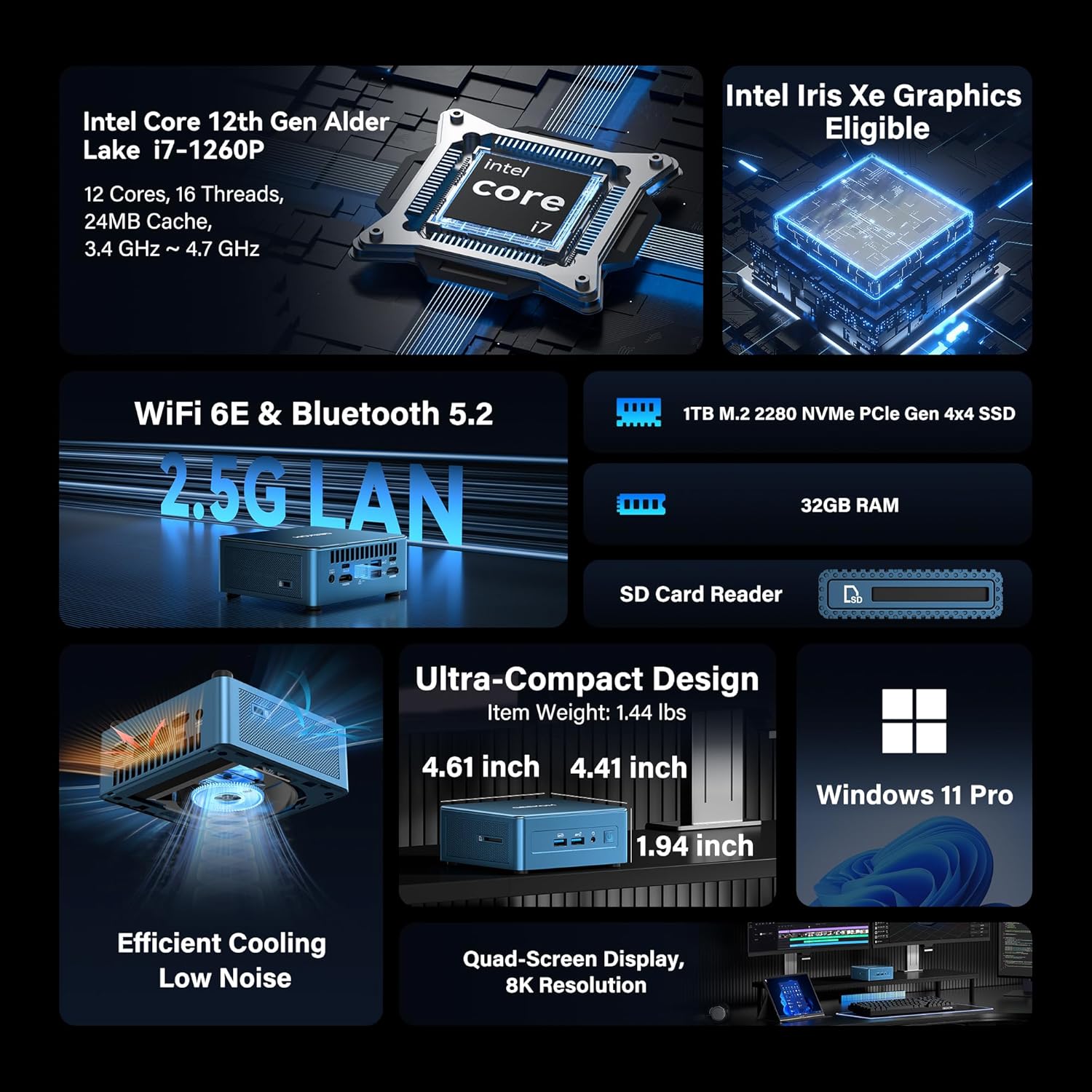
Image: GEEKOM Mini PC IT12 and its accessories, including the mini PC unit, power adapter, HDMI cable, and VESA mount.
Unboxing Video Guide
Video: A hands-on unboxing of the GEEKOM Mini PC, showing the contents of the box and the initial presentation of the device and its accessories.
2.2. Tengja jaðartæki
- Tengja skjá: Use the provided HDMI cable to connect your monitor to one of the HDMI 2.0 ports on the back of the Mini PC. Alternatively, use a USB4 port for DisplayPort output.
- Tengja lyklaborð og mús: Plug your USB keyboard and mouse into the available USB 3.2 Gen 2 ports on the front or USB ports on the back.
- Tengdu rafmagn: Connect the power adapter to the DC-in port on the back of the Mini PC, then plug the adapter into a power outlet.
- Nettenging: For a wired connection, connect an Ethernet cable to the 2.5GbE LAN port. For wireless, ensure the Wi-Fi antenna is connected (if external) or rely on the internal Wi-Fi 6E.

Mynd: Aftan view of the GEEKOM Mini PC IT12, showing the arrangement of ports including DC-in, USB4, HDMI, 2.5GbE LAN, USB 3.2, and USB 2.0. Cables are connected to some ports.
2.3. Fyrsta ræsing
Press the power button on the front of the Mini PC. The system will boot into Windows 11 Pro. Follow the on-screen instructions to complete the initial Windows setup.
3. Notkunarleiðbeiningar
3.1. Kveikt/slökkt
- Kveikt á: Ýttu á rofann á framhliðinni.
- Slökkva á: Smelltu á Start hnappinn í Windows og veldu síðan Power > Shutdown.
- Endurræsa: Smelltu á Start hnappinn í Windows og veldu síðan Power > Restart.
3.2. Skjástillingar
The GEEKOM Mini PC IT12 supports up to four displays simultaneously via its dual USB4 (8K DP1.4) and dual HDMI 2.0 (4K@120Hz) ports. To configure multiple displays in Windows 11:
- Hægrismelltu á skjáborðið og veldu „Skjástillingar“.
- Under "Multiple displays", you can detect, identify, and arrange your displays.
- Choose your preferred display mode (e.g., Extend these displays, Duplicate these displays).

Image: A GEEKOM Mini PC IT12 connected to two large monitors and a tablet, demonstrating its quad-display capability for a multi-screen workstation.
3.3. Net og tengingar
- Þráðlaust staðarnet: The 2.5Gb Ethernet port provides high-speed internet access.
- Wi-Fi 6E: Connect to wireless networks for fast and stable internet.
- Bluetooth 5.2: Pair with compatible Bluetooth devices such as keyboards, mice, and headphones.
4. Viðhald og uppfærslur
4.1. Kælikerfi
The IT12 Mini PC features an upgraded IceBlast cooling system with an all-copper module and a silent fan. To ensure optimal performance and longevity, keep the ventilation grilles clear of obstructions. Regularly clean dust from the vents using compressed air.

Mynd: Sprenging view diagram illustrating the internal components of the GEEKOM Mini PC IT12, highlighting the IceBlast cooling system with its fan and copper heat pipes.
4.2. Storage and Memory Expansion
The GEEKOM Mini PC IT12 offers flexible upgrade options:
- vinnsluminni: The 32GB DDR4 RAM can be expanded up to 96GB.
- NVMe SSD: The 1TB NVMe PCIe 4.0 SSD can be expanded up to 4TB.
- Viðbótargeymsla: The unit includes additional slots for M.2 2242 SATA SSD (up to 2TB) and 2.5" SATA HDD (up to 4TB) expansion.
For detailed instructions on how to access internal components for upgrades, please refer to the official GEEKOM support resources or consult a qualified technician.

Mynd: Nákvæm skýringarmynd sem sýnirasing the expandable storage options within the GEEKOM Mini PC IT12, illustrating slots for M.2 NVMe PCIe SSD, M.2 SATA SSD, and a 2.5-inch SATA HDD/SSD.
5. Bilanagreining
5.1. Enginn kraftur
- Gakktu úr skugga um að rafmagnsbreytirinn sé vel tengdur bæði við mini-tölvuna og virkan rafmagnsinnstungu.
- Staðfestu að rafmagnsinnstungan virki með því að stinga í samband annað tæki.
- Athugið hvort einhverjar sýnilegar skemmdir séu á rafmagnsmillistykkinu.
5.2. Engin skjáúttak
- Confirm the display cable (HDMI or USB4) is firmly connected to both the Mini PC and the monitor.
- Gakktu úr skugga um að skjárinn sé kveikt á og stilltur á rétta inntaksuppsprettu.
- Prófaðu aðra skjásnúru eða skjá ef hún er til staðar.
5.3. Vandamál með nettengingu
- Wired: Athugaðu tengingu Ethernet-snúru og stöðu leiðarans.
- Þráðlaust: Verify Wi-Fi is enabled in Windows settings and you are connected to the correct network. Restart your router if necessary.
5.4. System Performance Issues
- Ensure the Mini PC has adequate ventilation and is not overheating.
- Lokaðu óþarfa forritum sem keyra í bakgrunni.
- Check for available Windows updates and driver updates.
6. Tæknilýsing
| Eiginleiki | Smáatriði |
|---|---|
| Örgjörvi | 12th Gen Intel Core i7-1260P (12 Cores, 16 Threads, up to 4.70 GHz, 24MB Cache) |
| Grafík | Intel Iris Xe grafík (innbyggð) |
| vinnsluminni | 32GB DDR4 (hægt að stækka í 96GB) |
| Geymsla | 1TB NVMe PCIe 4.0 SSD (Expandable to 4TB) + M.2 2242 SATA SSD slot (up to 2TB) + 2.5" SATA HDD (up to 4TB) |
| Stýrikerfi | Windows 11 Pro |
| Myndbandsúttak | 2x USB4 (8K DP1.4), 2x HDMI 2.0 (4K@120Hz) - Supports Quad Display |
| USB tengi | 2x USB4, 3x USB 3.2 Gen 2, 1x USB 2.0 |
| Net | 2.5Gb Ethernet, Wi-Fi 6E, Bluetooth 5.2 |
| Kortalesari | SD Card Reader (UHS-II) |
| Mál (LxBxH) | 4.6 x 4.4 x 1.9 tommur |
| Þyngd | 3.3 pund |
7. Orkunýting
The GEEKOM Mini PC IT12 is designed for low power consumption, making it an energy-efficient alternative to traditional desktop PCs. Its 12th Gen Intel Core P-series CPU (28W single-CPU power draw) consumes significantly less power than high-performance H/HK series processors (45W+), reducing electricity costs and enabling 24/7 reliable operation with a quiet experience.
Video: A comparison demonstrating the energy consumption between a traditional desktop PC and the GEEKOM Mini PC IT12 under both light and heavy workloads.
8. Ábyrgð og stuðningur
Your GEEKOM Mini PC IT12 comes with a 3-year limited warranty. For technical assistance or warranty claims, please contact GEEKOM support through the following channels:
- Stuðningur Amazon seljanda: Log into your Amazon buyer's account, find your order, and click "Get help" for product assistance.
- Stuðningur við tölvupóst: Send an email to the After-sales Team at shirley.li@geekom.tw.
GEEKOM is committed to providing dedicated US-based technical support and ensures full certification including CE, FCC, CB, and CC for guaranteed safety and compliance.


